Email Business Email Guide: Essential Steps for 2026 Success
December 27, 2025
In 2026, the landscape of business communication is transforming fast. Is your email business email strategy ready to meet rising expectations and new challenges?
This guide delivers the essential steps every organisation needs to set up, optimise, and future-proof their business email. You will learn how to select the ideal platform, create a professional address, implement robust security, connect with productivity tools, and stay compliant with regulations.
Explore future-focused trends and discover how to build a secure, professional presence that keeps your business ahead. Follow our step-by-step advice to ensure your email business email supports your growth and success in 2026.
Understanding the Role of Business Email in 2026
In 2026, email business email plays a central role in how organisations communicate, collaborate, and build trust with clients and partners. The landscape has shifted rapidly, with new technologies, working patterns, and security concerns shaping the way businesses use and manage their email systems.
The Evolution of Business Email
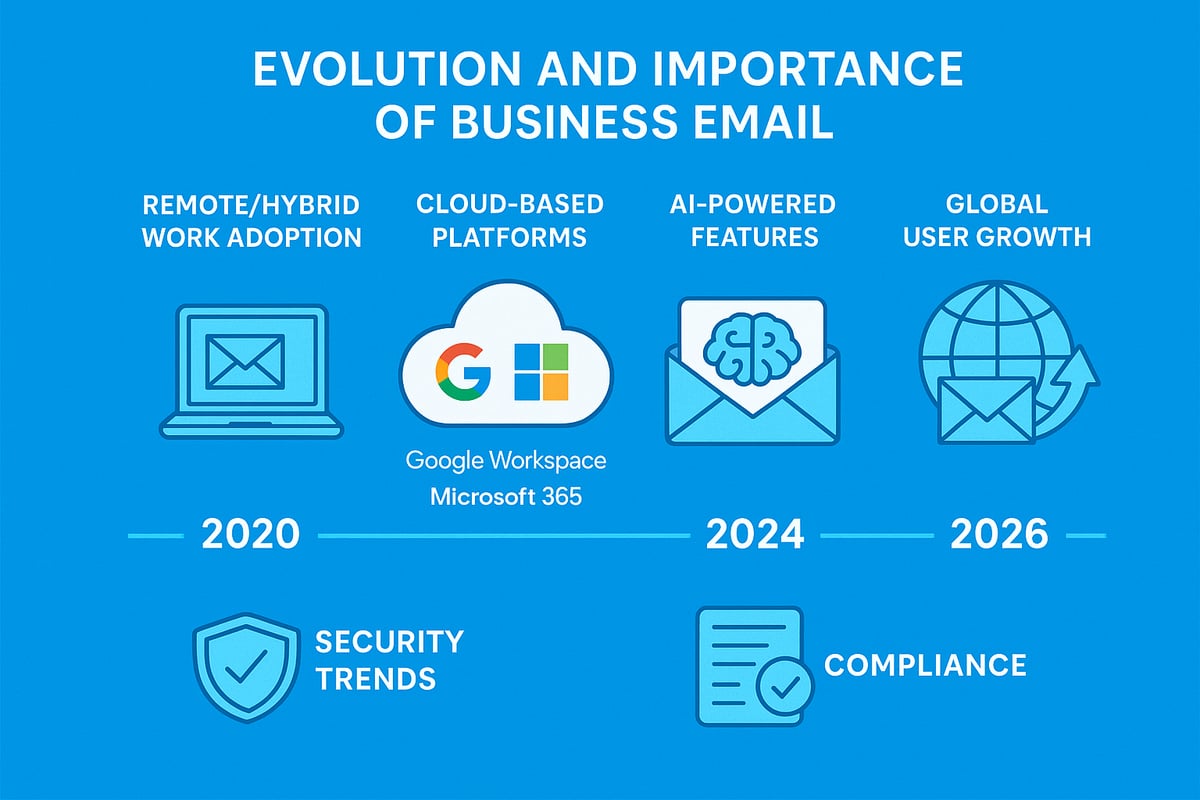
Since 2020, email business email has experienced a dramatic transformation. The rise of remote and hybrid work has made digital communication the backbone of business operations. Cloud-based platforms like Google Workspace and Microsoft 365 have become standard, offering advanced AI-powered tools to boost productivity and streamline collaboration.
By 2026, the number of global users is expected to reach 4.73 billion, according to Global email users projected to reach 4.73 billion by 2026. This surge highlights how essential email business email is for every organisation. AI now assists with sorting, prioritising, and even drafting responses, while cloud-based infrastructure ensures accessibility from anywhere. Email is no longer just a messaging tool, but the foundation for business success.
Why Professional Email Matters More Than Ever
A professional email business email address is more than just a means of contact; it is a signal of credibility and trust. Customers expect branded communication that reassures them they are dealing with a legitimate business. In fact, 75% of consumers judge a business’s credibility by its email address.
Small businesses using professional email business email addresses report higher response rates and improved deliverability. Branded email also helps avoid spam filters, ensuring messages reach their intended recipients. In a world where first impressions matter, a well-chosen email business email address is a simple yet powerful tool for building strong relationships.
Key Trends Shaping Business Email for 2026
Looking ahead, several trends are defining the future of email business email. AI-driven automation is now standard, with smart inboxes that prioritise urgent messages and suggest quick replies. Enhanced security protocols, including DMARC and BIMI, protect against phishing and spoofing.
Integration with collaboration tools such as chat, video, and project management platforms is seamless. Mobile-first usage and responsive design are essential as employees access email business email from any device. The use of custom domains not only strengthens branding but also adds a layer of security. AI assistants now help teams manage overflowing inboxes with ease.
Challenges Facing Businesses in Email Management
Despite these advancements, managing email business email comes with its own set of challenges. Phishing and cyber threats are on the rise, making robust security measures crucial. Compliance with regulations like GDPR and the UK Data Protection Act adds complexity, especially for businesses handling sensitive information.
Organisations must also juggle multiple accounts and devices, striving to maintain consistent branding across teams. Balancing accessibility for remote workers with the need for tight security remains a constant concern. Addressing these challenges is essential to unlock the full potential of email business email as a strategic asset.
Step 1: Choosing the Right Business Email Platform
Selecting the ideal email business email platform is the cornerstone of your digital communication strategy in 2026. With evolving business needs and rapid technology advancements, making an informed choice is more crucial than ever.
Evaluating Email Platform Options
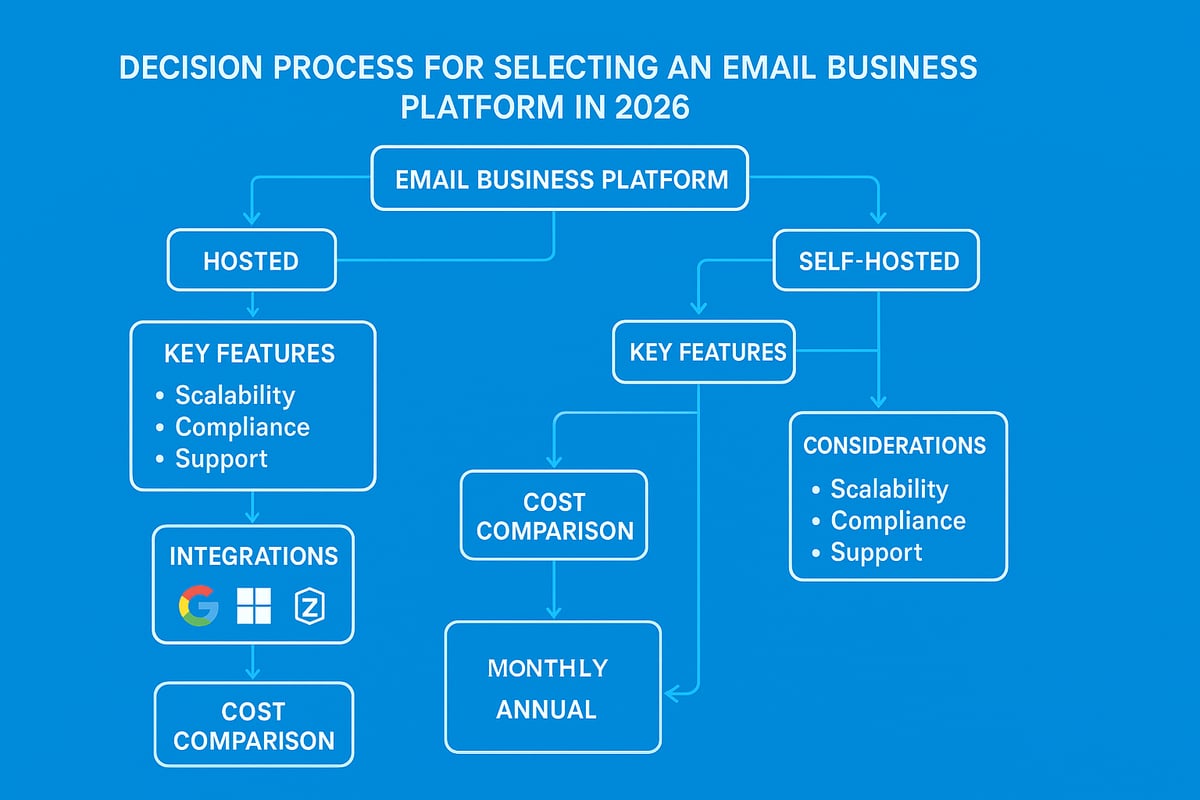
The first step in choosing an email business email platform is understanding the landscape. Businesses can select between hosted solutions, such as Google Workspace or Microsoft 365, and self-hosted options that provide greater control but require more technical expertise.
Hosted platforms are popular due to their scalability, regular updates, and strong support. For example, Google Workspace offers a 99.9% uptime guarantee, making it a trusted choice for reliability. When evaluating platforms, consider your current needs and how easily the solution can grow with your business.
Comparing Features and Integrations
Modern email business email platforms offer far more than just basic messaging. Essential features include custom domain support, generous storage, and mobile access. Look for platforms that integrate seamlessly with calendars, video conferencing, and CRM systems.
AI and automation capabilities are becoming standard, improving productivity and email management. Microsoft 365, for example, tightly integrates Teams and OneDrive, streamlining collaboration. Make a checklist of integrations your business relies on to ensure compatibility.
| Platform | Custom Domains | Storage | Key Integrations |
|---|---|---|---|
| Google Workspace | Yes | 30GB+ | Calendar, Meet, Drive |
| Microsoft 365 | Yes | 50GB+ | Teams, OneDrive |
| Zoho Mail | Yes | 30GB+ | CRM, Projects |
Cost Analysis and ROI
Understanding the cost structure of your chosen email business email platform is vital for long-term planning. Most providers operate on a subscription model, but watch out for additional costs related to storage, add-ons, or migration support.
Cloud-based solutions often deliver a strong ROI by reducing IT overhead and boosting productivity. According to Google Workspace, businesses can save up to 30% on IT costs. Compare the total cost of ownership, not just the monthly subscription, to make an informed decision.
Security and Compliance Considerations
Security is non-negotiable for any email business email platform. Built-in protections such as encryption, two-factor authentication, and anti-phishing tools are essential. Ensure the platform holds recognised compliance certifications, like ISO and GDPR readiness, and provides robust privacy controls.
Review security centres and dashboards offered by providers such as Google Workspace, which allow admins to manage threats and monitor compliance effectively. Prioritise platforms that support your industry’s data residency requirements.
Making the Final Choice
Finalising your email business email platform should align with both immediate needs and future growth plans. Assess the quality of vendor support, available migration assistance, and the flexibility of trial periods. Customer reviews and testimonials can provide valuable insight into real-world performance.
Before you decide, use a checklist to confirm each requirement is met. For a practical guide to getting started, see this step-by-step Set Up Email for Business resource.
Step 2: Setting Up a Professional Business Email Address
Building a strong foundation for your email business email presence starts with a professional setup. Each step, from domain registration to launch, shapes how clients perceive your brand and ensures smooth, secure communication.

Registering a Custom Domain
A custom domain is the first step in establishing a credible email business email identity. It shows professionalism and sets your business apart from generic addresses.
When choosing a domain, keep it short, memorable, and aligned with your brand. Register your domain through trusted providers such as:
- IONOS
- GoDaddy
- Namecheap
For UK businesses, consider the benefits of .co.uk for local trust versus .com for global reach:
| Extension | Benefit |
|---|---|
| .co.uk | Trusted by UK customers |
| .com | Broader international appeal |
Your email business email address (e.g., [email protected]) will reflect your brand’s professionalism and location.
Creating Email Accounts and Aliases
Set up clear, structured email accounts to ensure efficient communication. Use formats like firstname.lastname@ for staff or department-based addresses such as support@ or sales@.
For email business email flexibility, create:
- Shared inboxes (e.g., helpdesk@)
- Group emails (e.g., marketing@)
- Campaign-specific aliases (e.g., event2026@)
This approach makes it easy for customers to reach the right team and keeps your organisation's email business email strategy organised.
Configuring DNS and Email Routing
Proper DNS configuration is crucial for your email business email system’s reliability and security. Update MX records to point messages to your provider, and add SPF/DKIM records to reduce spam and spoofing.
Follow these steps:
- Access your domain’s DNS settings.
- Add or update MX records as per your provider’s instructions.
- Set SPF and DKIM records for authentication.
- Use tools like DNS Checker for verification.
Example code for SPF:
v=spf1 include:yourprovider.com ~all
A well-configured email business email setup ensures your messages land in inboxes, not spam folders.
Branding and Signature Best Practices
A consistent, branded signature reinforces your professionalism with every email business email sent. Include your logo, contact details, disclaimers, and social links.
Most businesses use signature management tools to maintain uniformity across teams. For guidance on effective branding, see Branding Your Business Email.
Did you know? 82% of businesses use branded signatures for marketing impact. Make sure your email business email signature supports your brand identity.
Testing and Launching Your Email
Before going live, thoroughly test your new email business email accounts. Send test messages to various clients and devices to check formatting and deliverability.
Follow this checklist:
- Test sending/receiving on all platforms
- Review formatting and branding
- Train staff on new protocols
- Troubleshoot common issues (e.g., spam or bouncebacks)
A smooth launch ensures your email business email is ready for efficient, professional communication from day one.
Step 3: Securing Your Business Email for 2026
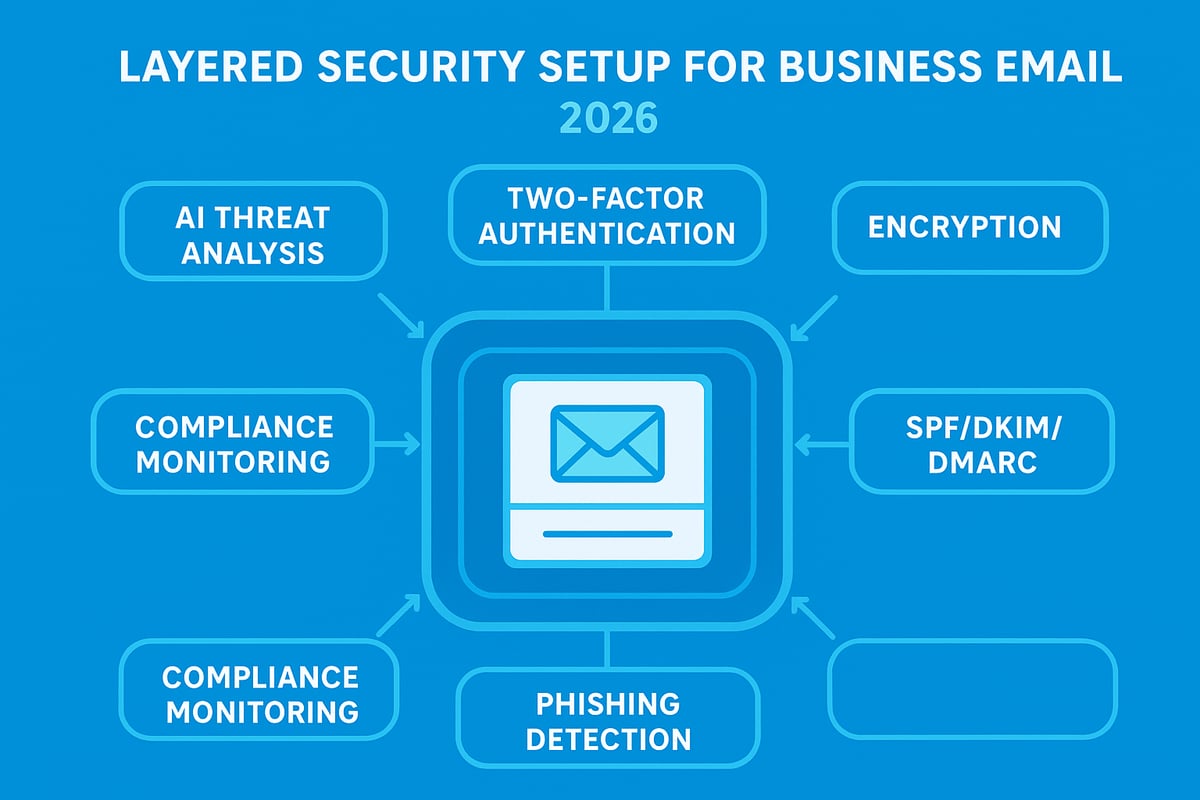
Keeping your email business email secure is non-negotiable in 2026. Threats are evolving, so taking a multi-layered approach to protection is essential. Let’s break down the critical steps to keep your communications safe and compliant.
Implementing Essential Security Protocols
The foundation of every secure email business email system is robust security protocols. Start by enabling two-factor authentication for every user. This adds a critical layer of protection against unauthorised access. Enforce strong password policies and require regular updates.
Configure SPF, DKIM, and DMARC records in your domain settings to prevent spoofing and phishing. These protocols confirm that your emails come from a trusted source. For step-by-step guidance, see Secure Email for Small Business. Leading providers like Google Workspace and Microsoft 365 offer built-in security defaults, but always verify they are active.
Training Staff on Email Security Awareness
A secure email business email environment depends on informed staff. Regular security training is vital. Run simulated phishing attacks to teach users how to spot suspicious emails and links. Make sure everyone knows how to report potential threats quickly.
Statistics show 90 percent of breaches start with phishing. Build a culture where security is everyone’s responsibility. Offer refresher sessions and keep your team updated on the latest scams. Even one well-trained employee can prevent a major incident.
Advanced Protection: Encryption, Archiving, and Backups
Advanced tools are now essential for protecting email business email data. Use end-to-end encryption for sensitive communications, ensuring only the intended recipient can read the message. Set up automatic archiving to comply with regulations and simplify e-discovery.
Implement regular backups of all email business email accounts. This makes disaster recovery fast and reliable. Many providers offer integrated archiving and backup services, but always test your recovery process to ensure business continuity.
Monitoring and Responding to Threats
Proactive monitoring is a must for email business email security. Use real-time monitoring tools that alert you to suspicious activity or unauthorised access attempts. Set up automated incident response plans so your team can act swiftly.
Integrate your email business email platform with security information and event management (SIEM) solutions for deeper analysis. For example, Google Workspace uses AI to detect threats and alert admins immediately. Regularly review alerts and update your response procedures.
Compliance with Data Protection Regulations
Every email business email system must comply with GDPR, the UK Data Protection Act, and any sector-specific rules. Define clear data retention policies and respect user rights regarding access and deletion. Keep detailed documentation and audit trails to demonstrate compliance.
Major providers offer resources and tools to support compliance. Always review these tools and update your procedures as regulations evolve. Maintaining compliance is not just a legal requirement, but a trust signal for your clients and partners.
Step 4: Integrating Email with Productivity and Collaboration Tools
Integrating your email business email with the right productivity and collaboration tools is essential for modern business success. Today’s platforms allow seamless connections between email, calendars, chat, and project management, helping teams stay organised and responsive. By optimising these integrations, you can streamline workflows, foster collaboration, and unlock greater efficiency across your organisation.
Connecting Email with Calendars, Chat, and Video
Modern email business email platforms offer robust integration with calendars, chat, and video conferencing tools. This means you can schedule meetings, send invites, and launch video calls directly from your inbox. For example, Google Workspace links email, Google Calendar, and Meet for effortless scheduling, while Microsoft 365 integrates Outlook, Teams, and OneDrive.
With these connections, you avoid switching between apps, reducing context loss and saving valuable time. Unified communications not only enhance efficiency but also ensure that important conversations and events are never missed. This integrated approach is vital for businesses aiming to maintain agility in a fast-paced digital environment.
Automating Workflows with Email Integrations
Email business email platforms now enable powerful workflow automation. Tools like Zapier and Make can link your email to CRM systems, task managers, and cloud storage, creating triggers and actions that reduce manual work. For instance, you can automatically forward new leads from your inbox to your sales pipeline or create tasks from flagged messages.
Managing multiple accounts is also simpler than ever. Solutions such as All Email Accounts in One Place help businesses centralise communications, making integrations even more effective. Automation minimises errors and frees your team to focus on high-value tasks.
Enhancing Team Collaboration
Collaboration thrives when email business email is connected to shared inboxes, collaborative threads, and group discussion tools. Teams can co-author documents, share files in real time, and maintain transparent communication through project updates linked directly to their inbox.
Integrated platforms support group discussions, making it easy to assign responsibilities and track progress. According to Microsoft, teams using these tools are 25% more productive. By leveraging shared features, businesses can break down silos and encourage a culture of open, effective collaboration.
Mobile and Remote Access Considerations
With the shift to remote and hybrid work, accessing email business email securely across devices is crucial. Leading platforms provide robust mobile apps with features like push notifications, calendar sync, and secure messaging. Device management tools allow for remote wipe and access controls, ensuring sensitive data remains protected.
Staff can respond to emails, join video calls, and collaborate on documents from anywhere. This flexibility supports business continuity and keeps teams connected, even when working across locations or time zones.
Leveraging AI and Smart Features
AI-driven features are transforming how email business email supports productivity. Smart inboxes can sort, prioritise, and suggest responses, while AI-powered search helps users find information faster. These tools reduce inbox clutter and highlight urgent messages, allowing staff to focus on what matters most.
Personal productivity insights provide actionable feedback, helping users optimise their communication habits. By adopting these AI enhancements, businesses can future-proof their workflows and stay ahead of evolving demands in 2026.
Step 5: Maintaining, Monitoring, and Scaling Your Business Email
Maintaining a robust email business email system is crucial as your organisation grows and evolves. This step ensures your communication infrastructure remains efficient, secure, and adaptable for the future. Let's break down the key actions to keep your email business email strategy at peak performance.
Ongoing Management and Support
Effective management is the backbone of any successful email business email system. Admin dashboards make it easy to oversee users, delegate permissions, and maintain control over access points. Assigning specific roles helps prevent accidental changes and keeps sensitive data secure.
Keep track of activities with access logs and change tracking. This provides transparency and accountability, especially in larger teams. Use group-based permissions to streamline onboarding and offboarding, reducing manual errors. The Microsoft 365 admin centre, for example, offers a centralised platform to manage all aspects of your email business email environment.
Monitoring Performance and Deliverability
Monitoring the health of your email business email setup helps ensure your messages reach their intended recipients. Track key metrics like open rates, bounce rates, and spam reports. Regular audits are essential to spot potential deliverability issues early.
Consider a table to summarise monitoring tools:
| Metric | Tool Example | Frequency |
|---|---|---|
| Open Rate | Google Workspace | Weekly |
| Bounce Rate | Return Path | Monthly |
| Spam Reports | Microsoft 365 | As needed |
By staying proactive, you can address problems before they affect your email business email communication.
Updating Security and Compliance Measures
Security and compliance are non-negotiable for any email business email system today. Regularly review and update your security protocols, adapting to new threats and regulations. Implement annual compliance checklists to ensure ongoing alignment with standards.
Staying up to date with frameworks like Zero Trust Email Frameworks in 2026 can protect your organisation by layering authentication and access controls. Keep your staff trained on new security features and make compliance part of your regular IT operations for your email business email.
Scaling for Business Growth
As your business expands, your email business email needs will change. Add new users and domains easily by leveraging scalable platforms. Migrate to advanced plans or integrate new tools as requirements evolve, ensuring a seamless transition.
A typical growth path might see you start with five users and scale to fifty, all within the same robust system. Use automation to simplify user provisioning and ensure consistency across departments. Proper planning makes scaling your email business email smooth and future-ready.
Future-Proofing Your Email Strategy
The digital landscape is always shifting, so your email business email strategy must stay agile. Prepare for emerging trends such as AI-driven automation and quantum-safe encryption. Evaluate new platforms regularly and adopt technologies like BIMI to boost brand visibility.
Flexibility in your infrastructure means you can adapt to new requirements without major disruptions. Keeping an eye on industry updates helps ensure your email business email remains secure, compliant, and innovative.
Step 6: Measuring Success and Optimising for the Future
Measuring the effectiveness of your email business email setup is essential for long-term success. By tracking the right metrics, gathering feedback, and staying ahead of trends, you ensure your communication remains secure, efficient, and future-ready.
Tracking Key Metrics and KPIs
To optimise your email business email strategy, start by consistently monitoring key performance indicators. Track open rates, click-through rates, and response times to measure engagement and effectiveness.
A sample KPI table:
| KPI | Target Value | Tool Example |
|---|---|---|
| Open Rate | 30%+ | Google Workspace |
| Click-Through Rate | 5%+ | Microsoft 365 |
| Phishing Alerts | < 1% of emails | Security Dashboards |
| Bounce Rate | < 2% | Built-in Analytics |
Given that 68% of businesses expect a phishing attack in 2026, monitoring security-related KPIs is now a critical part of any email business email performance review.
Gathering Feedback and Continuous Improvement
Regular feedback from users and customers is vital for refining your email business email processes. Encourage staff to highlight common issues or suggest improvements during quarterly review meetings.
Consider these steps for continuous improvement:
- Run pilot programmes for new features.
- Use surveys to gather user experience data.
- Benchmark your metrics against industry standards to identify gaps.
By acting on feedback, you ensure your email business email system evolves to meet changing needs.
Staying Ahead with Email Innovations
The email business email landscape is rapidly changing, with AI and automation transforming workflows. Stay proactive by monitoring industry trends, joining beta programmes, and exploring new features offered by your provider.
Leverage AI-powered tools for smarter sorting, automatic responses, and productivity insights. Early adoption of emerging technologies, such as quantum-safe encryption and smart inboxes, can give your business a competitive edge.
Building a Culture of Email Excellence
Fostering a strong culture around email business email best practices enhances productivity and security. Recognise and reward efficiency, and offer regular training for both new and existing staff.
Given that 93% of companies prioritise cybersecurity, yet over half have one or fewer security staff, building robust processes and a knowledgeable team is more important than ever. Companies with a strong email culture see up to 20% higher productivity, setting a clear benchmark for success.