Business Email Account: Essential Guide for 2026
March 15, 2026
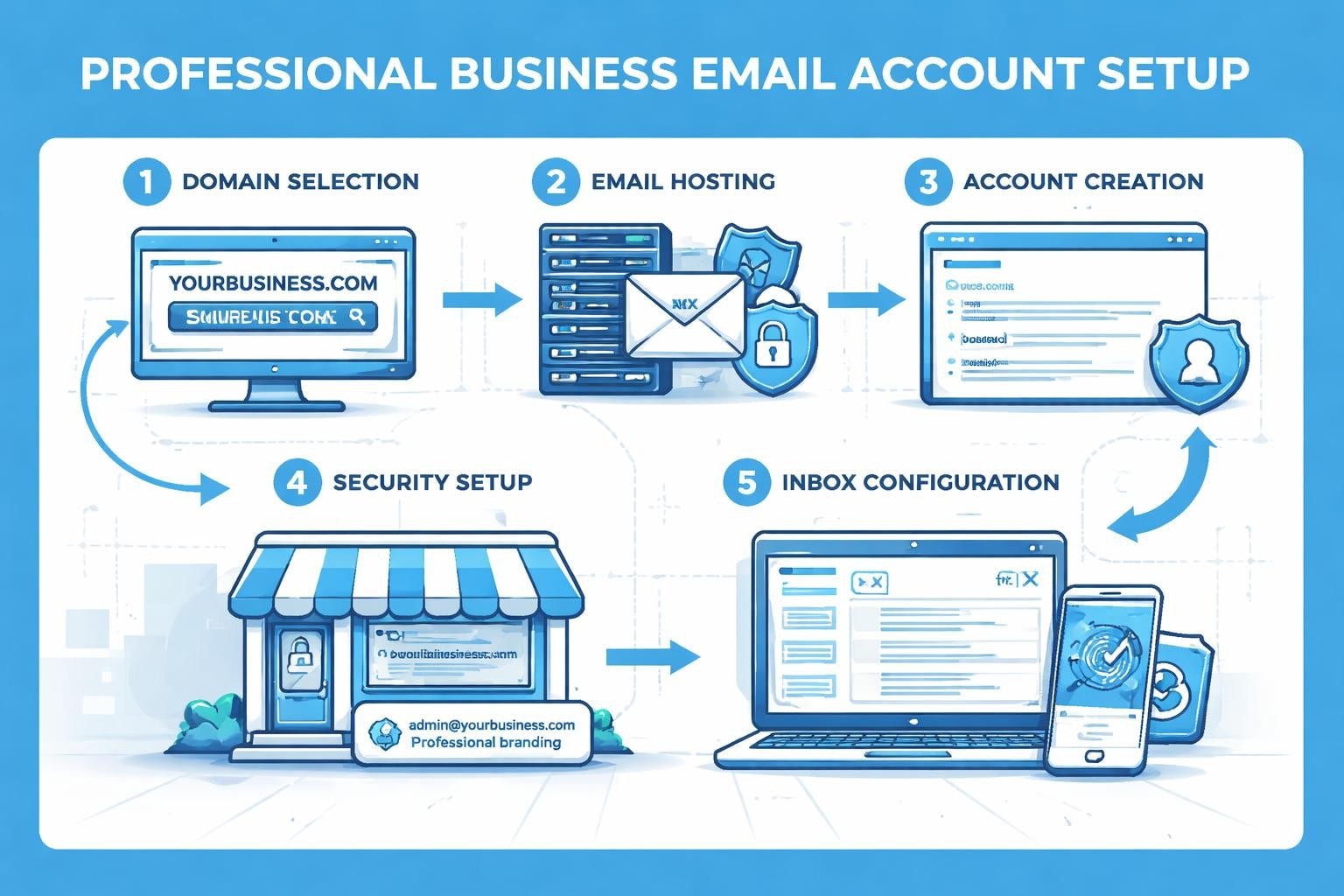
A business email account represents far more than just another inbox for your company. It establishes credibility, protects your brand identity, and serves as the foundation for professional communication in today's digital landscape. Small businesses that rely on generic email providers risk appearing unprofessional and missing critical security features designed specifically for commercial operations. Understanding how to properly establish and maintain your business email infrastructure can dramatically impact client trust, operational efficiency, and overall business success.
Why Your Small Business Needs a Dedicated Business Email Account
Professional credibility starts with your email address. When potential clients receive messages from [email protected] instead of [email protected], they immediately perceive your business as legitimate and established.
Beyond first impressions, a business email account provides essential security features that free email services cannot match. Commercial email solutions offer advanced spam filtering, malware protection, and encryption capabilities that safeguard sensitive business communications. According to Norton's business email security guidelines, implementing proper security measures through professional email accounts can prevent costly data breaches.
Key advantages include:
- Custom domain addresses that reinforce brand recognition
- Enhanced security protocols protecting client data
- Improved deliverability rates for marketing campaigns
- Professional features like shared calendars and contacts
- Scalability as your team grows
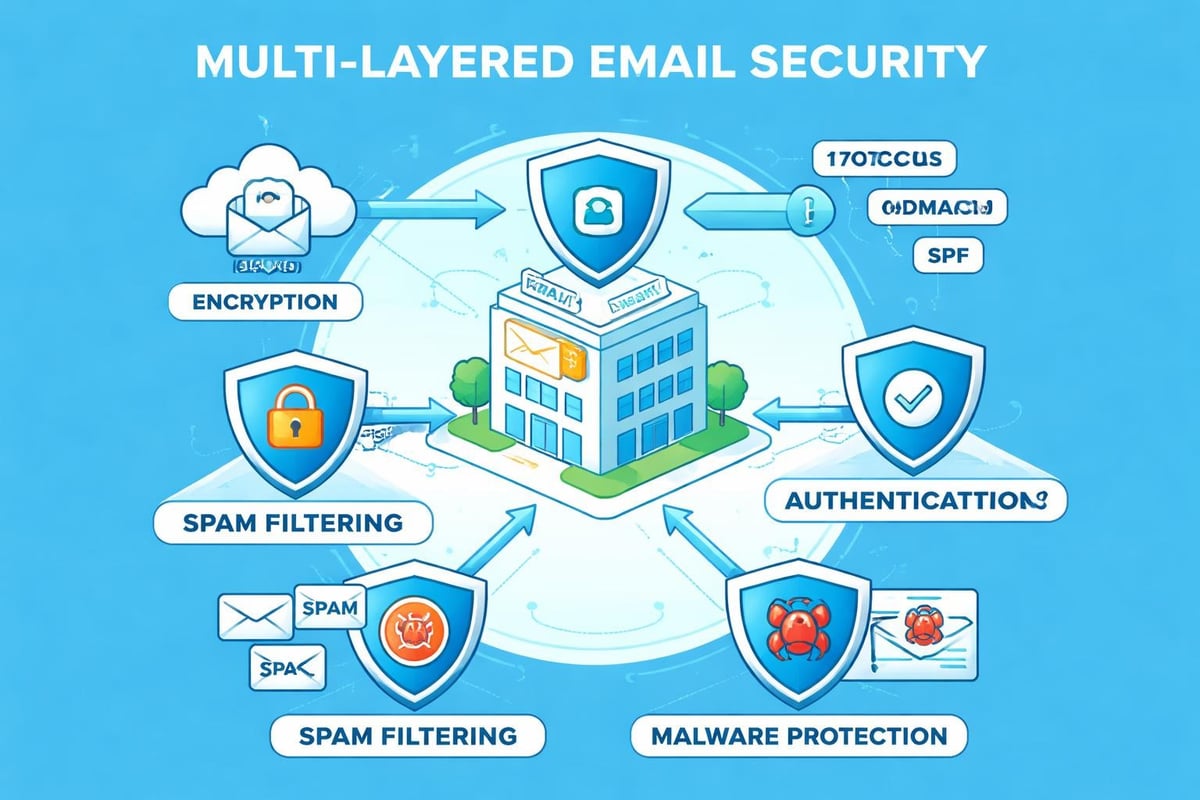
The investment in a proper business email account typically represents a fraction of other business expenses whilst delivering substantial returns through improved professional image and operational capabilities. Small businesses using professional email solutions report higher response rates and increased client confidence.
Setting Up Your First Business Email Account
Establishing a business email account requires careful planning and strategic decision-making. The process begins with selecting an appropriate domain name that reflects your business identity and remains memorable for clients.
Choosing the Right Domain Name
Your domain forms the foundation of every business email account you create. Select something concise, brandable, and directly related to your company name. Avoid hyphens, numbers, or unconventional spellings that create confusion when communicated verbally.
Register your domain through reputable registrars and consider purchasing common variations to protect your brand. Many businesses secure both .com and .co.uk extensions, particularly when operating in the United Kingdom market.
Selecting an Email Service Provider
Not all email providers offer equal functionality for business needs. Enterprise-grade solutions provide administrative controls, user management tools, and integration capabilities that free services lack.
| Feature | Free Email | Business Email Account |
|---|---|---|
| Custom Domain | No | Yes |
| Storage | 5-15 GB | 50+ GB per user |
| Security Controls | Basic | Advanced |
| Technical Support | Limited | Priority assistance |
| Team Collaboration | Minimal | Full suite |
Consider providers that specialise in small business requirements. Many offer migration assistance to transfer existing emails and contacts seamlessly. When setting up business email, prioritise solutions with intuitive interfaces that minimise training requirements for your team.
Configuration and Technical Setup
Once you've selected your provider, configuration involves several technical steps. Most modern platforms offer guided setup wizards, but understanding the fundamentals helps prevent common mistakes.
- Add and verify your domain through DNS records
- Create individual user accounts for team members
- Configure email clients on desktop and mobile devices
- Set up email forwarding and aliases as needed
- Enable security features including two-factor authentication
The technical aspects might seem daunting initially, but most providers offer comprehensive documentation and support resources. Taking time to configure settings properly from the start prevents headaches later.
Essential Security Practices for Business Email Accounts
Email remains the primary attack vector for cybercriminals targeting small businesses. A compromised business email account can expose customer data, financial information, and confidential business strategies. Kaspersky's email security recommendations emphasise that small businesses face disproportionate risks due to typically having fewer dedicated IT security resources.
Implementing Multi-Factor Authentication
Multi-factor authentication (MFA) adds critical protection beyond passwords alone. Even if credentials become compromised, attackers cannot access your business email account without the second authentication factor.
Common MFA methods include:
- SMS verification codes
- Authentication apps generating time-based codes
- Biometric verification on mobile devices
- Hardware security keys for maximum protection
Enable MFA across all business email accounts immediately. The minor inconvenience of an extra login step pales compared to recovering from a security breach.
Password Management and Policies
Weak passwords represent the most common vulnerability in business email security. Establish clear password policies requiring complexity, regular updates, and unique credentials for each service.
Consider implementing password managers across your organisation. These tools generate strong passwords, store them securely, and simplify the login process whilst maintaining security standards. The FTC's business security guide recommends password managers as essential tools for protecting business networks.
Email Encryption and Secure Communication
Sensitive business communications require encryption to prevent interception. Modern business email accounts offer built-in encryption options for messages containing confidential information.
Transport Layer Security (TLS) encrypts emails in transit between servers, whilst end-to-end encryption ensures only intended recipients can read message contents. Understand when to use each encryption type and train your team on proper implementation.
Managing Multiple Users and Permissions
As your business grows, managing multiple business email accounts becomes increasingly complex. Proper administrative controls prevent unauthorised access whilst ensuring team members have appropriate permissions.
Creating an Organisational Structure
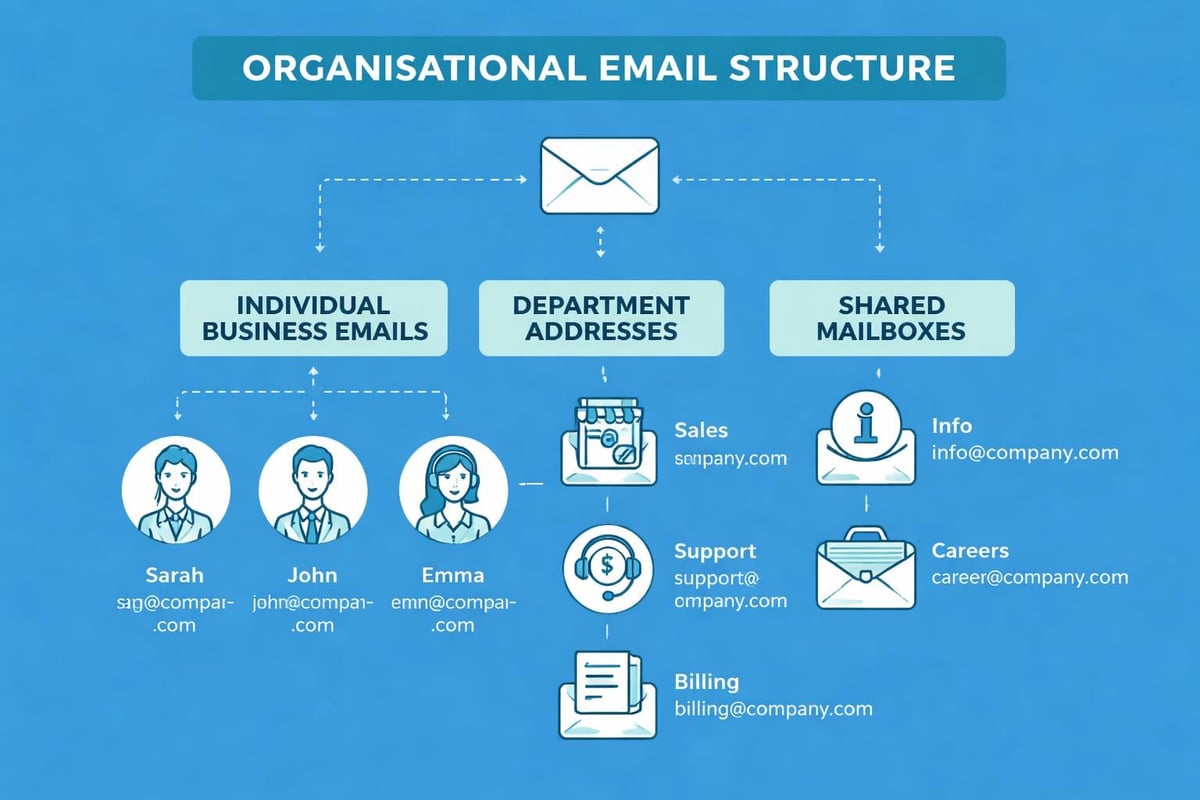
Develop a logical email structure reflecting your business hierarchy. Department-based addresses (sales@, support@, info@) centralise communications whilst individual accounts maintain personal accountability.
| Email Type | Purpose | Access Level |
|---|---|---|
| Individual Accounts | Personal correspondence | User-specific |
| Department Addresses | Team communications | Shared access |
| Role-Based Addresses | Functional communications | Limited sharing |
| Administrative Account | System management | Owner only |
Regularly audit who has access to shared accounts and update permissions when team members change roles or leave the organisation. Data retention policies should clearly define how long to maintain archived emails from departed employees.
Delegation and Shared Mailboxes
Shared mailboxes allow multiple team members to monitor and respond from a single business email account. This functionality proves invaluable for customer service teams, sales departments, and administrative functions requiring collaborative responses.
Configure delegation carefully to maintain accountability. Most platforms allow tracking which team member sent specific messages from shared accounts, creating transparency whilst enabling efficient workflow distribution.
Optimising Your Business Email Account for Marketing
Email marketing represents one of the highest-ROI channels available to small businesses. However, using your primary business email account for bulk marketing can damage sender reputation and deliverability.
Separating Transactional and Marketing Communications
Establish distinct email streams for different communication types. Transactional emails (order confirmations, password resets) should originate from your primary business email account, whilst marketing campaigns benefit from dedicated sending infrastructure.
This separation protects your business email account reputation whilst allowing proper tracking and optimisation of marketing campaigns. When sending marketing emails, dedicated platforms provide analytics, segmentation tools, and compliance features that standard business email accounts lack.
Building Sender Reputation
Your business email account's sender reputation directly impacts whether messages reach recipient inboxes or get filtered to spam. Building positive reputation requires consistent practices over time.
- Send emails only to recipients who've opted in
- Maintain clean email lists by removing invalid addresses
- Avoid spam trigger words in subject lines and content
- Provide clear unsubscribe options in every message
- Monitor bounce rates and engagement metrics
Dedicated email marketing platforms for small businesses handle these technical requirements automatically whilst providing intuitive interfaces for campaign creation and management.
Compliance and Anti-Spam Regulations
Business email accounts must comply with regulations like GDPR, CAN-SPAM, and PECR. Non-compliance risks substantial fines and reputational damage.
Understanding your anti-spam policy obligations ensures your business operates within legal boundaries. Key requirements include obtaining explicit consent before sending marketing emails, honouring unsubscribe requests promptly, and including accurate sender information in every message.
Mobile Access and Remote Work Considerations
Modern business operations demand seamless email access across devices and locations. Configuring your business email account properly for mobile use maintains productivity whilst preserving security.
Securing Mobile Email Access
Mobile devices present unique security challenges. Lost or stolen phones can expose your entire business email account if not properly secured.
Essential mobile security measures:
- Enable device-level passcodes or biometric authentication
- Configure remote wipe capabilities for lost devices
- Use official email apps rather than generic mail clients
- Avoid accessing business email on public Wi-Fi without VPN protection
- Regularly update mobile operating systems and email apps
Microsoft's secure email guide emphasises maintaining strict standards for mobile device usage, particularly when handling sensitive business communications.
Synchronisation Across Devices
Ensure your business email account synchronises properly across desktop, laptop, tablet, and mobile devices. Modern email protocols like IMAP and Exchange ActiveSync maintain consistency, ensuring messages read on one device appear read on all others.
Test synchronisation thoroughly across all devices your team uses. Inconsistent synchronisation creates confusion and potential duplicate responses to clients.
Backup and Disaster Recovery Planning
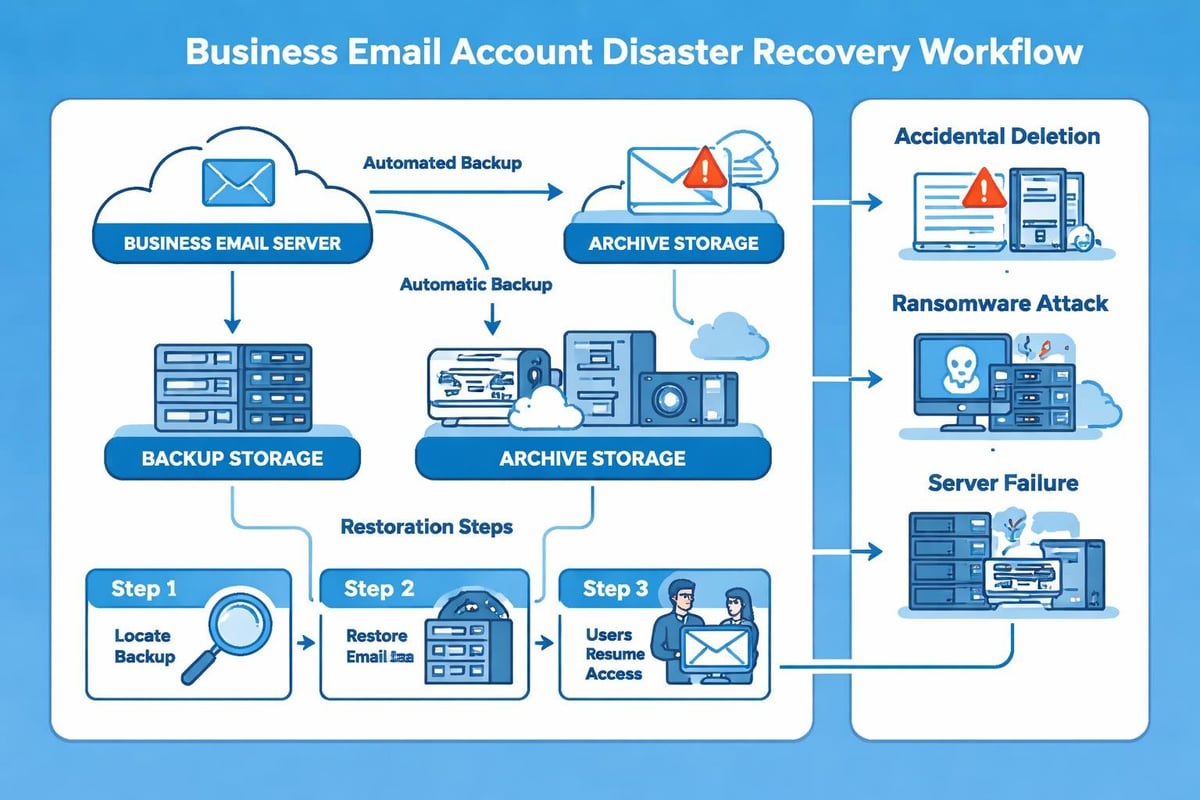
Many small businesses assume their email provider handles backups automatically. Whilst providers maintain system-level redundancy, individual business email account data may not receive the protection you expect.
Implementing Email Archiving
Email archiving creates separate, searchable copies of all business communications. Beyond disaster recovery, archives prove invaluable for legal compliance, dispute resolution, and historical reference.
Choose archiving solutions that offer:
- Long-term storage with guaranteed accessibility
- Advanced search capabilities across years of messages
- Export functionality for legal discovery
- Tamper-proof preservation of original messages
Some industries face specific email retention requirements. Data retention policies should reflect both regulatory obligations and business operational needs.
Recovery Procedures and Testing
Develop documented procedures for recovering your business email account following various disaster scenarios. Test these procedures regularly rather than discovering gaps during actual emergencies.
| Scenario | Recovery Priority | Testing Frequency |
|---|---|---|
| Individual Account Deletion | High | Quarterly |
| Mass Email Deletion | Critical | Semi-annually |
| Complete System Outage | Critical | Annually |
| Ransomware Attack | Critical | Annually |
Regular testing identifies weaknesses in your recovery plan whilst familiarising team members with procedures, reducing panic during actual incidents.
Integration with Business Tools and Workflows
Your business email account shouldn't exist in isolation. Integration with other business tools multiplies efficiency and streamlines operations.
CRM and Customer Management Integration
Connecting your business email account to customer relationship management (CRM) systems creates comprehensive customer interaction histories. Sales teams can review all email correspondence within customer records, improving context and personalisation.
Modern integrations operate bidirectionally, logging outbound emails automatically whilst allowing CRM-initiated messages through your business email account. This seamless connection eliminates manual data entry and reduces information gaps.
Productivity Tool Connections
Calendar synchronisation ensures meeting invitations from your business email account appear across all planning tools. Document collaboration platforms can share files directly through email whilst maintaining proper version control and access permissions.
Task management integration converts emails into actionable items, preventing important messages from getting lost in crowded inboxes. When evaluating email clients, consider which integrations matter most for your business workflows.
Automation and Email Rules
Automated rules and filters transform your business email account from passive inbox to active productivity tool. Configure rules that automatically:
- Categorise incoming messages by sender or subject
- Forward specific emails to team members or departments
- Archive low-priority notifications
- Flag urgent communications requiring immediate attention
- Send automated responses during holidays or busy periods
Start with simple rules and gradually expand automation as you identify repetitive manual tasks consuming valuable time.
Cost Considerations and Budgeting
Business email accounts represent ongoing operational expenses requiring careful budget planning. Understanding pricing models helps optimise spending whilst ensuring adequate functionality.
Pricing Structures Compared
Email providers use various pricing models, from per-user monthly fees to tiered plans based on storage and features. Evaluate total cost of ownership rather than just base subscription prices.
Consider hidden costs like:
- Additional storage beyond base allocations
- Advanced security features sold separately
- Migration assistance and setup fees
- Training and ongoing support
- Add-on applications and integrations
When exploring pricing plans, calculate costs across your entire team and projected growth over 12-24 months. Many providers offer discounts for annual commitments versus monthly billing.
Return on Investment Analysis
Quantifying business email account ROI involves both tangible and intangible factors. Direct cost savings include reduced IT support requirements through managed services and decreased security incident expenses.
Productivity improvements deliver substantial value. If professional email tools save each team member just 30 minutes weekly through better organisation and integration, that compounds significantly across your organisation. Enhanced credibility may translate to higher conversion rates and larger deal sizes, though attributing specific revenue to email infrastructure proves challenging.
Training Your Team on Email Best Practices
Even the most sophisticated business email account delivers limited value without proper user training. Developing comprehensive email guidelines ensures consistent, professional communication across your organisation.
Creating Email Communication Standards
Document clear standards covering tone, formatting, response times, and appropriate use cases. Consistency in email communications reinforces brand identity whilst preventing embarrassing mistakes.
Essential guidelines should address:
- Appropriate greeting and closing conventions
- When to use "reply" versus "reply all"
- File attachment size limits and alternatives
- Email signature requirements and formatting
- Classification of sensitive information
Make guidelines accessible and reference them during onboarding. Regular refresher training keeps best practices top-of-mind for all team members.
Recognising and Avoiding Phishing Attempts
Phishing represents the most prevalent email security threat facing small businesses. Training employees to recognise suspicious emails protects your entire organisation.
According to Sectigo's security best practices, regular security awareness training significantly reduces successful phishing attacks. Teach team members to scrutinise sender addresses, hover over links before clicking, and report suspicious messages immediately.
Conduct simulated phishing exercises to test awareness and identify team members requiring additional training. Frame these as educational opportunities rather than punitive measures.
Establishing and maintaining a robust business email account infrastructure requires attention to security, proper configuration, and ongoing management. The investment in professional email solutions pays dividends through enhanced credibility, improved team collaboration, and protected business communications. Small businesses ready to elevate their email operations will find comprehensive solutions designed specifically for their needs at Astonish Email, where email marketing and professional communication tools come together to support growing businesses.