Email Details Guide: Your Essential Handbook for 2026
February 1, 2026
In 2026, email remains the backbone of both business and personal communication, connecting billions of people every day. With over 347 billion emails sent worldwide daily, the need to understand and manage email details has never been greater.
Mastering email details is crucial for achieving efficiency, professionalism, and security in a digital-first world. This handbook offers a clear, comprehensive guide to everything you need to know about email details, from structure and best practices to the latest tools and trends.
You will learn about email structure, essential security measures, etiquette, productivity tools, and future innovations—all to help you communicate smarter and safer.
The Anatomy of an Email: Understanding Every Detail
Mastering email details is essential for anyone looking to communicate efficiently and professionally in 2026. Each element, from the subject line to the signature, plays a specific role in ensuring your message is delivered, understood, and trusted. Understanding these components is the first step towards optimising your email strategy.
Essential Components of Email Details
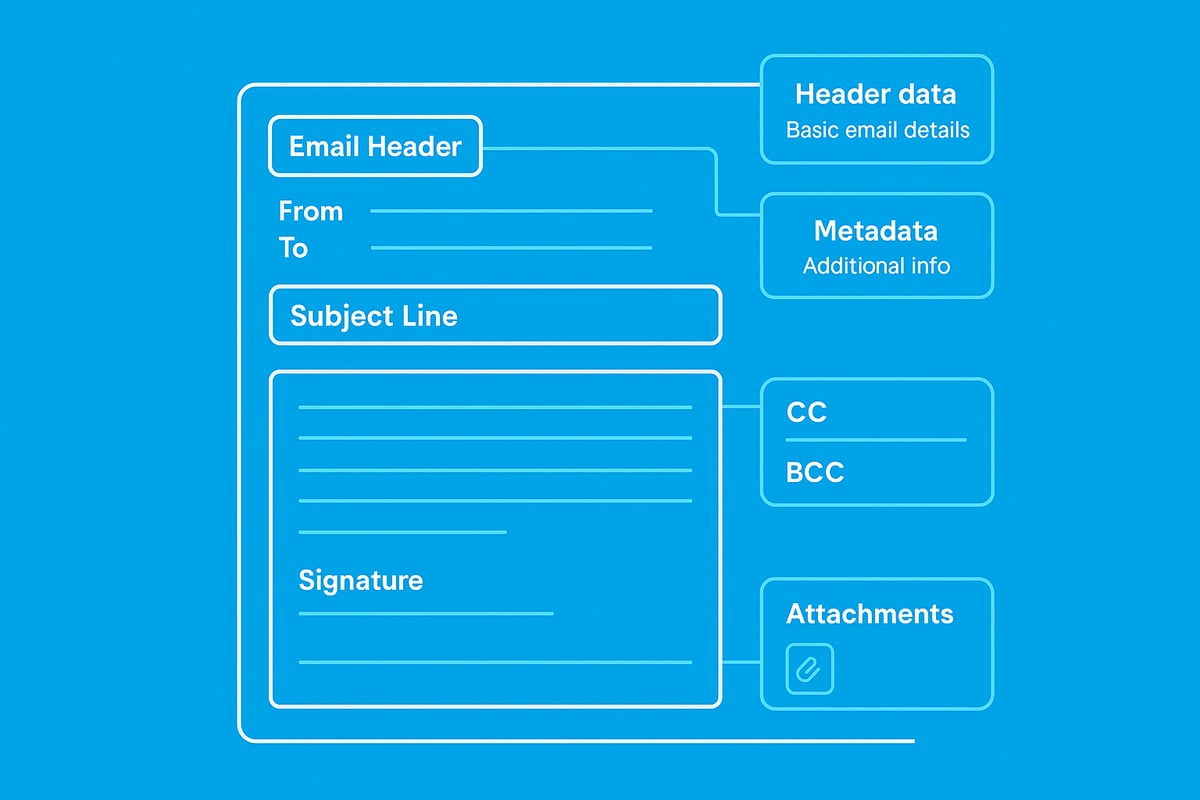
Every email is built on a framework of core components. Understanding these email details provides clarity and professionalism in every message you send.
| Component | Purpose |
|---|---|
| Subject Line | Summarises the content, grabs attention |
| Sender | Identifies who is sending the email |
| Recipient (To) | Directs the message to the main addressee(s) |
| CC | Copies in secondary recipients for visibility |
| BCC | Sends copies privately, hiding addresses |
| Body | Contains the main message content |
| Signature | Provides sender details and branding |
| Attachments | Shares files or documents securely |
Each of these email details must be completed thoughtfully to avoid confusion or miscommunication. For a deeper dive into the anatomy and structure of business emails, see the Anatomy of a Business Email guide.
The Significance of Email Header Data
Beyond the visible fields, email details include technical header data. Headers record the path an email takes from sender to recipient. They include information such as timestamps, server IPs, and authentication checks.
Header data is crucial for tracking delivery issues, detecting phishing attempts, and verifying sender authenticity. IT teams often review these email details when investigating suspicious messages or troubleshooting delivery problems.
Metadata, another aspect of email details, helps spam filters assess whether a message is legitimate. Factors like sender reputation, content patterns, and technical compliance all influence whether your email lands in the inbox or spam folder.
How Modern Email Clients Handle Email Details
Email clients in 2026 interpret email details with advanced features. Smart inboxes prioritise important messages based on sender, subject, and previous interactions. Visual cues highlight trusted senders or flag potential threats.
Most email clients now display essential details, like the subject and sender, prominently. They also offer easy access to hidden fields such as CC and BCC. Metadata and headers are usually tucked away but can be revealed for troubleshooting.
These improvements ensure users have quick access to the most relevant email details, improving both efficiency and security.
Avoiding Common Mistakes in Email Details
Even experienced professionals can overlook vital email details. Common errors include missing subject lines, neglecting to use BCC for privacy, and attaching the wrong files.
A 2025 survey found that 37% of professionals most frequently overlook the CC and BCC fields when composing group messages. Formatting mistakes, such as unclear subject lines or inconsistent signatures, can reduce response rates and damage credibility.
By paying close attention to these email details, you create a more effective and trustworthy communication channel.
Real-World Example: Dissecting a Business Email
Consider a typical business email:
From: Alice Smith <[email protected]>
To: Bob Jones <[email protected]>
CC: Carol Lee <[email protected]>
Subject: Q2 Project Update
Body: Hi Bob, Please find attached the Q2 project report. Let me know if you have questions.
Attachment: Q2_Report.pdf
Signature: Alice Smith, Project Manager, Company Ltd.
In this example, each element serves a clear function. The subject provides context, recipients are assigned appropriately, and the attachment is referenced in the body. The signature reinforces professionalism and brand identity.
Detailed attention to these email details leads to faster responses and fewer misunderstandings. Studies show that well-structured emails can boost workplace communication efficiency by up to 28%.
Email Security Essentials: Protecting Your Information
In today's digital landscape, safeguarding your email details is more critical than ever. As we move into 2026, businesses and individuals face increasingly sophisticated threats targeting email communication. Understanding the risks and applying robust security measures ensures your email details remain confidential, authentic, and compliant.
Common Email Threats in 2026
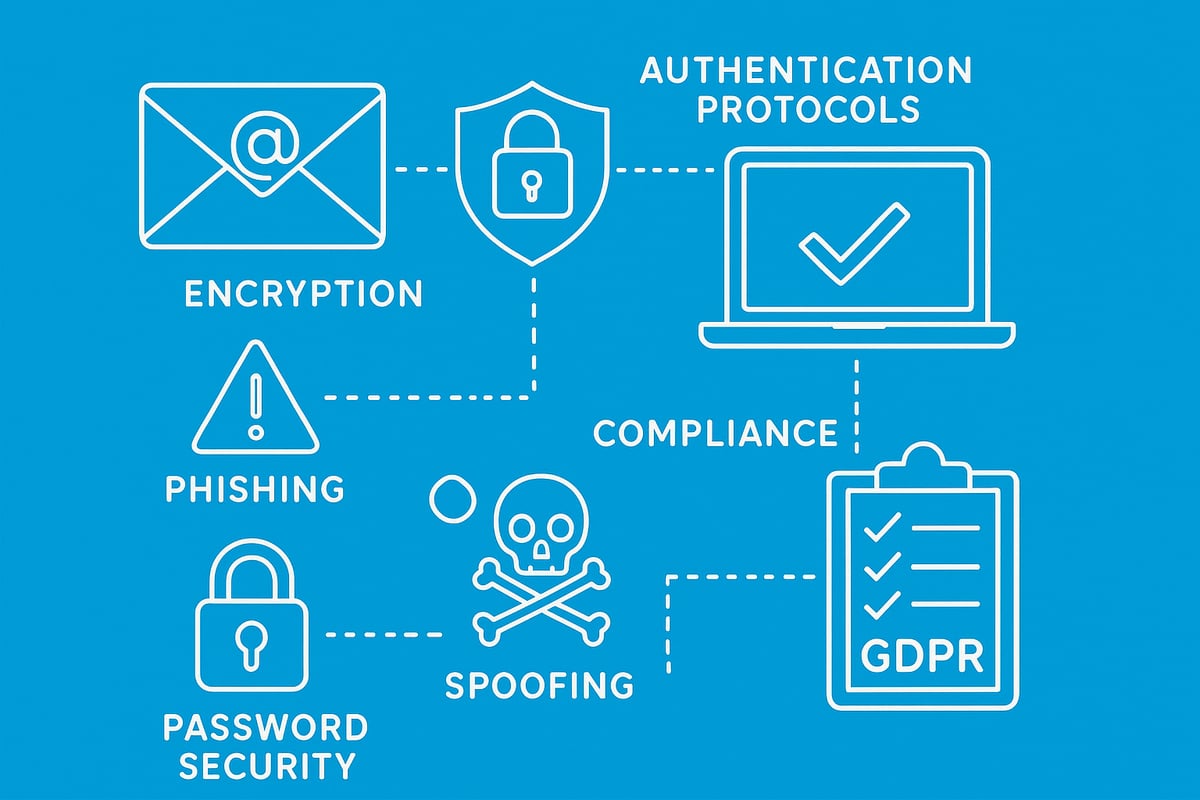
Email details are a prime target for cyber criminals. In 2026, the most prevalent threats include:
- Phishing: Fraudulent messages designed to steal credentials or personal data.
- Spoofing: Attackers impersonate trusted senders to deceive recipients.
- Malware: Harmful software delivered via attachments or malicious links.
- Business Email Compromise: Criminals gain access to corporate accounts for financial fraud.
According to the Cyber Security Breaches Survey 2025, 79% of UK businesses reported email-based attacks in the past year. This alarming figure highlights the urgent need to protect email details.
A recent example involved a high-profile phishing attack on a UK financial firm, resulting in substantial financial losses and reputational harm. Warning signs of suspicious emails include unexpected requests, poor grammar, and mismatched sender addresses.
Poorly protected email details can lead to data breaches, regulatory penalties, and lasting damage to business trust. Recognising these risks is the first step in effective defence.
Best Practices for Securing Email Details
Securing your email details requires a multi-layered approach. Start with strong, unique passwords for every account, and always enable two-factor authentication. This significantly reduces the risk of unauthorised access.
Encryption is essential. Ensure your email client uses TLS for communication, and consider end-to-end encryption for sensitive messages. Regularly update your email software and security filters to guard against the latest threats.
Handle attachments and links with care. Never open unexpected files, and verify URLs before clicking. For example, in Gmail, you can enable confidential mode for added encryption in just a few clicks.
Here's a quick checklist for securing your email details:
| Security Step | Why It Matters |
|---|---|
| Strong Passwords | Prevents unauthorised access |
| Two-Factor Auth | Adds a second verification |
| Encryption Enabled | Protects message content |
| Software Updates | Fixes known vulnerabilities |
| Safe Attachments | Blocks malware and phishing |
By following these steps, you ensure your email details remain out of reach from cyber threats.
Compliance and Privacy Regulations
Email details must be managed in line with strict privacy and compliance regulations. The GDPR and updated UK data protection laws require businesses to protect personal and sensitive data within emails.
Key requirements include:
- Securing storage and transmission of email details.
- Obtaining clear consent for marketing or transactional emails.
- Promptly reporting data breaches.
A compliance checklist for email details:
- Is personal data encrypted during transmission?
- Are recipients' consent records up to date?
- Is sensitive information excluded from mass emails?
- Are marketing communications opt-in only?
In 2024–2025, UK regulators issued millions in fines for non-compliant email practices. Staying up to date with legal requirements protects both your organisation and the people whose email details you manage.
Mastering Email Etiquette and Professionalism
In 2026, mastering email etiquette is essential for anyone looking to communicate effectively and professionally. With the sheer volume of email details exchanged daily, even minor missteps can impact your reputation or slow down workflows. Let us explore how to refine your approach and ensure every message stands out for the right reasons.
Writing Clear and Effective Emails
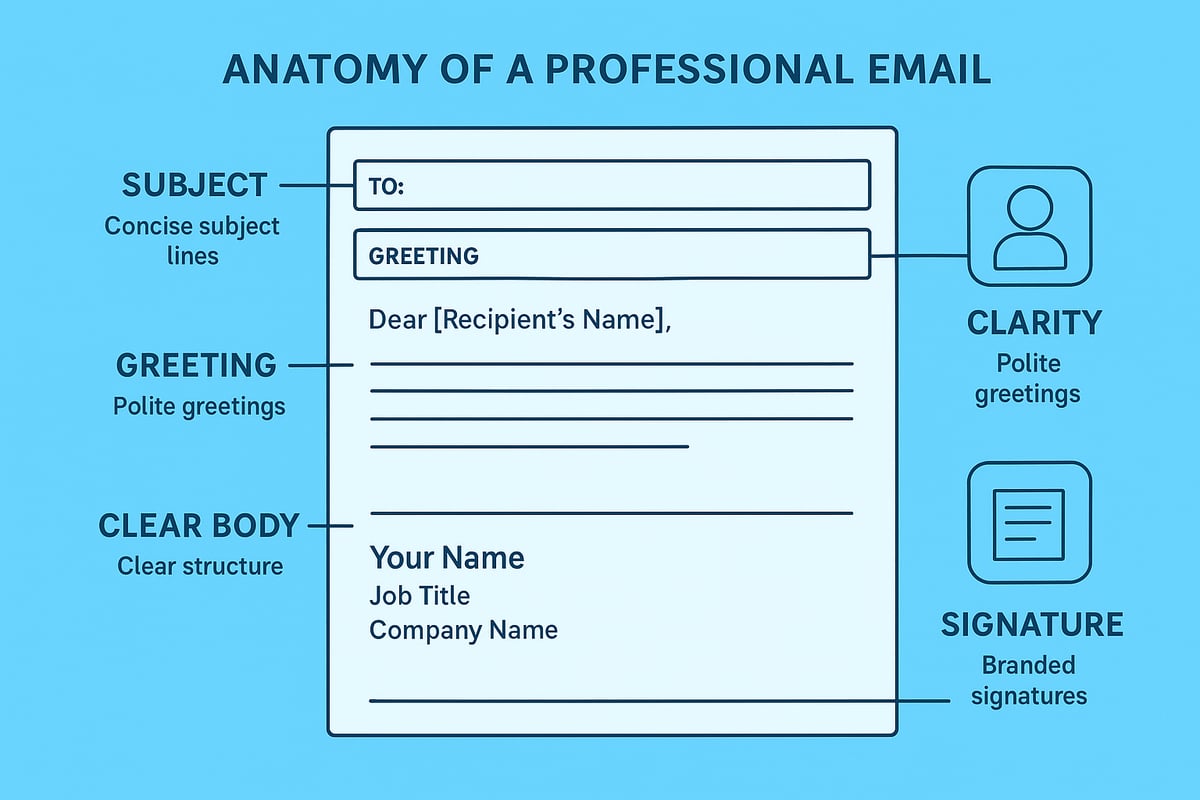
Clarity is the cornerstone of effective communication. Structuring your messages thoughtfully ensures your email details are understood at a glance. Begin with a direct subject line, followed by a courteous greeting. The body should be concise, focused, and include all necessary information. End with a clear call-to-action and a polite closing.
Common pitfalls include:
- Overly long or rambling messages
- Excessive jargon or unexplained acronyms
- Missing context or unclear requests
Consider the following before-and-after comparison:
Before:
Subject: Info
Hi,
Can you help me?
Thanks.

After:
Subject: Request for Q2 Sales Data by Friday
Hi Sarah,
Could you please send me the final Q2 sales figures by end of day Friday? Let me know if you need any clarification.
Best regards,
James
Data shows that concise, well-structured messages have a 28 percent higher response rate compared to verbose emails, according to a 2025 workplace survey. By paying close attention to your email details, you foster clarity and professionalism in every exchange.
Managing Recipients and Threads
Proper management of recipients and threads is vital for maintaining control over email details and ensuring messages reach the right people. The "To" field should list primary recipients, while "CC" is best reserved for those who need to stay informed but are not required to act. Use "BCC" to discreetly include recipients without exposing their addresses.
Best practices for managing group emails:
- Limit use of "Reply All" to necessary situations
- Clearly state the purpose when forwarding threads
- Maintain context by summarising previous discussions
Overuse of "CC" or mismanaging threads can quickly lead to information overload. A recent survey found that 41 percent of professionals missed key email details due to cluttered conversations. Streamline your approach by organising threads logically and using filters where possible.
Mismanaged threads can disrupt workplace productivity, causing confusion or duplicated tasks. Attending to these email details ensures smoother collaboration and a more efficient workflow.
Digital Signatures and Branding
A professional email signature is more than a sign-off, it is a critical component of your email details that reflects your brand and builds trust. Consistency is key. Every signature should include:
- Full name and job title
- Company name and logo
- Direct contact information
- Legal disclaimers where necessary
Branding opportunities abound in your signature. Incorporate company colours, add a promotional banner, or highlight a recent achievement. Studies show branded signatures can boost response rates by up to 15 percent.
For inspiration, explore Best Practices for Email Signatures to ensure your email details reinforce your professional image.
Effective email details in your signature not only convey credibility but also serve as a subtle marketing tool. Review and update your signature regularly to keep it aligned with your evolving brand.
Tools and Technologies to Optimise Email Management
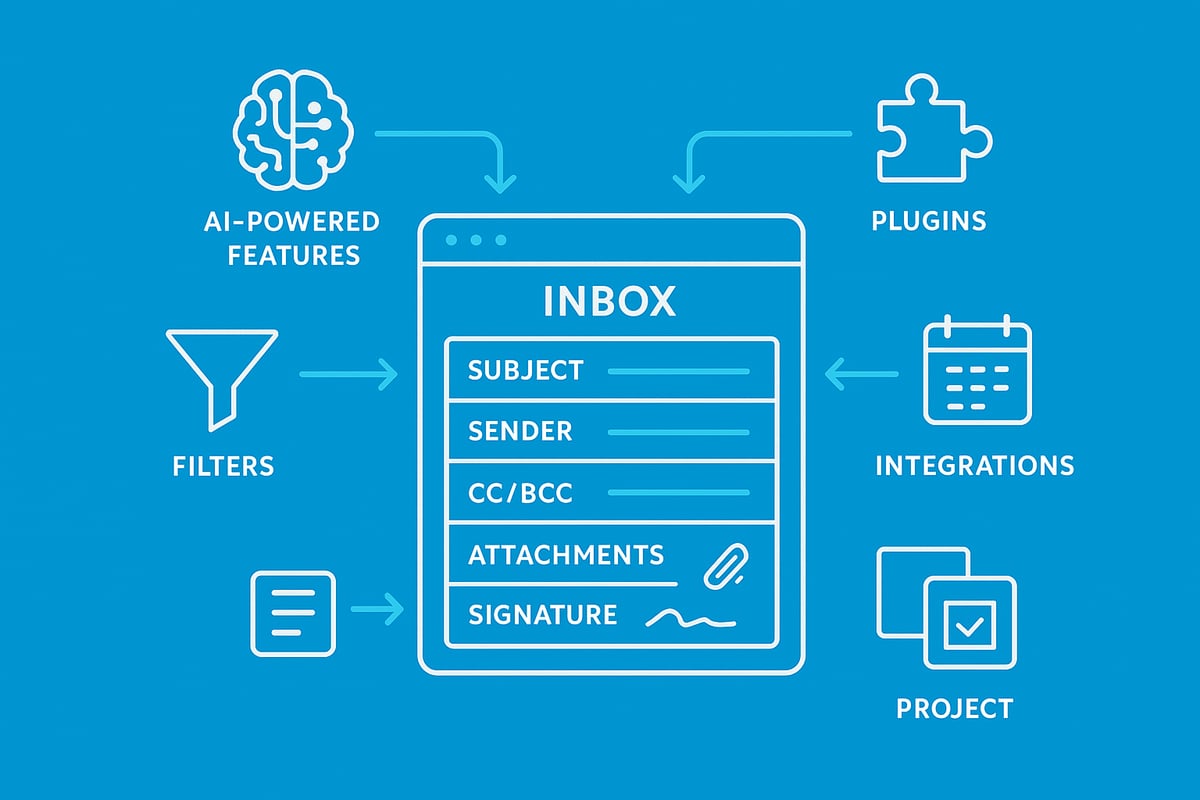
Selecting the right tools can transform how you manage email details. In 2026, advancements in software and integrations empower professionals to communicate with precision, automate tasks, and keep every inbox organised.
These innovations not only reduce manual effort but also ensure that email details are secure, accessible, and actionable. Let us explore how modern platforms, productivity tools, and add-ons can help you optimise your workflow.
Advanced Email Clients and Features
The landscape of email clients has evolved rapidly. Outlook, Gmail, and an array of emerging platforms now compete by offering advanced features tailored for business and personal use. Understanding how each platform handles email details is crucial for making the best choice.
| Email Client | Key Features | User Adoption (2025) | Best For |
|---|---|---|---|
| Outlook | Smart sorting, Focused Inbox, AI scheduling | 35% | Enterprises |
| Gmail | Priority Inbox, Smart Compose, integrated Meet | 40% | SMEs, individuals |
| Titan | Custom domains, collaboration tools | 10% | Start-ups |
| Others | Niche features, privacy focus | 15% | Privacy advocates |
Modern clients interpret email details such as headers and metadata to help filter spam, highlight important messages, and ensure authenticity. AI-powered suggestions offer quick replies and flag critical actions, making email details more actionable.
Smart inboxes now use machine learning to reduce clutter, surfacing essential conversations and suppressing noise. For example, Focused Inbox in Outlook automatically channels priority emails to the top, letting you act on key email details efficiently.
Choosing the right client depends on your workflow, collaboration needs, and security requirements. Evaluate how each platform manages email details, integrates with other tools, and supports compliance.
Automation, Filters, and Productivity Tools
Automation is key to managing the growing volume of email details. Setting up rules and filters allows emails to be sorted by sender, subject, or keywords, ensuring nothing important is missed.
Consider this step-by-step approach:
- Identify common email details such as sender domains or project codes.
- Create rules to label, move, or flag messages automatically.
- Set up auto-responses for common queries and out-of-office periods.
- Integrate calendars and task lists for seamless scheduling.
Automated tools save time and prevent overload. According to recent reports, businesses using advanced automation reclaim up to 15% of working hours previously lost to manual sorting of email details.
Integrating email with CRM and project management software centralises communications, making every piece of email details accessible to your team. For a deeper dive into efficient organisation, see Optimising Email Organisation Tools.
Essential Add-ons and Integrations
Add-ons further enhance how you handle email details. Popular plugins include grammar checkers, encryption tools, and scheduling assistants that streamline daily tasks.
Integrating email with collaboration platforms like Slack or Trello enables direct task creation and status updates from your inbox. These connections mean email details are never siloed, supporting smoother workflows.
When installing third-party tools, always review security settings. Ensure that your add-ons do not compromise the integrity of sensitive email details or expose confidential information.
Future Trends in Email Details and Communication
The landscape of email details is evolving rapidly as technology and user expectations shift. Understanding where email is headed can help you stay ahead, ensuring your communication remains effective, secure, and professional.
AI and Personalisation in Email
Artificial intelligence is revolutionising email details by delivering smarter, more personalised communication. AI tools now analyse recipient behaviour to suggest optimised subject lines, tailor content, and improve targeting. As a result, businesses are seeing open and click-through rates rise significantly.
For example, many platforms use AI to generate dynamic email details for each recipient, adjusting tone and content based on previous interactions. This level of customisation ensures emails feel relevant and engaging, enhancing user experience.
Industry reports from 2025 show that AI-driven personalisation leads to a 30% increase in engagement compared to traditional approaches. Comparing AI-generated email copy with human-written versions, the former often outperforms in terms of response rates and efficiency.
Key developments in AI and email details include:
- Automated content suggestions for faster drafting
- Predictive analytics to determine the best send times
- Real-time language adjustments for clarity and tone
Mastering these tools will be essential for anyone looking to optimise their email details and maintain a competitive edge.
Email in the Era of Collaboration Platforms
The role of email details is shifting as collaboration platforms like Slack, Teams, and WhatsApp become integral to workplace communication. While instant messaging offers speed and informality, email remains the backbone for formal exchanges and record-keeping.
Seamless integration is now a priority, allowing users to transfer email details directly into chat threads or project management tools. This hybrid workflow improves efficiency and ensures critical information is not lost between platforms.
Recent data reveals a generational divide: younger professionals increasingly prefer chat apps, while established industries continue to rely on email details for official correspondence. Yet, both groups benefit from tools that bridge the gap, such as shared inboxes and unified notifications.
Consider the following hybrid workflow:
- Initiate a project discussion in a team chat
- Share relevant email details via integration
- Archive key decisions in both platforms for future reference
Organisations that embrace these trends will find their email details become more actionable and accessible across all communication channels.
Security and Compliance Innovations
Security remains a top concern for email details as cyber threats become more sophisticated. New encryption standards and authentication protocols are emerging, offering advanced protection for sensitive information.
Regulatory changes expected in 2026 will further impact how email details are managed. Organisations must stay informed to ensure compliance and avoid penalties. For instance, the sharp rise in credential theft incidents, as highlighted in Credential Theft Surges 160% in 2025, underscores the importance of robust email security.
Early adoption of these innovations by leading UK businesses demonstrates the value of proactive measures. By prioritising secure and compliant email details, organisations not only protect their reputation but also build trust with clients and partners.
Step-by-Step Guide: Managing Email Details Like a Pro in 2026
Mastering email details is essential for modern professionals. By following a systematic approach, you can streamline communication, boost security, and maintain compliance. This step-by-step guide will equip you with practical tactics for every stage of email management in 2026.
Step 1: Setting Up Your Email for Success
The foundation of effective email details management is a secure, organised setup. Start by selecting a reputable provider that offers robust security and privacy features. Configure your account with strong passwords and enable two-factor authentication.
Import your contact list, and create folders or labels for key projects, clients, or topics. This early organisation will make it easier to manage email details as your inbox grows. For example, when setting up a new business email account, take time to categorise contacts and set up a folder system to keep correspondence tidy from day one.
Step 2: Composing and Sending Professional Emails
Clear, concise communication is at the heart of great email details. Begin each message with a descriptive subject line, followed by a professional greeting. Structure your content logically, using bullet points or short paragraphs for readability.
Attach relevant files, insert your signature, and use templates for recurring messages. For a time-sensitive proposal, include all necessary information and a clear call to action. For further guidance, explore Email Etiquette Best Practices 2025 for updated tips on professional tone and clarity.
Step 3: Organising and Archiving Emails Efficiently
Maintaining order is vital for accessing important email details later. Set up automatic rules to sort incoming messages into folders or apply labels. Regularly archive emails to reduce inbox clutter, but know when to delete irrelevant correspondence.
| Action | Best For | Retention Period |
|---|---|---|
| Archive | Client communications, receipts | 1–7 years |
| Delete | Spam, outdated notices | Immediate |
A monthly inbox clean-up routine, using these principles, keeps your email details accessible and your workflow efficient.
Step 4: Ensuring Security and Compliance
Protecting sensitive email details is a top priority. Always review messages for confidential data before sending. Enable encryption and use secure links for sharing critical documents.
Stay current with compliance by following GDPR and data protection best practices. For a step-by-step security guide tailored to small businesses, refer to Secure Email for Small Business. For example, encrypt attachments when sending client contracts to ensure privacy.
Step 5: Leveraging Automation and Integrations
Take your email details management further by automating repetitive tasks. Set up auto-responders for out-of-office notifications and follow-up reminders. Integrate your email with calendars and productivity apps to streamline workflows.
Here is a simple auto-responder template:
Subject: Out of Office
Thank you for your email. I am currently away and will respond as soon as possible. For urgent matters, please contact [colleague/contact].
Automating appointment confirmations or follow-ups ensures key email details are never missed.
Step 6: Monitoring and Analysing Email Performance
Continually improve your approach by tracking the performance of your email details. Use built-in analytics to monitor open and click rates. Adjust your communication strategies based on this data to increase engagement.
For example, analyse your latest newsletter campaign to see which subject lines or content types perform best. Use these insights to refine future email details and achieve better results.