Email Saving Guide: Your Essential Handbook for 2026
January 8, 2026
Drowning in overflowing inboxes and lost messages? In a world where digital communication never stops, mastering email saving is essential for staying organised and productive in 2026.
This guide is your roadmap to taking control of your inbox, whether for personal peace of mind or professional compliance. You will discover the latest strategies, tools, and best practices for saving, organising, and securing your emails.
Inside, we explore why email saving matters now more than ever, review must-have tools, break down step-by-step methods, reveal advanced organisation tips, and cover security essentials. Ready to transform your digital life? Let us begin.
Why Email Saving Matters in 2026
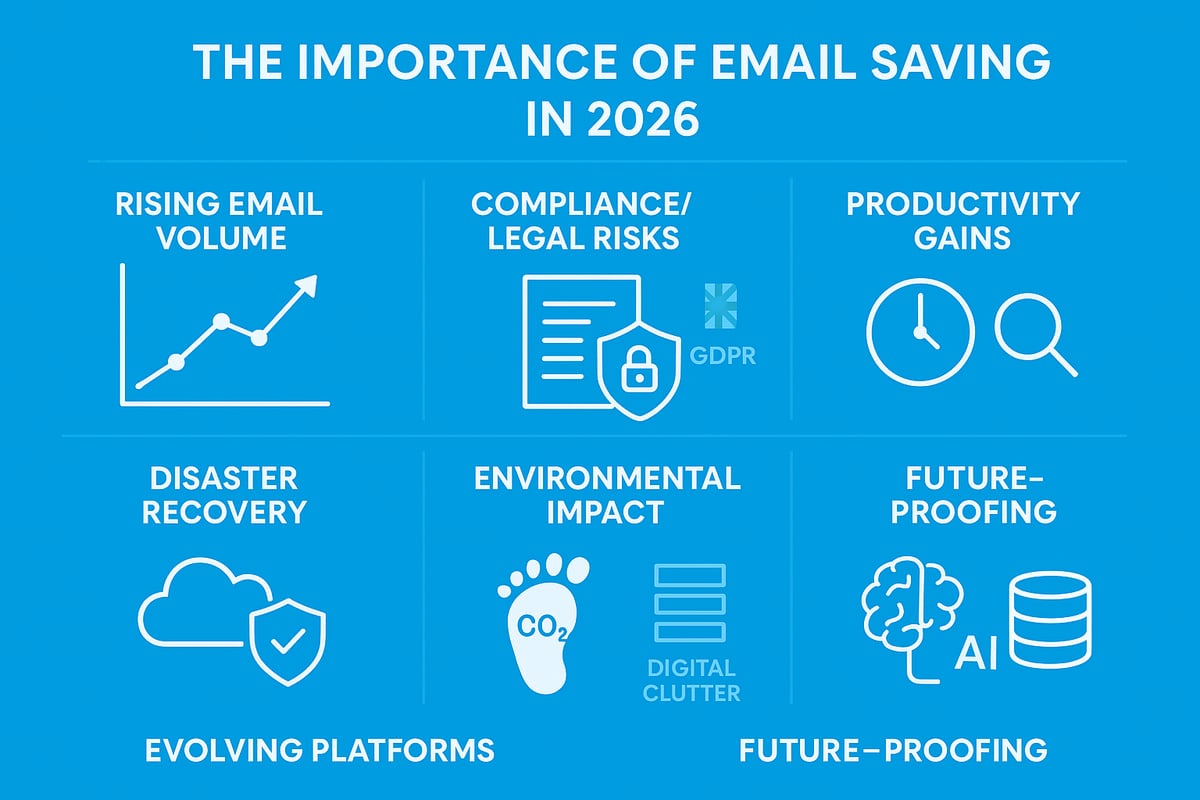
The world is sending and receiving more emails than ever. If you feel overwhelmed by your inbox, you are not alone. In 2026, email saving is not just a trend, it is a necessity for individuals and organisations alike.
The Growing Volume of Emails
Email traffic continues to surge. The average office worker now receives over 120 emails daily, according to recent research. With the rise of remote and hybrid work, inboxes are filling up faster than ever. Small businesses, in particular, often struggle to keep pace with client communications, leading to information overload.
This relentless increase demands better email saving strategies. Without an effective approach, important messages can vanish in the noise, making it harder to stay organised and responsive.
Legal, Compliance, and Business Needs
Compliance requirements are stricter than ever. Regulations like GDPR and the UK Data Protection Act set clear rules for retaining and managing emails. For sectors such as finance and healthcare, proper record-keeping is not optional, it is a legal duty.
Real-world failures in email saving can result in significant fines and reputational damage. To understand the full legal landscape, see Email archiving laws in the UK, which outlines the essential frameworks every UK business should know.
Personal Productivity Benefits
Efficient email saving boosts productivity. Quick access to critical information and attachments saves valuable time. According to industry data, professionals spend up to 2.5 hours each week searching for old emails.
With the right systems, you can track projects more easily and manage knowledge across teams. Less time hunting for messages means more time for meaningful work.
Data Loss and Disaster Recovery
Accidental deletion, hacking, or device failures are real threats. Without robust email saving, you risk losing contracts, agreements, or vital correspondence. One company lost critical contracts simply because their emails were not backed up.
A reliable backup and saving process ensures you can recover swiftly from unexpected events, protecting your organisation and reputation.
Environmental Impact
Digital clutter is not just a productivity issue, it has environmental costs. Every stored email consumes energy, contributing to the overall carbon footprint. Campaigns in the UK now encourage digital decluttering as part of sustainable business practices.
Adopting smart email saving helps reduce unnecessary storage, supporting both your efficiency and the planet.
Evolving Email Platforms
Platforms like Gmail and Outlook constantly evolve, impacting how you save and access emails. Cloud-based solutions offer scalability and convenience, while on-premise options provide greater control.
Choosing the right tools for email saving depends on your needs and the latest platform features. Staying updated ensures you benefit from improved security and storage options.
Future-Proofing Communication
Email saving is vital for future-proofing your business. Storing historical data allows you to harness AI-driven insights and adapt to new regulations. As technology and compliance standards change, a proactive approach to email saving keeps you ready for whatever comes next.
Essential Tools and Technologies for Email Saving
Effectively managing your inbox in 2026 means leveraging the right tools for email saving. With the ever-growing volume of digital correspondence, a strategic blend of built-in features, third-party apps, and automation can transform how you store, organise, and secure your emails.
Built-in Email Client Features
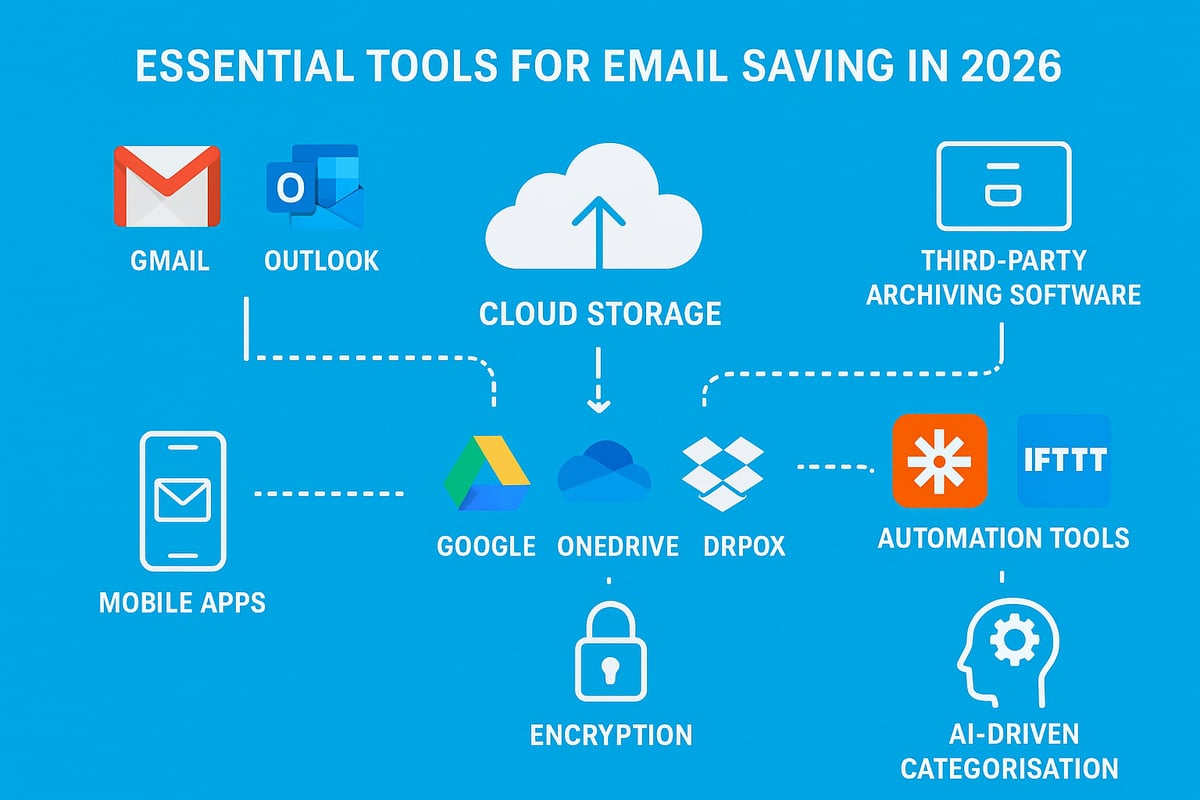
Most popular email clients, such as Gmail, Outlook, and Apple Mail, offer native options for email saving. Users can archive messages, export emails as files, or move them to dedicated folders. These built-in features are typically user-friendly and require minimal setup.
However, relying solely on native tools can have limitations. Storage caps, restricted search capabilities, and inconsistent export formats may impact long-term accessibility. Evaluating the pros and cons of each client is crucial for efficient email saving.
| Email Client | Archive Option | Export Format | Search Capabilities |
|---|---|---|---|
| Gmail | Yes | MBOX | Advanced |
| Outlook | Yes | PST/MSG | Robust |
| Apple Mail | Yes | EML/MBOX | Good |
Third-Party Email Archiving Solutions
For advanced email saving needs, third-party archiving tools like MailStore and eM Client provide automated backups, powerful search, and encryption. These platforms support multiple email providers, making it easier to centralise your archives.
Features often include scheduled archiving, granular search filters, and support for various file formats. Businesses benefit from compliance-ready storage and the ability to restore messages quickly. Consider user reviews, compatibility, and support when choosing an archiving solution.
Cloud Storage Integration
Integrating your email saving workflow with cloud storage services, such as Google Drive, OneDrive, or Dropbox, ensures both accessibility and security. Many email clients and third-party tools allow direct saving of emails and attachments to the cloud.
This approach not only protects against device failure but also streamlines cross-device access. If you want to explore strategies for consolidating all your messages, see All email in one place for practical tips on unified email management.
Mobile Apps for Email Saving
In 2026, mobile apps for email saving have become increasingly sophisticated. Leading solutions on iOS and Android enable users to save emails as PDFs, forward important messages to cloud storage, or automate archiving tasks on the go.
These apps offer offline access, robust search, and seamless integration with other productivity tools. Whether you are a freelancer or managing team correspondence, mobile-friendly options are essential for efficient email saving outside the office.
Automation and Workflow Tools
Automation platforms like Zapier, IFTTT, and Microsoft Power Automate have revolutionised email saving. By creating scheduled workflows, you can save specific emails or attachments to chosen directories automatically.
For example, you might set up a Zapier workflow to save every invoice received to a dedicated cloud folder. Automation reduces manual effort, minimises errors, and ensures consistency in your email saving strategy.
# Example: Automate saving Gmail attachments to Google Drive
trigger: New Gmail email with attachment
action: Save attachment to Google Drive folder
Security and Encryption Technologies
Security is paramount when it comes to email saving. End-to-end encryption ensures that only authorised users can access archived messages. Many third-party tools and cloud services now offer robust encryption standards and support GDPR-compliant storage.
Always enable two-factor authentication and choose providers that prioritise data protection. Regularly review your security settings to stay ahead of evolving threats.
AI and Smart Organisation Tools
Artificial intelligence has brought new efficiency to email saving. AI-powered tools can categorise, label, and suggest which emails to archive or delete based on your usage patterns.
These smart systems learn over time, helping you maintain a clutter-free archive and retrieve information rapidly. As email volumes rise, AI-driven organisation will become indispensable for both personal and business users.
Step-by-Step Guide: How to Save Your Emails Effectively
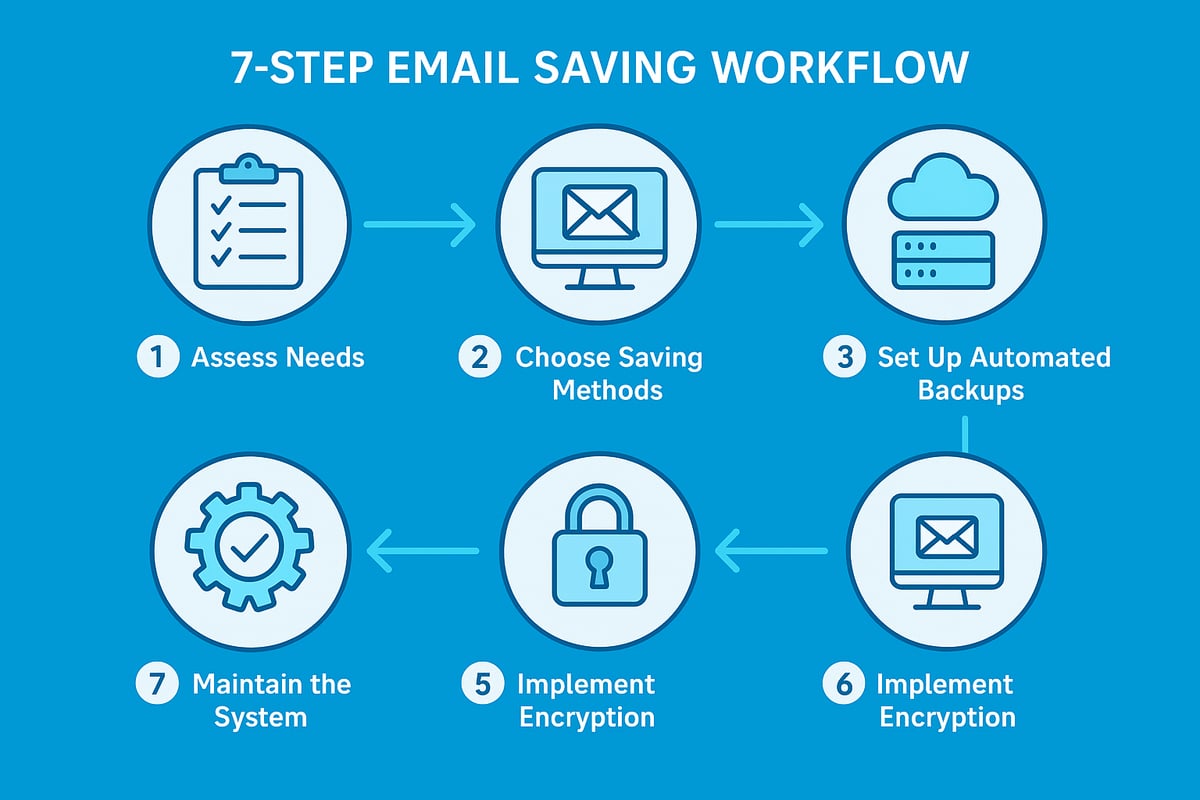
Managing your inbox efficiently requires a structured approach. This guide breaks down the process into clear, actionable steps to help you master email saving in 2026. Whether for personal use or business, following these steps will ensure your emails are secure, organised, and always accessible.
Step 1: Assess Your Email Needs and Volume
Begin your email saving journey by evaluating which emails truly need to be kept. Identify categories such as personal, business, legal, or compliance-related correspondence. Estimate how many emails you receive weekly and the average size of attachments. This helps determine your storage requirements and the frequency of archiving.
For businesses, understanding legal obligations is critical. Review your industry’s data retention requirements. For example, referencing a data retention policy for emails ensures you comply with regulations and avoid unnecessary risks. Knowing what to save and for how long lays a strong foundation for all future steps.
Step 2: Choose the Right Saving Method
Selecting an effective email saving method is essential for long-term accessibility. Common formats include PDF, EML, and MSG files. Each has its pros and cons: PDFs offer universal readability, EML and MSG preserve metadata and attachments.
Most email platforms provide built-in export options. For example, Gmail’s “Download message” as EML or Outlook’s “Save As” feature. Consider your future needs, such as whether you will need to restore emails into an email client or simply view them. Choose a format that aligns with both your workflow and compliance requirements.
Step 3: Set Up Automated Backups
Automating email saving minimises manual effort and reduces the risk of forgetting to archive important messages. Use your email client’s scheduling features or third-party automation tools to set regular backups. Popular options include Zapier, Microsoft Power Automate, or scripts that export emails to cloud storage.
Configure your automation to run daily, weekly, or monthly based on your assessed email volume. Ensure backups include all necessary folders and attachments. Test your automation initially to confirm it captures everything you need for peace of mind.
Step 4: Organise Saved Emails
Effective organisation is the backbone of successful email saving. Create a logical folder structure before you start archiving. Common approaches include sorting by year, project, client, or topic. For freelancers, a project-based system makes it easy to retrieve correspondence for each client.
Use consistent naming conventions for files and folders, such as “2026_ProjectName_ClientName.” This simplifies search and retrieval later. Many email platforms support colour-coded labels or tags, which further enhance your ability to find what you need quickly.
Step 5: Implement Security Measures
Protecting your archived emails is a non-negotiable aspect of email saving. Begin by encrypting your saved files and archives. Many email clients and third-party tools offer built-in encryption, or you can use standalone encryption software.
Set strong, unique passwords for all storage locations. Enable two-factor authentication on cloud accounts to add another layer of security. Regularly update your security settings and review access permissions, especially if sensitive business information is involved.
Step 6: Test and Verify Your Saved Emails
Routine testing is crucial to ensure your email saving system works as intended. Schedule periodic checks to open archived emails and verify files are accessible and uncorrupted. Attempt to restore a few emails back into your email client as a practical test.
Document these tests in a simple log for future reference. If you encounter any issues, address them immediately to prevent data loss. Consistent verification ensures your archives remain reliable and ready when needed.
Step 7: Maintain and Update Your System
Email saving is not a one-time task but an ongoing process. Set reminders for regular reviews, such as an annual digital spring-cleaning. Delete outdated or irrelevant emails to free up storage and reduce digital clutter.
Keep your software and automation scripts updated to benefit from the latest security patches and features. Review your organisational structure periodically, adjusting it as your email habits or business needs evolve. Proactive maintenance ensures your email saving strategy remains efficient and secure.
Advanced Organisation and Search Strategies
The sheer amount of data handled by email saving solutions in 2026 is staggering. With Email usage statistics 2024 showing record volumes, advanced organisation is no longer optional. Structured systems and smart search strategies are now essential for both personal and professional inboxes.

Tagging and Labelling Systems
Effective tagging is at the heart of modern email saving. By applying descriptive labels like "invoice", "client", or "urgent", you create a robust framework for sorting and retrieval. Most email clients now allow multiple tags per message, enabling granular filtering. For instance, a single email can be tagged as both "project" and "finance", making it easy to locate later.
Consider these best practices:
- Use consistent tag names across devices.
- Combine tags for complex searches, e.g., "client" plus "Q1".
- Regularly review and update your tags to prevent clutter.
Tagging transforms chaotic inboxes into structured archives, optimising email saving for quick access.
Smart Folders and Dynamic Filters
Smart folders and dynamic filters take email saving further by automatically sorting messages based on rules you define. These features move emails into designated folders as soon as they arrive, such as all receipts into "Expenses" or client messages into "Projects".
Set up rules like:
- Sender-based sorting (e.g., all emails from a client)
- Keyword detection in subject or body
- Date or attachment filters
Dynamic filters ensure your email saving system stays up to date, reducing manual effort and keeping your inbox tidy.
Full-Text Search and Indexing
Advanced email saving depends on powerful full-text search and indexing. Modern platforms index not only subject lines but also email bodies and attachments, enabling lightning-fast retrieval. Leveraging advanced search operators can further refine results.
For example, in Gmail:
label:invoice after:2026/01/01 before:2026/06/30
AI-driven search can now understand context, surfacing related emails even if keywords differ. This makes email saving practical for knowledge management and compliance needs.
Cross-Platform Access
Email saving is most effective when your archives are accessible on any device. Leading solutions sync saved emails across desktop, mobile, and web, ensuring continuity. Whether reviewing contracts on your laptop or referencing a client message on your phone, seamless access is vital.
Prioritise tools that offer:
- Real-time sync across platforms
- Offline access when needed
- Secure authentication for every device
Cross-platform access future-proofs your email saving strategy and supports hybrid work environments.
Collaboration and Sharing
Collaboration is central to business communications. Modern email saving platforms allow secure sharing of archived messages with colleagues or clients. Permission controls ensure only authorised users view sensitive data.
Best practices for sharing include:
- Assigning view or edit rights as needed
- Using audit trails to track access
- Sharing links instead of forwarding emails
These features make teamwork efficient while maintaining control over your saved emails.
Archiving vs Deleting: Best Practices
Deciding between archiving and deleting is crucial for effective email saving. Archiving preserves important messages for future reference, while deleting removes clutter and reduces storage costs.
| Action | Use When | Retention Impact |
|---|---|---|
| Archive | Legal, financial, or project needs | Retains data |
| Delete | Spam, outdated, or trivial emails | Frees up space |
Follow legal guidelines and business policies to strike the right balance in your email saving routine.
Case Study: Small Business Email Organisation Success
A UK SME transformed its workflow by implementing structured email saving. By introducing tagging, smart folders, and robust search, staff reduced time spent searching for messages by 40 percent. Cross-platform access meant team members could collaborate from anywhere. This systematic approach to email saving boosted productivity, compliance, and peace of mind.
Automating Email Saving and Management
Struggling to keep up with an ever-growing inbox? Automation can revolutionise your approach to email saving, ensuring important messages are stored, organised, and protected without manual effort.
Setting Up Automation Rules
The first step in automating email saving is to create rules within your email client. Most platforms, such as Gmail or Outlook, allow users to set up filters or auto-forwarding rules.
For example, you can instruct your client to automatically move all invoices to a dedicated folder or save attachments to cloud storage. Here is a sample automation rule in Outlook:
If subject contains "Invoice", move to "Finance" folder and flag as important.
These rules save time and reduce the risk of missing important emails. By systematically applying them, you ensure email saving becomes a seamless background process.
Using Third-Party Automation Tools
Beyond built-in features, third-party automation tools like Zapier, IFTTT, and Microsoft Power Automate offer advanced workflows for email saving.
These platforms connect your email with apps like Google Drive, Dropbox, or project management tools. For instance, you can set up a workflow to save attachments from specific senders directly to a cloud folder.
Comparison Table: Popular Automation Tools for Email Saving
| Tool | Key Feature | Integration Level |
|---|---|---|
| Zapier | Multi-app workflows | High |
| IFTTT | Simple triggers | Moderate |
| Power Automate | Enterprise-grade automation | High |
Using these tools, businesses can streamline email saving across multiple platforms and devices.
AI-Driven Email Triage
Artificial intelligence now plays a crucial role in email saving and management. AI tools analyse email content, context, and user behaviour to prioritise messages.
For example, AI can suggest archiving newsletters in bulk while flagging contracts for saving. These smart triage systems reduce manual sorting and enable more accurate email saving.
AI also helps by learning from your actions, making suggestions more relevant over time. This approach minimises clutter and ensures vital information is retained.
Scheduled Maintenance and Clean-Up
Automating scheduled maintenance is essential for sustainable email saving. Set up reminders or automated scripts to delete outdated emails, archive completed projects, or review saved folders regularly.
For example, you can schedule a monthly clean-up to remove irrelevant messages or compress older archives. This routine keeps your storage efficient and compliant with best practices.
Automation also supports digital decluttering, reducing your environmental impact by minimising unnecessary data.
Reducing Manual Workload
Automated email saving drastically cuts down time spent on repetitive tasks. By deploying rules and smart workflows, businesses and individuals report up to 30% less time spent managing emails.
According to Employee email overwhelm statistics 2024, employees are increasingly burdened by inbox overload, highlighting the urgent need for efficient automation.
Automated systems free up time for more strategic activities, improving both productivity and well-being.
Limitations and Risks of Automation
While automation transforms email saving, it is not without risks. Automated rules may occasionally miscategorise important emails, or fail to archive messages that fall outside predefined patterns.
Regular monitoring is vital to catch errors early. Security is also a concern, especially for business users. Adopting secure practices, such as those outlined in Secure email for small business, ensures that automation does not compromise sensitive information.
Balance automation with human oversight for the most reliable results.
Email Security and Compliance Essentials
Understanding the security and compliance landscape is critical for effective email saving in 2026. Organisations must navigate evolving regulations, protect sensitive data, and ensure robust processes are in place for every saved email.
Understanding Legal and Regulatory Requirements
The legal framework for email saving in the UK is shaped by the GDPR and the Data Protection Act. These laws mandate that organisations retain, protect, and manage email records according to strict standards. Sectors such as finance, healthcare, and legal services face additional rules, often requiring detailed audit trails and longer retention periods.
For a comprehensive overview of regulatory expectations, including how they influence email saving strategies, see GDPR compliance in email archiving.
Encryption and Data Protection
Encrypting email archives is now a baseline requirement. Encryption shields messages from unauthorised access during both storage and transfer. In 2026, industry-standard protocols such as AES-256 and secure SSL/TLS channels are widely adopted for email saving.
It is essential to apply encryption to both individual email files and entire backup repositories. Regularly review your encryption tools to ensure compliance with the latest security benchmarks.
Secure Storage Solutions
Choosing where to store saved emails is a pivotal decision. Cloud platforms offer scalability and remote access, while on-premise servers provide direct control over data. The NHS, for example, recommends encrypted cloud solutions for sensitive email saving, provided that providers meet UK data residency requirements.
When selecting a storage method, evaluate both security features and compliance certifications. Balance ease of access with the need for robust protection.
Managing Access and Permissions
Limiting access to saved emails is a key security practice. Implement role-based access control, ensuring only authorised users handle sensitive archives. Audit logs are essential for tracking who accessed which files and when.
This approach not only supports compliance but also helps detect suspicious activity. Regularly update permissions as staff roles evolve to maintain the integrity of your email saving system.
Responding to Data Breaches
Even with strong defences, breaches can occur. Establish clear protocols for investigating and containing incidents involving email saving. Promptly notify affected parties and regulatory authorities as required.
Document every step of your response to support future audits and demonstrate compliance. Regular drills will help your team react swiftly if a real breach arises.
Regular Compliance Audits
Routine audits ensure your email saving practices align with legal and business requirements. Use checklists to verify encryption, access controls, retention periods, and documentation. Schedule these audits at least annually, or more often in highly regulated industries.
Audits not only identify gaps but also prepare your organisation for external reviews or inspections.
Training and Awareness
Human error remains a leading cause of data breaches. Regular staff training on secure email saving and compliance is essential. Annual programmes should cover the latest threats, correct handling procedures, and reporting requirements.
By fostering a culture of security, you reduce the risk of accidental data loss or non-compliance.
Building a Resilient Email Saving System
Combining legal awareness, technical safeguards, and ongoing training forms the backbone of a resilient email saving strategy. As regulations and threats evolve, regularly review and update your protocols to maintain both compliance and security.