Source Email Guide: Essential Insights for 2026
February 8, 2026
Email threats are evolving fast in 2026, making it more crucial than ever to understand the hidden details behind every message. Falling for phishing or spam can be costly, but mastering source email data gives you the power to protect yourself and your business.
This guide explains what source email is, why it matters, and how you can access and use this vital information. You will discover practical strategies for boosting security, troubleshooting problems, and staying compliant with regulations.
By learning how to interpret source email data, you will be equipped to tackle common email challenges and prepare for future trends.
Understanding Email Source: What It Is and Why It Matters
As email threats become more complex, understanding the source email has never been more vital. The ability to access and interpret the technical details behind every message empowers both individuals and organisations to spot risks, solve delivery issues, and meet growing compliance demands.
What Is an Email Source?
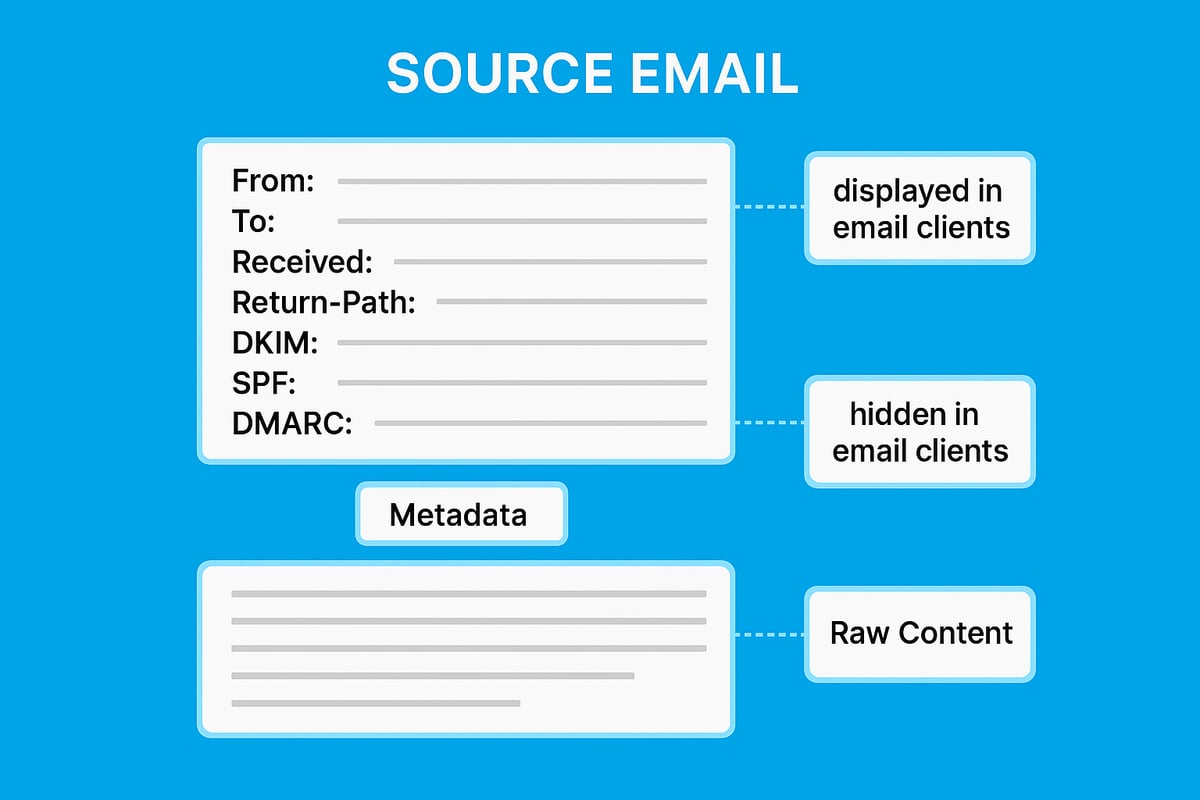
A source email refers to the complete set of data that makes up an email, not just the visible message body. This includes headers, metadata, and the raw content that travels from sender to recipient. Where the typical inbox shows only the subject and main text, the source email reveals the underlying structure, such as delivery paths and authentication details.
The difference between email content and source code is significant. While content is what you read, the source email contains technical instructions and identifiers that email servers use to process and route messages. Standard protocols like SMTP (Simple Mail Transfer Protocol), IMAP (Internet Message Access Protocol), and POP3 (Post Office Protocol) govern how this data is created and transmitted.
For example, in Gmail, you can view the source email by selecting "Show original" from the message menu. Outlook and most webmail platforms offer similar options. Examining the source email allows you to see information that is not available in the standard view, such as the true sender and the route the email took through various servers.
This technical transparency is crucial because the source email holds clues that are invisible in the regular interface. Being able to access and interpret this data makes it easier to troubleshoot problems and verify authenticity.
Why the Email Source Is Important in 2026
The significance of the source email continues to grow. It is a critical tool for diagnosing delivery problems, such as emails that bounce or land in spam folders. Analysing the source email helps users and administrators pinpoint where a message was delayed or blocked, and why.
Security remains a top concern. The source email is a frontline defence against phishing and spoofing, as it provides evidence of the actual sender and whether the message was tampered with. In 2025, email phishing attacks increased by over 30 percent, highlighting the urgent need for users to scrutinise source email data. Recent studies show that phishing attacks increased by 150% year-over-year, making source analysis more essential than ever.
Compliance is another driving factor. Regulations like GDPR and the UK Data Protection Act require businesses to retain and audit source email data for legal and operational purposes. For instance, tracing a suspicious message back to its origin can be crucial during a security investigation or compliance review.
The source email is also invaluable when investigating spam. By checking the technical trail, you can confirm if a message is genuine or manipulated.
Key Components of Email Source Data
Understanding the source email means knowing what to look for in the headers. The most important fields include:
- From: Declares the sender’s email address.
- To: Shows the recipient’s address.
- Received: Tracks each server the email passed through.
- Return-Path: Indicates where bounce messages go.
- Message-ID: A unique identifier for each email.
- DKIM, SPF, DMARC: Authentication results to verify sender legitimacy.
Each of these headers provides critical insights. For example, analysing the Received header can help track down the origin of a suspicious email. If you notice mismatched domains or unusual relay paths, it may indicate spoofing.
Modern email clients sometimes hide parts of the source email to simplify the interface. However, advanced users can still access the full headers and raw data when needed. Reviewing the source email allows you to uncover hidden issues and protect your inbox from threats.
Step-by-Step Guide: How to Access and Interpret Email Source
Understanding how to access and interpret source email data is essential for anyone serious about email security, troubleshooting, and compliance. Whether you are an individual user or a business professional, following a structured approach ensures you extract the right insights and avoid common pitfalls.
Accessing Email Source in Popular Email Clients
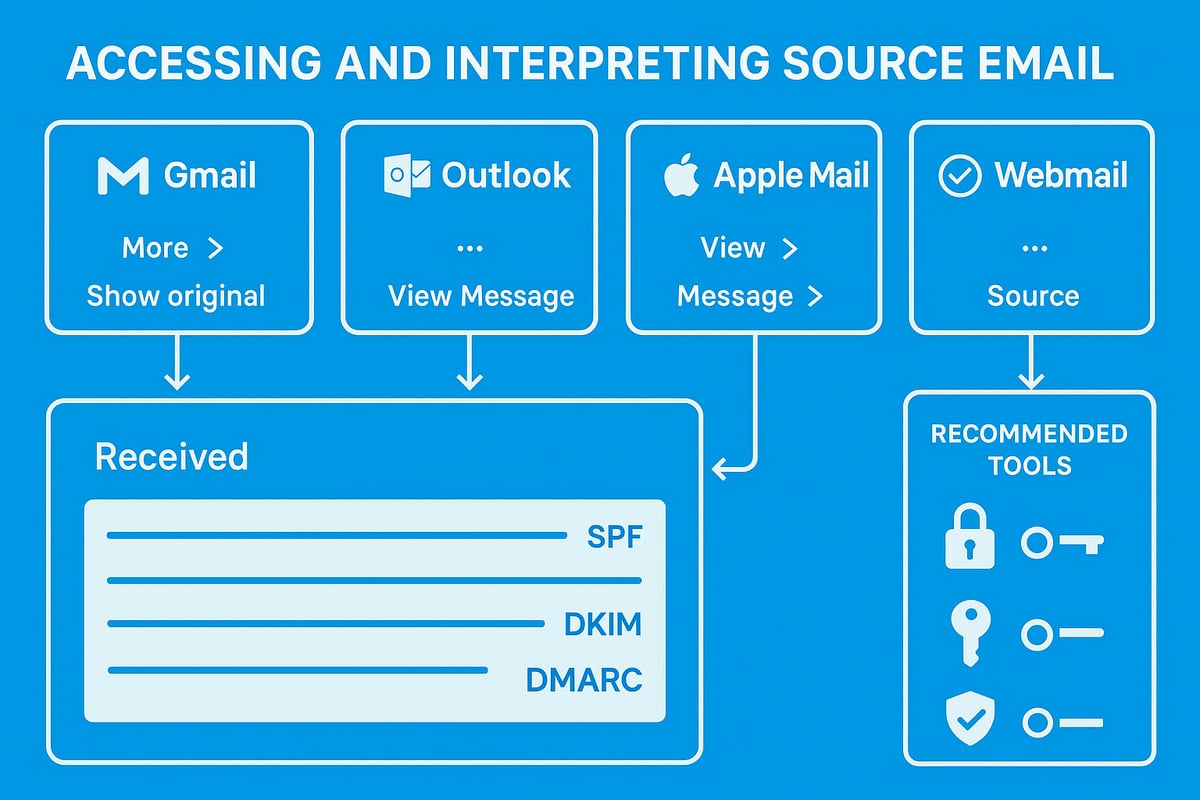
Accessing source email varies depending on your chosen email client, but the principles remain the same. Here is how you can find the source email in the most common platforms:
Gmail (Web):
- Open the desired message.
- Click the three-dot menu in the top right.
- Select "Show original" to view the full source email.
Outlook (Desktop):
- Open the email.
- Go to File > Properties.
- Find the "Internet headers" box at the bottom for the source email.
Apple Mail:
- Select the email.
- Choose View > Message > All Headers.
- Review the displayed source email details.
Webmail Services (e.g., One.com):
- Open the message.
- Look for "More" or "View source" in the menu.
- The source email will appear in a new window.
| Client | Menu Path to Source Email | Mobile Support |
|---|---|---|
| Gmail | More > Show original | Limited |
| Outlook | File > Properties | Not available |
| Apple Mail | View > Message > All Headers | Yes |
| Webmail (One.com) | More > View source | Varies |
On mobile devices, accessing source email may require third-party apps or forwarding the email to a desktop client for full analysis.
Troubleshooting delivery issues, such as emails bouncing back, often starts with reviewing the source email for error codes and relay paths. For step-by-step help, see Emails bouncing back troubleshooting.
Interpreting the Key Sections of the Email Source
Once you have accessed the source email, interpreting the information is crucial. The source email contains technical data that reveals the journey and authenticity of the message.
Key Header Fields:
- Received: Tracks each server the email passed through.
- From/To: Shows sender and recipient addresses.
- Return-Path: Indicates where bounces are sent.
- Message-ID: Unique identifier for the email.
- Authentication-Results: Summarises SPF, DKIM, and DMARC checks.
A typical header may look like:
Received: from mail.sender.com (123.45.67.89)
Authentication-Results: spf=pass dkim=pass dmarc=pass
Red Flags to Watch For:
- Mismatched domains between "From" and "Return-Path".
- Suspicious relay paths, especially via unknown servers.
- Failed SPF, DKIM, or DMARC results.
When sharing the source email with IT or support, copy the entire header and body. Use services like Pastebin for temporary sharing, but always redact sensitive information. Avoid forwarding the email directly without removing personal data, as this could expose confidential details.
Common mistakes include misreading the order of "Received" fields or overlooking authentication failures. Always start from the topmost header and work down to trace the message path.
Tools and Resources for Analysing Email Source
Analysing source email manually is possible, but specialised tools can streamline the process and reduce errors.
Recommended Tools:
- Google Message Header Analyzer: Paste the source email to visualise header paths.
- Microsoft Message Header Analyzer: For Outlook users, offers detailed breakdowns.
- Mailheader.org: Free, open-source tool for all platforms.
| Tool Name | Features | Cost |
|---|---|---|
| Google Header Analyzer | Visual, highlights delays | Free |
| Microsoft Header Analyzer | Integrated with Outlook | Free |
| Mailheader.org | Open-source, privacy-focused | Free |
Using these tools, you can quickly identify if the source email has been spoofed, whether authentication passed, and where delays occurred. Manual inspection is still valuable for learning, but automation speeds up routine checks.
Always ensure the source email is only shared with trusted parties, especially when using third-party tools. Refer to official guides from your provider, such as Google or Microsoft, for further detail on accessing and interpreting source email securely.
Practical Applications: Troubleshooting, Security, and Compliance
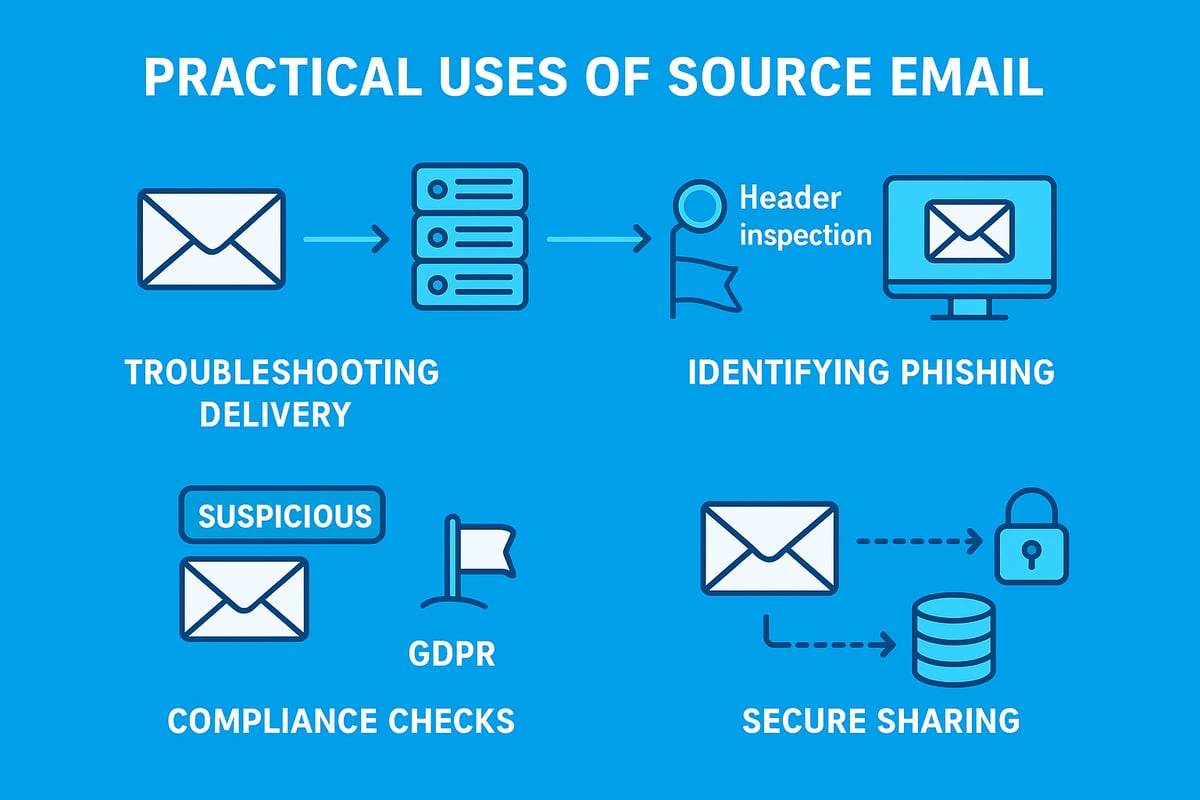
Understanding how to use source email in practical scenarios is crucial for both individuals and businesses. Source email analysis can reveal hidden issues, strengthen security, and help organisations comply with regulations. Let us explore how you can leverage source email in real-world situations.
Troubleshooting Email Delivery and Performance
When emails go missing or arrive late, source email data is your best diagnostic tool. By examining headers such as Received, Return-Path, and Message-ID, you can track the exact path an email took from sender to recipient.
For example, if a message is delayed, checking the timestamps in each Received line will reveal where the holdup occurred. If emails are flagged as spam, looking at SPF, DKIM, and DMARC results in the source email can pinpoint authentication failures.
- Identify server misconfigurations by comparing header fields.
- Trace routing problems by analysing relay paths.
- Diagnose spam issues by reviewing authentication results.
A sample header might show a failed SPF check, indicating a sender domain issue. Regularly reviewing source email empowers you to resolve delivery problems quickly and maintain business communications.
Enhancing Security and Preventing Phishing
Source email is a frontline defence against phishing and spoofing. Cyber attackers often manipulate visible sender information, but the source email exposes the true origin and authentication status.
By reviewing fields such as Authentication-Results, From, and Received, you can spot mismatched domains or suspicious relay paths. Analysing the source email helps uncover forged senders, malicious redirects, and attempts to bypass security filters.
- Look for discrepancies between
FromandReturn-Path. - Check for missing or failed SPF, DKIM, and DMARC headers.
- Investigate unusual relay chains or unknown servers.
Given the rise in AI-generated phishing emails, many users struggle to identify threats. Scrutinising the source email provides the technical evidence needed to stop sophisticated attacks before they cause harm.
Meeting Legal and Regulatory Requirements
For businesses, source email plays a vital role in compliance. Regulations such as GDPR and the UK Data Protection Act require organisations to retain certain email data and verify its authenticity during audits or legal disputes.
Source email contains metadata that can confirm when and how a message was sent or received. During an audit, providing unaltered source email helps prove compliance and resolve disputes.
- Store complete source email records for required retention periods.
- Use headers as evidence during investigations or legal proceedings.
- Redact sensitive information when sharing with external auditors.
To understand specific requirements, review your company's data retention policy overview. Well-documented source email procedures are essential for demonstrating compliance and avoiding penalties.
Sharing Email Source with IT or Support Teams
When reporting issues or seeking technical support, sharing the source email is often necessary. However, it is important to do this securely to protect sensitive information.
First, copy the full source email, including all headers and raw content. Before sending, redact personal data such as email addresses or confidential details. Use secure channels like encrypted email or trusted paste services.
- Copy the entire source email, not just the body.
- Remove or anonymise sensitive information.
- Share via encrypted platforms or secure ticketing systems.
Providing the source email allows IT and support teams to investigate problems accurately and efficiently. Safe sharing practices minimise the risk of data exposure while ensuring effective troubleshooting.
Open-Source Email Solutions and the Future of Email Source Transparency
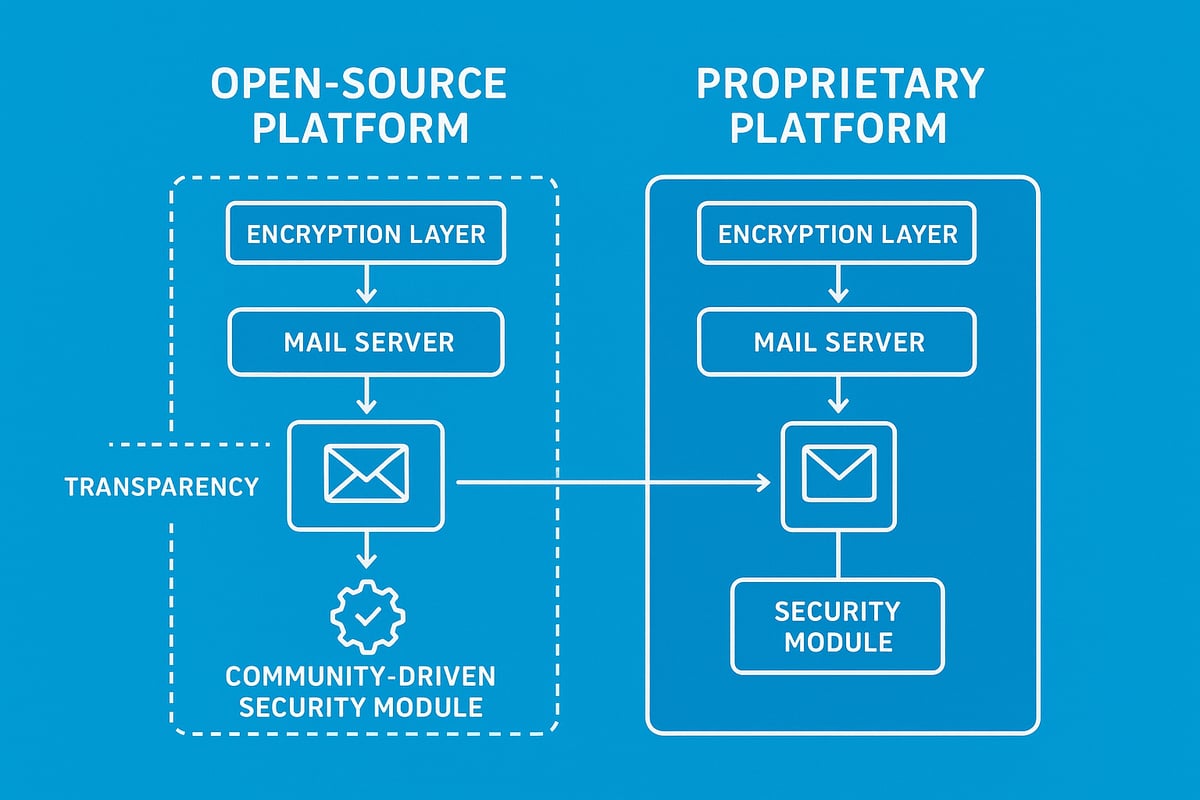
Open-source email solutions have become a driving force in the evolution of source email transparency. As businesses and individuals prioritise security and control, understanding the differences between open-source and proprietary email platforms is essential. This section explores the growing impact of open-source technology, its influence on source email practices, and the innovations shaping the future.
The Rise of Open-Source Email Platforms
Open-source email platforms are gaining traction as organisations seek greater visibility and control over their communications. Unlike proprietary services, open-source platforms make their source code publicly available, allowing experts to audit security protocols and verify how source email data is handled.
This transparency brings critical benefits:
- Users and administrators can inspect, modify, and improve security features.
- Community-driven development results in faster identification and resolution of vulnerabilities.
- Organisations are not locked into a single vendor's ecosystem.
A recent study showed open-source email adoption among small and medium-sized enterprises (SMEs) increased by 18% in 2025. Privacy-focused providers like Forward Email demonstrate how open-source models can prioritise both user privacy and robust source email access.
Consider this comparison:
| Feature | Open-Source Platform | Proprietary Platform |
|---|---|---|
| Source code access | Public and auditable | Closed, vendor-controlled |
| Customisation | High | Limited |
| Source email transparency | Full | Often restricted |
| Community support | Active, collaborative | Vendor-managed |
By enabling direct access to source email data, open-source solutions empower users to troubleshoot issues, strengthen security, and comply with regulations.
Security and Privacy Implications in 2026
Security expectations are evolving. In 2026, end-to-end encryption and encryption-at-rest are considered basic requirements for any source email system. Open-source providers frequently lead the way, implementing these protections transparently and allowing users to validate their effectiveness.
Source email data stored and transmitted by open-source platforms is often easier to audit, which is vital for regulated industries. Users can verify that sensitive information is handled properly and that security protocols such as SPF, DKIM, and DMARC are correctly applied to outbound messages.
For example, Forward Email offers direct access to message headers and full source email content, making it straightforward to trace delivery paths and authenticate senders. In contrast, some proprietary services limit header visibility, potentially hindering compliance investigations.
Security is not just about tools but about strategies. Businesses looking to protect their communications can benefit from secure email for small business strategies that emphasise transparency and user control. Open-source solutions, by design, give organisations the confidence that their source email data is both secure and accessible when needed.
Trends in Email Source Analysis and Automation
The landscape of source email analysis is rapidly changing. Artificial intelligence (AI) and machine learning are now integrated into many open-source email platforms, automating the examination of header fields and identifying threats in real time.
Modern email clients increasingly offer one-click access to source email data, with visual tools that map out delivery routes and flag suspicious elements. Automated alerts, powered by AI, notify users of anomalies in authentication results or relay paths, reducing the risk of falling victim to sophisticated phishing attacks.
Looking ahead, open-source communities are pioneering the adoption of quantum-safe encryption standards, preparing for future threats. As email standards evolve, open-source platforms are likely to remain at the forefront, ensuring that source email transparency is not compromised by new security challenges.
In summary, open-source innovation is driving greater control, visibility, and resilience in source email management. By embracing these platforms, users and businesses can stay ahead of emerging risks and regulatory demands.
Email Source Best Practices for Individuals and Businesses
Understanding and applying best practices for source email management is essential for both individuals and businesses in 2026. With email threats evolving rapidly, developing a robust approach to monitoring, securing, and leveraging source email data ensures stronger protection, better compliance, and improved performance.
Routine Checks and Monitoring
Regularly reviewing source email data helps detect suspicious activity before it escalates. By examining headers weekly or monthly, users can identify unauthorised logins, unknown senders, or changes in routing paths.
- Schedule monthly or bi-weekly audits of source email headers.
- Look for mismatched domains, altered relay paths, or unusual authentication failures.
- Use automated tools or scripts to flag anomalies for review.
Training staff is equally important. Many employees still struggle to spot advanced phishing attempts, especially those crafted by AI. According to a recent report, most people still can't identify a phishing attack written by AI, making regular source email checks and training vital for every organisation.
Securing Your Own Outbound Emails
Implementing technical safeguards for outbound source email is crucial to prevent your messages from being flagged as spam or spoofed. Proper configuration of SPF, DKIM, and DMARC ensures your emails are authenticated and trusted by recipients.
| Protocol | Purpose | Setup Tip |
|---|---|---|
| SPF | Validates sending servers | Add SPF record to DNS |
| DKIM | Verifies message integrity | Enable DKIM signing in server |
| DMARC | Enforces authentication | Set DMARC policy in DNS |
Follow these steps:
- Publish accurate SPF, DKIM, and DMARC records for your domain.
- Test outbound emails with tools that analyse source email headers for errors.
- Monitor reports for failed authentications and address issues immediately.
Consistently securing your source email not only protects your reputation but also boosts deliverability rates.
Data Privacy and Safe Sharing
When sharing source email data with IT or support teams, privacy must be prioritised. Headers can contain sensitive information such as personal email addresses, IPs, or internal routing details.
Best practices include:
- Removing or anonymising personal data before sharing.
- Using secure channels, such as encrypted email or trusted platforms.
- Documenting who receives the source email and for what purpose.
For example, before uploading headers to support, use a simple script:
# Remove personal email addresses from source email
import re
with open('email_source.txt', 'r') as f:
    content = f.read()
content = re.sub(r'\b[A-Za-z0-9._%+-]+@[A-Za-z0-9.-]+\.[A-Z|a-z]{2,}\b', '[REDACTED]', content)
with open('email_source_redacted.txt', 'w') as f:
    f.write(content)
Understanding the risks of sharing source email can also help prevent spam or misuse. For further reading, see this guide on email sign-ups and spam risks.
Leveraging Source Analysis for Business Growth
Analysing source email data goes beyond security. Businesses can use header information to optimise deliverability, track campaign performance, and block malicious senders.
Consider these strategies:
- Monitor bounce rates and authentication results in source email headers.
- Use header analysis to identify and stop repeated spam attacks.
- Adjust email marketing tactics based on deliverability insights.
By integrating source email checks into regular business processes, organisations can enhance their email effectiveness and protect their brand reputation.
Training and Support Resources
Continuous learning is essential for staying ahead of evolving threats. Provide regular training on source email analysis for staff at all levels.
Recommended resources include:
- Official documentation from major email providers.
- Community forums and webinars focused on source email best practices.
- Internal guides with step-by-step instructions for header analysis.
Encourage your team to ask questions and share new findings. Establishing a culture of awareness around source email will strengthen your organisation's overall resilience.
The Future of Email Source: Innovations and Predictions for 2026
The landscape of source email is evolving rapidly as both threats and technology advance. Looking ahead to 2026, several innovations are set to transform how users and businesses interact with and secure their source email data. From artificial intelligence to regulatory changes, staying informed is essential for proactive protection.
AI and Machine Learning in Source Analysis
Artificial intelligence is revolutionising the way organisations handle source email analysis. AI-powered tools can now inspect headers, authentication results, and relay paths in real time, detecting subtle anomalies that might escape manual review. For example, machine learning models can flag suspicious patterns, automatically alerting IT teams to potential phishing attempts. As malicious actors become more sophisticated, AI is increasingly vital for staying ahead. Notably, as malicious URLs overtake email attachments as the biggest malware threat, AI-driven analysis of source email helps identify dangerous links before users are exposed.
Enhanced User Interfaces for Source Access
User interfaces for viewing and interpreting source email data are becoming more intuitive. Modern email clients are introducing one-click access to raw headers, complete with visual maps that trace the email’s journey across different servers. These enhancements make it easier for both technical and non-technical users to spot anomalies or verify sender authenticity. By reducing complexity, these tools empower users to engage with source email data directly, improving both individual and organisational security. Expect to see even more user-friendly dashboards and guided analysis features in the next generation of email platforms.
Evolving Security Standards and Protocols
Security standards for source email are advancing to counter new threats. Updates to SPF, DKIM, and DMARC protocols are anticipated, aiming to strengthen sender authentication and reduce spoofing. The adoption of quantum-safe encryption is also on the horizon, promising to protect source email data against future computing threats. As protocols evolve, businesses will need to adapt their infrastructure to maintain compliance and security. Automated tools will help check for protocol alignment and flag misconfigurations, making it easier to manage source email security in a dynamic threat landscape.
Greater Regulatory Scrutiny and Compliance
With the financial impact of cybercrime reaching new heights, as seen when scammers stole a record $16.6 billion in 2024, regulators are expected to introduce stricter requirements for email management. Future laws may mandate more detailed logging and retention of source email data, ensuring traceability and accountability. Businesses will need to update their compliance policies, invest in secure archiving solutions, and regularly audit their email practices. Keeping up with evolving regulations will be crucial for avoiding fines and protecting sensitive information.
The Role of Open-Source Communities
Open-source communities are set to play a pivotal role in the evolution of source email transparency. By developing and maintaining email platforms that prioritise auditability and user control, these communities foster innovation and security. Collaborative projects often release updates quickly, addressing vulnerabilities and adding features based on real-world feedback. As more organisations adopt open-source solutions, users gain greater visibility into how their source email data is handled. This shift empowers businesses and individuals to make informed choices about privacy and security.
Key Takeaways for Users and Businesses
To prepare for the future, users and businesses must stay proactive about source email management. Adopt advanced tools that leverage AI for threat detection, embrace user-friendly interfaces for easier analysis, and keep systems aligned with the latest security standards. Regularly review compliance obligations, and consider open-source platforms for greater transparency. By making source email a central part of your security strategy, you position yourself to respond swiftly to emerging risks and regulatory changes.