Sign Up an Email Account: The Essential Guide for 2026
February 3, 2026
In 2026, a reliable email address is your passport to the digital world. Whether you are managing work, shopping online, or staying in touch, the ability to sign up an email account has become essential for daily life.
This guide will show you how to sign up an email account step by step, keeping you ahead with the latest trends, advanced security features, and best practices for the modern landscape.
You will learn how to choose the perfect provider, safeguard your privacy, master the sign-up process, configure your inbox, and optimise your account for productivity and safety. Ready to take control of your digital identity? Let us begin.
Why You Need an Email Account in 2026
A reliable email account is the cornerstone of modern digital life. As we approach 2026, the reasons to sign up an email account have expanded, reflecting advances in technology, new threats, and shifting user expectations. Let us explore why email remains indispensable, no matter your role or goals.
The Evolving Role of Email in Daily Life
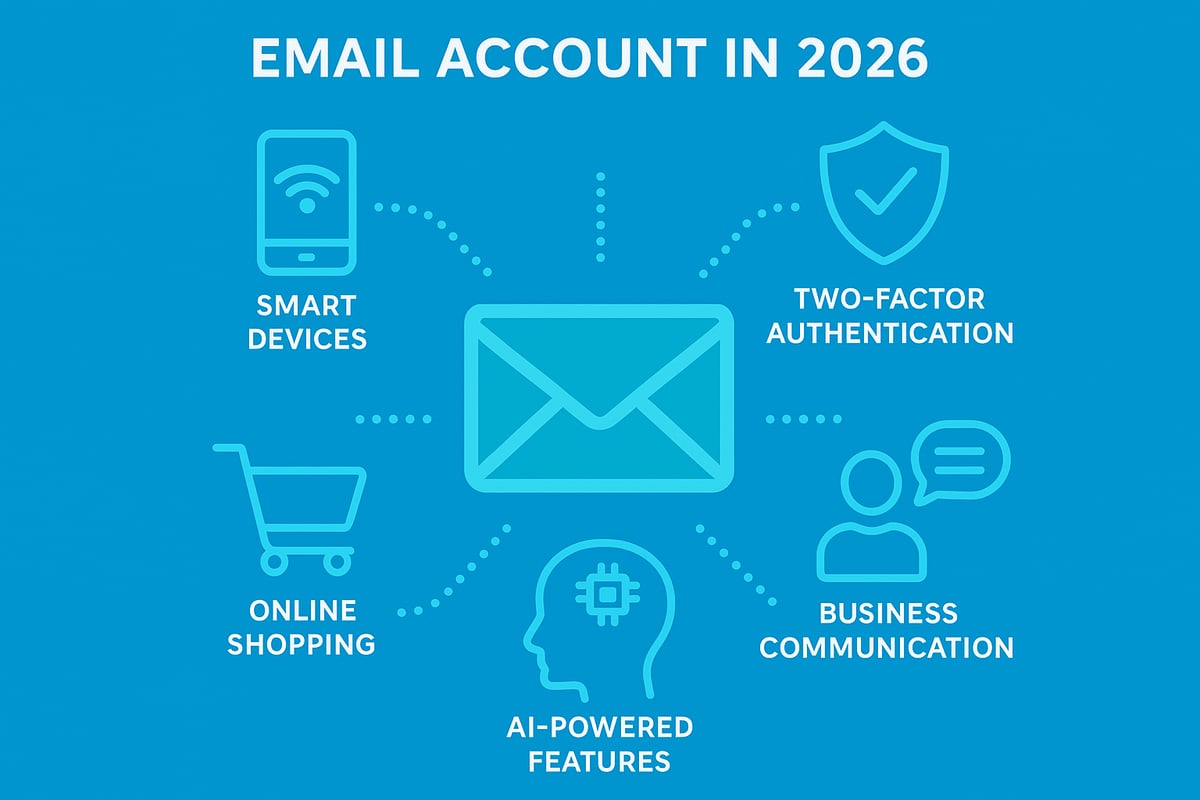
Email now serves as a universal digital identity, unlocking access to services, banking, and government portals. Smart devices and IoT systems integrate seamlessly with your inbox, sending real-time notifications and reminders. Email is also vital for secure two-factor authentication and password recovery, ensuring you stay connected and protected.
Remote work, online education, and telemedicine all rely on robust email systems. According to Global email usage statistics 2025–2026, more than 4.6 billion people used email in 2025, with numbers still rising. If you plan to sign up an email account, you are joining a growing global community.
Email vs. Messaging Apps: Why Email Remains Essential
While messaging apps offer speed, email provides a persistent, searchable record of communications. This is critical for job applications, legal contracts, and formal business exchanges. Email maintains professionalism and is accepted in virtually every industry.
Cross-platform compatibility and open standards mean your email works everywhere, from desktop to mobile. In fact, 85% of businesses still prefer email for official communication, making it essential to sign up an email account for professional purposes.
Email for Online Shopping, Subscriptions, and Social Media
Most online shops and subscription services require you to sign up an email account to create profiles, track orders, and receive customer support. Your inbox becomes a central hub for digital receipts, newsletters, and exclusive offers.
Managing these communications in one place saves time and simplifies your digital life. A recent survey shows 70% of e-commerce platforms require email sign-up, proving it is a necessity for online transactions.
Security and Privacy: Email as a Gateway
Email is often the first target for phishing attacks and identity theft. That is why secure email practices are crucial when you sign up an email account. Protecting your inbox means safeguarding sensitive personal and financial data.
A staggering 91% of cyber attacks start with email, underlining the importance of choosing providers with robust security features and staying vigilant against suspicious messages.
The Rise of Smart Email Features in 2026
Artificial intelligence has transformed the way we use email. AI-powered sorting, spam filtering, and scheduling tools are now standard, helping you manage your inbox with ease. Virtual assistants can even draft replies or schedule meetings directly from your email.
Integration with productivity tools streamlines workflows, and 65% of users now expect AI features when they sign up an email account. These advancements boost both efficiency and user satisfaction.
Accessibility and Inclusivity
Modern email platforms prioritise accessibility, offering adaptive interfaces for users with disabilities. Multilingual support and voice command options ensure everyone can communicate effectively, regardless of ability or language.
If you sign up an email account in 2026, you will find that inclusivity is built in from the start, making digital communication open to all.
The Foundation for Digital Identity
Your email address is more than just a point of contact, it is a long-term digital asset. Whether for personal branding or business growth, having a reliable email account strengthens your online presence and credibility.
To sign up an email account is to invest in your digital future, ensuring you are ready for new opportunities and connections in the years ahead.
Choosing the Right Email Provider
Selecting the best email provider is a crucial first step when you want to sign up an email account in 2026. With so many options available, understanding the landscape and knowing what to look for can help you make an informed decision that suits your needs, whether personal, professional, or business-focused.
Overview of Popular Email Providers in 2026
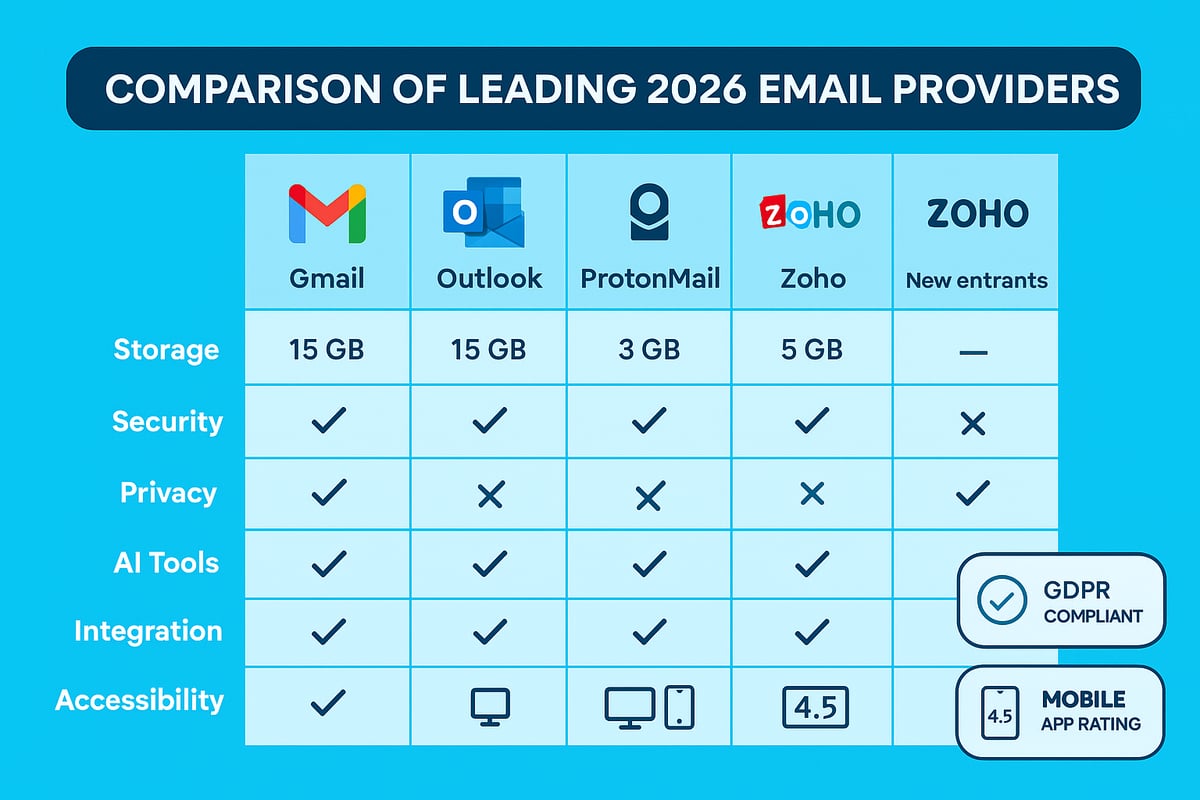
The digital landscape in 2026 offers a wide variety of email providers, each with unique strengths. Leading names such as Gmail, Outlook, ProtonMail, and Zoho continue to dominate, while innovative new entrants focus on privacy and AI-powered features.
Gmail currently holds 28% of the global market, offering seamless integration with Google apps and powerful spam filtering. ProtonMail stands out for privacy, boasting a 40% year-on-year growth among users seeking secure communications. Zoho attracts small businesses with its productivity suite, while Outlook remains a favourite for professionals.
If you are looking for a no-cost solution, consider reading How to get a free email account, which compares the latest free options and helps you decide which provider aligns best with your needs.
Key Criteria for Selection
When you sign up an email account, prioritise security, privacy, storage, and integration. Evaluate features such as:
- End-to-end encryption and two-factor authentication
- Data collection policies and jurisdiction
- Storage limits and upgrade options
- Compatibility with productivity tools and third-party apps
For example, Zoho offers 5GB free and integration with business tools, while ProtonMail provides robust privacy controls. Consider your daily habits and future needs before making your choice.
Free vs. Paid Email Accounts
Choosing between free and paid email accounts depends on your requirements. Free accounts often come with ads, limited storage, and basic support, while paid plans offer:
| Feature | Free Account | Paid Account |
|---|---|---|
| Storage | 5–15GB | 50GB+ |
| Ads | Yes | No |
| Support | Basic/community | Priority support |
| Custom domains | Rare | Available |
If you plan to sign up an email account for business or need advanced features, upgrading to a premium service like Outlook Premium (£5/month) may be worthwhile.
Specialised Email Services
Some providers cater to specific audiences. Tutanota and ProtonMail appeal to privacy advocates, while Google Workspace and Microsoft 365 serve businesses needing collaboration tools and custom domains. Students may benefit from providers offering academic discounts or enhanced security.
Always check if your chosen service supports custom domains, essential for professional branding when you sign up an email account for work.
Future-Proofing Your Choice
The email provider you select today should stand the test of time. Assess the provider’s reputation, history, and support for emerging technologies like AI-driven inboxes and blockchain verification.
Look for migration tools and data export options, so you are prepared for future changes or upgrades. A reliable provider will help you maintain access and security as technology evolves.
User Experience and Interface
A user-friendly interface is vital. Prioritise intuitive design, accessibility features, and cross-device syncing when you sign up an email account. Check mobile app ratings and ensure the provider supports adaptive layouts for all users, including those with disabilities.
Providers with high-rated apps and responsive interfaces make email management more efficient and enjoyable.
Regional and Legal Considerations
For UK users, GDPR compliance and data residency are essential. Confirm your provider stores data within approved jurisdictions and offers localised support. This is particularly important for businesses and individuals managing sensitive information.
Choosing a provider familiar with UK regulations ensures your account remains compliant and secure as you sign up an email account.
Step-by-Step Guide: Signing Up for an Email Account
Setting up a new email address in 2026 is straightforward if you follow a structured approach. This step-by-step guide ensures you will sign up an email account securely, efficiently, and with all the latest best practices in mind.
Step 1: Preparing to Sign Up
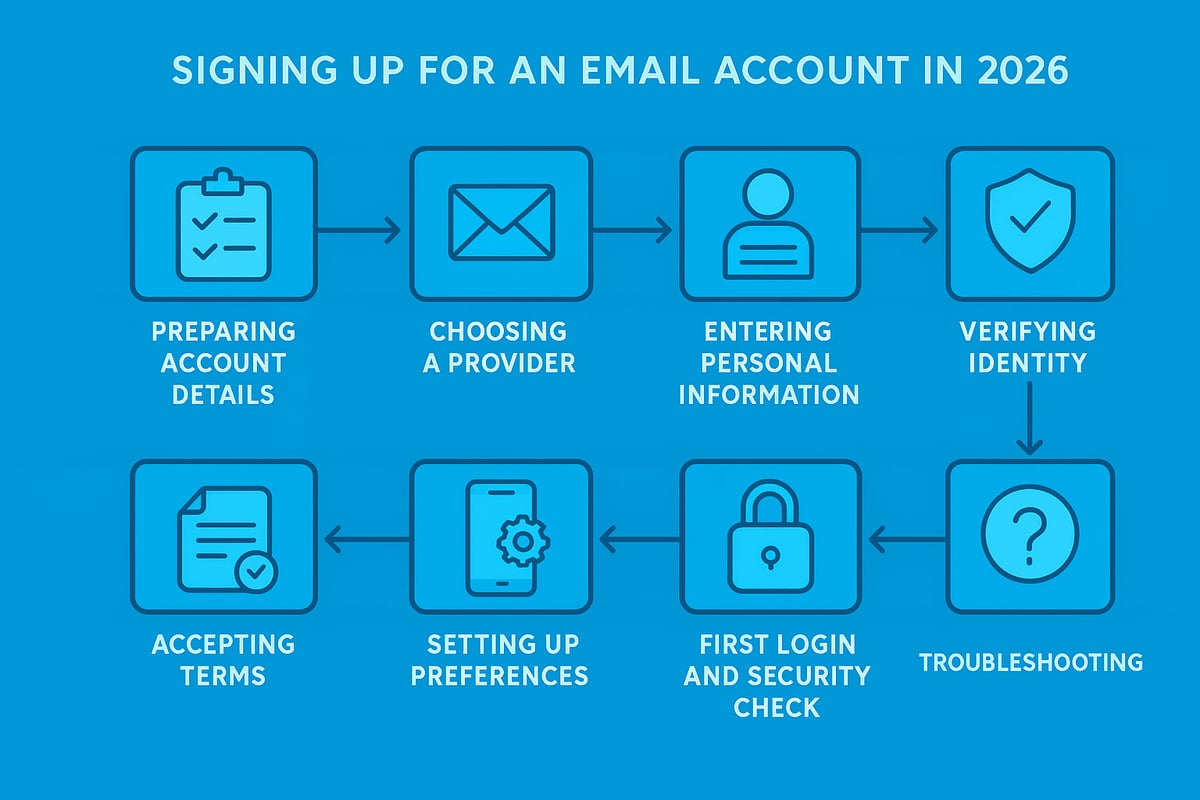
Before you sign up an email account, gather essential details. You will need your full name, a mobile number, and a backup email (if available). Plan your username and ensure it is professional and unique, especially if you intend to use this address for work or business.
Create a strong password using a mix of uppercase, lowercase, numbers, and special characters. A password manager can help you generate and store complex passwords securely. Confirm your chosen device and browser meet the provider’s requirements to avoid compatibility issues.
For a more detailed walkthrough, you can consult the Adding an email account guide, which complements these instructions with practical examples.
Step 2: Choosing Your Email Provider
Selecting the right service is a crucial part of the process to sign up an email account. Compare providers by looking at features such as storage, privacy, security, and integration with other tools. For example, ProtonMail prioritises privacy and requires minimal personal data, while Gmail offers robust AI-powered features.
Consider your privacy needs, the provider’s reputation, and whether you prefer a free or paid service. Evaluate mobile app quality and accessibility options, especially if you rely on your smartphone for email.
Step 3: Filling in Registration Details
When you sign up an email account, enter your personal information carefully. Use your real name for authenticity, and create a memorable yet secure username. Your password should be at least 12 characters, including symbols and numbers. Here’s an example of a strong password:
H!7pL9s@2qWz
Set up backup methods, such as a recovery email or phone number, to ensure you can regain access if needed. Some providers, like Google, require phone verification for added security.
Step 4: Verifying Your Identity
Verification is essential when you sign up an email account, as it protects you from unauthorised access. Common methods include SMS codes, email confirmation links, CAPTCHAs, or even biometric identification for modern devices.
This step ensures only you can access your new inbox. For instance, Outlook uses two-step verification to enhance your account’s protection. Always keep your verification methods up to date.
Step 5: Accepting Terms and Privacy Policies
Before you finalise the process to sign up an email account, carefully read the provider’s terms of service and privacy policy. Pay attention to data collection, third-party sharing, and marketing communications. Decide if you want to opt in or out of promotional emails.
Providers serving the UK and EU will offer GDPR consent checkboxes. Understanding these agreements helps you make informed decisions about your data privacy.
Step 6: Completing Initial Setup
Once you sign up an email account and accept the terms, you will be prompted to set display preferences. Choose a display name, upload a profile picture, and select your preferred language and time zone. These details help personalise your experience and make your communications more professional.
Providers like Gmail offer onboarding tours to guide you through settings and features. Adjust accessibility options if you have specific needs, such as screen readers or larger text.
Step 7: First Login and Security Check
After you sign up an email account and log in for the first time, verify that you can access your inbox from all devices. Review your provider’s security dashboard, which may prompt you to check security settings or add recovery information.
Gmail, for example, encourages a security check-up post-sign-up. Take this opportunity to enable two-factor authentication and review recent login activity for peace of mind.
Step 8: Troubleshooting Common Issues
Even with careful planning, you might face issues as you sign up an email account. Common problems include verification failures, blocked registrations, or device incompatibility. If this happens, consult the provider’s support channels, such as live chat or help forums.
For example, Zoho offers live chat support to resolve new account issues quickly. Keep records of any error messages, as they can expedite the troubleshooting process.
Configuring Your New Email Account for Maximum Security and Productivity
Securing and optimising your inbox is the next crucial step once you sign up an email account. In 2026, digital threats and productivity demands are higher than ever, so configuring your account properly is essential. This section outlines practical actions to protect your data, streamline communication, and make the most of advanced features.
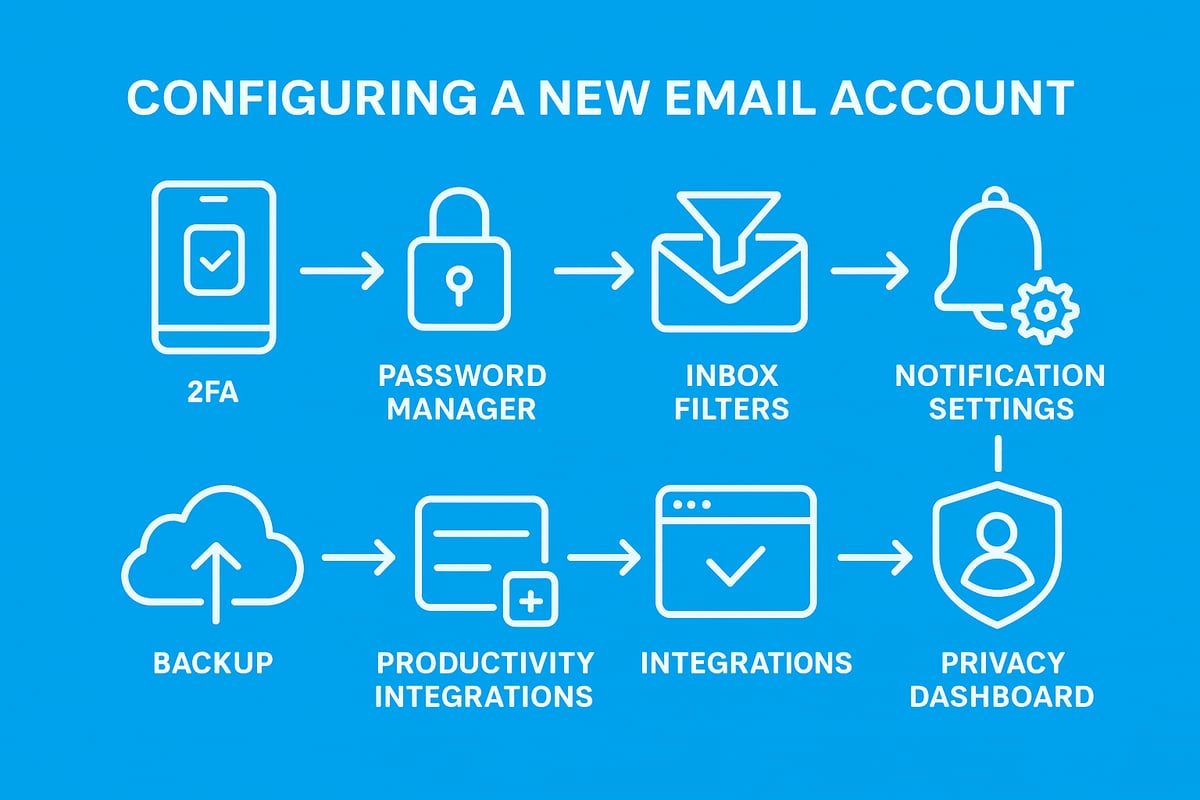
Setting Up Two-Factor Authentication (2FA)
After you sign up an email account, enabling two-factor authentication (2FA) should be your first priority. 2FA adds an extra layer of security by requiring a code sent to your phone or generated by an authenticator app, making it much harder for attackers to access your inbox.
Most major providers offer options like SMS verification, app-based tokens, or even biometric authentication. According to Microsoft, accounts with 2FA enabled are 99.9% less likely to be compromised.
For more on implementing robust security measures, see Email security best practices for 2026.
Creating Strong Passwords and Using Password Managers
When you sign up an email account, choose a password that is unique, at least 12 characters long, and includes a mix of upper and lower case letters, numbers, and symbols. Avoid using personal information or common words.
A password manager helps generate and store complex passwords for all your accounts, reducing the risk of reuse and breaches. Regularly update your passwords and never share them.
Example of a strong password:
G7t!r3Qp#zLw8F
Customising Inbox Settings
Personalise your inbox to match your workflow as soon as you sign up an email account. Modern email services offer custom folders, smart labels, and AI-driven filters that automatically organise your messages.
Set up rules for sorting newsletters, work emails, and personal correspondence. Configure an email signature and enable auto-replies for holidays or absences. These small adjustments save time and help prevent important messages from being lost.
Managing Notifications and Mobile Access
Configuring notifications is vital once you sign up an email account, especially if you access email on multiple devices. Use the official app for your provider to ensure secure, encrypted connections and timely updates.
Adjust notification preferences to avoid constant distractions, choosing alerts only for important messages. Sync your inbox across devices for seamless access, and review app permissions regularly to maintain privacy.
Email Backup and Recovery Options
Protect your data by setting up backup and recovery options immediately after you sign up an email account. Add a recovery phone number and secondary email address for account retrieval if you ever get locked out.
Many providers allow you to export emails and contacts, either manually or on a schedule. Regular backups ensure you never lose important information, even if your main device is lost or compromised.
Integrating with Productivity Tools
To boost efficiency, connect your new email account with calendars, task managers, and cloud storage platforms. Most providers support seamless integration, allowing you to schedule meetings, share documents, and set reminders directly from your inbox.
Linking productivity tools means you can manage your day without switching between apps. This integration is especially useful for business users who want to maximise the benefits after they sign up an email account.
Privacy Settings and Data Management
Review the privacy dashboard of your provider after you sign up an email account. Adjust data sharing, ad preferences, and third-party app permissions according to your needs.
Enable features such as encrypted email storage and granular access controls. Regularly check which apps and services have access to your account, revoking any you no longer use. This proactive approach helps maintain privacy and keeps your digital footprint secure.
Advanced Tips and Best Practices for Email in 2026
Mastering email in 2026 means adopting advanced strategies that keep your inbox secure, organised, and professional. Whether you sign up an email account for personal or business use, these best practices help you get the most out of modern features while protecting your digital identity.
Avoiding Spam and Phishing
When you sign up an email account, you are instantly exposed to a range of spam and phishing threats. Recognising suspicious emails is crucial. Watch for unfamiliar senders, urgent requests, and unexpected attachments. Use your provider’s built-in spam filters and always report phishing attempts.
Modern inboxes leverage AI to flag harmful content, but vigilance is key. For a deeper look at how to protect yourself during the sign-up process, review Email sign-ups and spam prevention. This guide offers practical steps for keeping your inbox safe from day one.
- Enable spam filters and reporting features
- Avoid clicking on links from unknown sources
- Regularly review your spam folder for false positives
Being proactive with these habits will significantly reduce your risk.
Organising Your Inbox Efficiently
A cluttered inbox quickly leads to missed messages. When you sign up an email account, take advantage of AI-powered categorisation, smart folders, and snooze features. These tools sort important emails from newsletters or promotions.
Consider this table for a quick comparison of common organisation tools:
| Feature | Benefit | Example |
|---|---|---|
| Smart Folders | Auto-sort emails | Priority/Updates |
| Bulk Actions | Declutter quickly | Archive/Delete |
| Unsubscribe Tool | Reduce noise | Newsletter Control |
Regularly declutter using bulk actions and unsubscribe from emails you no longer need. This keeps your inbox focused and efficient.
Email Etiquette and Professionalism
First impressions often start with email. After you sign up an email account, use clear subject lines, polite greetings, and concise language. Attach documents only when necessary and use descriptive filenames.
Templates can save time and ensure consistency, especially for recurring communications. Scheduling emails for appropriate time zones demonstrates professionalism and respect for recipients’ schedules.
- Always proofread before sending
- Use a professional signature with contact details
- Respond promptly to important messages
Strong etiquette enhances your digital reputation and builds trust.
Managing Multiple Accounts and Aliases
Many users sign up an email account for different purposes, such as work, personal, or newsletters. Most providers now offer unified inboxes, so you can manage several accounts from one dashboard.
Aliases let you create alternative addresses for privacy or filtering. For example, use [email protected] to separate online purchases from personal messages.
- Link accounts for easy switching
- Use aliases to track subscriptions or filter messages
- Regularly review account permissions
This approach streamlines your workflow and boosts both security and organisation.
Automation and Productivity Hacks
Maximise efficiency by automating routine tasks as soon as you sign up an email account. Set up rules and filters to sort messages, auto-forward specific emails, or trigger auto-replies.
Example automation using a rule:
If subject contains "invoice", move to "Finance" folder
Leverage AI-powered smart replies and follow-up reminders to minimise manual effort. Over a third of users now automate at least one email task, saving valuable time daily.
Staying Up-to-Date with New Features
Email providers frequently roll out new tools and experimental features. After you sign up an email account, regularly check for updates in your provider’s settings, join user forums, or sign up for beta programmes.
Engaging with these communities helps you discover productivity enhancements early. Embrace features like AI-driven inboxes, predictive typing, or new integration options to stay ahead in the digital landscape.
Email for Business and Marketing
If you sign up an email account for business, leverage it for newsletters, promotions, and customer engagement. Email remains the top channel for high ROI in digital marketing.
Build subscriber lists, segment audiences, and monitor campaign performance. Use analytics to refine subject lines and content for better results. For small businesses, email marketing can deliver up to £40 return for every £1 spent.
Professional email practices ensure your messages reach the right people and support business growth.
Common Mistakes to Avoid When Signing Up an Email Account
When you sign up an email account in 2026, avoiding common mistakes is crucial for your digital safety and productivity. Simple missteps can lead to data breaches, lost access, or unprofessional impressions. Let us explore the most frequent pitfalls and how to steer clear of them.
Choosing Weak or Predictable Passwords
When you sign up an email account, using weak or common passwords is one of the biggest security risks. Attackers often guess simple combinations or use breached lists. For example, “123456” and “password” are still found in many data leaks.
Here is a quick comparison of password dos and don’ts:
| Do | Don’t |
|---|---|
| Use 12+ characters | Use names or birthdays |
| Mix uppercase, numbers, and symbols | Use common passwords |
| Change passwords regularly | Reuse old passwords |
Choosing a strong password when you sign up an email account is your first defence against cyber attacks.
Ignoring Security and Privacy Settings
Many users skip essential security steps as they sign up an email account. Failing to enable two-factor authentication (2FA) or review privacy permissions increases your vulnerability. According to industry reports, 60% of breaches are linked to poor security hygiene.
Always:
- Turn on 2FA where available.
- Review app permissions.
- Check privacy dashboards for data sharing.
Taking these actions when you sign up an email account greatly reduces your risk of unauthorised access.
Using Personal Email for Business Purposes
It is tempting to use your personal address when you sign up an email account for business, but this can harm your credibility and security. Mixing personal and professional communication can lead to data leaks and confusion.
For professional needs, consider creating a professional business email instead. This choice helps your brand appear trustworthy and keeps business correspondence secure and organised.
Overlooking Recovery Options
One overlooked step as you sign up an email account is failing to set up recovery methods. If you lose access, recovering your account becomes difficult without:
- A backup email address
- A verified phone number
- Security questions
Take a moment during the sign up an email account process to enable these options. It is a small step that can prevent major headaches later.
Falling for Phishing During Sign-Up
Cyber criminals target new users as they sign up an email account, often with fake forms or malicious links. Always check the web address and look for secure HTTPS connections.
For those interested in advanced protection, research like LLM-PEA: Leveraging Large Language Models Against Phishing Email Attacks shows how AI is being used to detect sophisticated scams. Staying alert to phishing tactics is essential each time you sign up an email account.
Not Reading Terms and Privacy Policies
When you sign up an email account, skipping the terms and privacy policies can lead to unexpected data sharing or unwanted marketing. A recent survey found that 70% of users do not read these documents, risking their privacy.
Take a few minutes to review the terms. Look for how your data is stored, shared, and used. This helps you make informed choices when you sign up an email account.
Failing to Organise from the Start
A cluttered inbox quickly becomes overwhelming if you do not set up folders and filters as you sign up an email account. Good organisation helps you find important messages and keeps your inbox manageable.
Start with:
- Basic folders (work, personal, receipts)
- Filters for newsletters and alerts
- Labels for key contacts
Organising early saves time as you use your email.
Signing Up with Untrusted Providers
Choosing a reputable service is vital when you sign up an email account. Untrusted providers may lack security, support, or even misuse your data. Always research your provider’s reputation, support channels, and compliance with regulations before you sign up an email account.
A trusted provider ensures your data stays safe and your experience remains smooth.
Email for Business: Next Steps After Account Creation
Establishing a business presence online begins the moment you sign up an email account. Beyond this first step, optimising your business email unlocks credibility, security, and efficiency. Let us explore each essential next step to ensure your email becomes a powerful asset for your business.
Setting Up a Professional Email Address
A professional email address is vital for trust and branding. Instead of using a generic personal address, opt for a custom domain such as [email protected]. When you sign up an email account with providers like Google Workspace or Microsoft 365, you gain access to domain management and advanced branding options.
Benefits include:
- Improved customer trust and credibility
- Consistent branding across communications
- Greater control over user accounts
Consider the following when selecting your domain:
| Provider | Custom Domain Support | Branding Tools |
|---|---|---|
| Google Workspace | Yes | Advanced |
| Outlook/365 | Yes | Robust |
| Zoho Mail | Yes | Moderate |
Configuring Email for Teams and Collaboration
Once you sign up an email account for your business, configuring it for teams is crucial. Modern platforms offer shared inboxes, group aliases, and delegation features.
Key collaboration tools include:
- Shared mailboxes for support or sales teams
- Group email addresses for departments
- Calendar and project management integration
By enabling these features, your team can respond faster and work together seamlessly, keeping all communications organised.
Ensuring Compliance and Security for Business Emails
With increased regulation, securing your business communications is essential. After you sign up an email account, ensure compliance with GDPR and industry-specific standards. Enable audit trails and archiving, which make tracking and retrieving emails straightforward.
Best practices include enabling two-factor authentication, regular security reviews, and using encrypted services. This approach protects sensitive data and prepares your business for compliance audits, which 80 percent of companies now face annually.
Email Marketing Essentials for Small Businesses
Email remains the top channel for customer engagement and ROI. After you sign up an email account, you can launch campaigns to reach your audience directly.
Astonish Email: Email Marketing Made Easy for UK Small Businesses simplifies this process. With features like a drag-and-drop editor, contact management, and real-time reporting, small businesses can run effective campaigns without technical expertise. Customer testimonials highlight the platform's ease of use and results, making it a strong choice for UK SMEs.
Training Staff and Setting Policies
Staff training is a critical step after you sign up an email account for your business. Establish clear guidelines for email etiquette, security practices, and acceptable use.
Ongoing training should cover:
- Recognising phishing attempts
- Creating strong passwords
- Handling sensitive information
By setting policies early, you safeguard your business and maintain a professional standard across all communications.
Scaling Up: When to Upgrade or Add Features
As your business grows, your email needs will evolve. If you sign up an email account and notice increased campaign frequency, larger contact lists, or a need for automation, consider upgrading your plan.
Look for:
- Expanded storage
- Advanced analytics
- Automation features
Regularly review your setup to ensure your email solution continues to meet your business objectives.