Creating a Free Business Email: The Essential Guide 2026
December 29, 2025
In 2026, a professional business email is more than just a necessity; it is a vital part of establishing credibility and trust with clients and partners. Many business owners still believe that creating a free business email is a costly or complicated process, but that is simply not the case.
A dedicated business email address boosts your brand image, ensures better deliverability, and helps your communications stand out as reliable and secure. In this essential guide, you will learn every step involved in creating a free business email, get a comparison of top providers, find answers to common questions, and receive practical security tips to keep your business communications safe.
Why Your Business Needs a Professional Email Address in 2026
A professional business email address is no longer a luxury in 2026, it is a necessity. With digital communication at the heart of every transaction, creating a free business email is one of the most effective ways to demonstrate credibility and establish trust with your audience.

Enhanced Credibility and Trust
When you use a branded email address like [email protected], customers see your business as established and legitimate. Generic addresses may raise doubts, but a custom domain signals professionalism. According to a 2023 HubSpot survey, 75% of consumers trust businesses with a custom email.
The process of creating a free business email ensures your communications are taken seriously. This trust factor cannot be overstated, particularly when first impressions are critical in a competitive digital marketplace.
Brand Consistency and Professional Image
Every email you send is an opportunity to reinforce your brand identity. A consistent domain in your email address aligns with your website, social media, and marketing materials, creating a unified image. This cohesion is essential for small businesses aiming to build recognition and loyalty.
By creating a free business email, you maintain this consistency without incurring unnecessary costs. Your brand appears stronger and more memorable with every interaction.
Improved Deliverability and Communication
Business email platforms provide better deliverability compared to free personal accounts. Messages sent from a branded address are less likely to end up in spam folders, ensuring important information reaches your clients and partners.
When creating a free business email, you benefit from advanced filtering and authentication tools. This results in more reliable communication and fewer missed opportunities for your business.
Security, Compliance, and Privacy
Security is paramount in 2026. Business email services offer enhanced spam filtering, encryption, and compliance features. These measures protect sensitive data and ensure you meet regulations such as GDPR and UK data protection laws.
As you focus on creating a free business email, prioritise providers that include robust security options. This not only protects your business but also reassures your clients that their information is safe.
Separation of Work and Personal Life
Mixing personal and work emails can lead to confusion, missed messages, and privacy risks. A dedicated business email address keeps professional correspondence organised and distinct from personal inboxes.
Creating a free business email helps streamline your workflow and ensures sensitive business information stays confidential. This separation is essential for maintaining balance and efficiency.
Competitive Edge in the Marketplace
Standing out is more challenging than ever. A professional email address gives you an immediate edge, signalling to clients and suppliers that you take your business seriously. Many competitors may still rely on generic accounts, making your brand appear more established.
Adopting the practice of creating a free business email puts you ahead, helping you attract more clients and build better partnerships.
Real-World Impact and Consumer Perception
The business benefits are not just theoretical. A recent report found that 60% of young businesses saw increased customer engagement, and 42% experienced higher sales after adopting a professional email address. You can read more about this in the Impact of Professional Email on Business Success.
In summary, creating a free business email is a strategic move for any business in 2026. It strengthens credibility, boosts deliverability, protects data, and provides a clear advantage over less professional competitors.
Understanding Free Business Email Options: What’s Available in 2026?
Navigating the landscape of free business email solutions can feel overwhelming, especially with new developments in 2026. For organisations focused on creating a free business email, understanding the available options is essential for making an informed decision.
What Is a Free Business Email Solution?
A free business email solution allows companies to set up professional, domain-based email addresses (like [email protected]) without incurring monthly costs. This is a crucial step for anyone creating a free business email, as it boosts trust and brand recognition compared to generic addresses.
You can choose between domain-based emails, which use your custom domain, and generic addresses, such as those ending in @gmail.com or @outlook.com. For UK businesses, domain-based options offer a more professional image.
Popular Free Business Email Providers in 2026
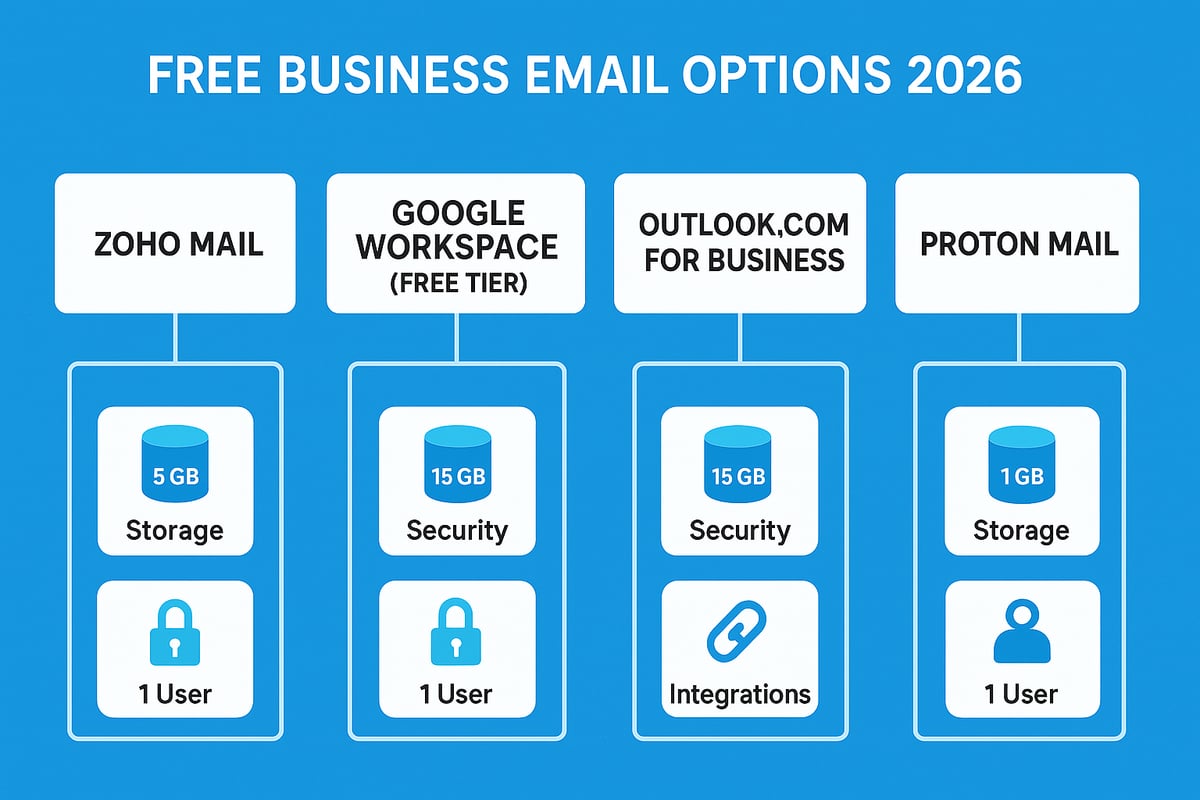
Several providers offer robust free plans for those interested in creating a free business email. The most notable options in 2026 include:
- Zoho Mail: Free for up to 5 users, each with 5GB storage.
- Google Workspace (Free Tier): Limited to 3 users, with reduced storage and features.
- Outlook.com for Business: Free plan allows basic custom domain integration.
- Proton Mail: Focused on privacy, with end-to-end encryption and a free tier for small teams.
The right provider for creating a free business email depends on your storage, privacy, and integration needs.
Comparing Features and Limitations
When creating a free business email, it is important to compare providers side by side. Here is a summary:
| Provider | User Limit | Storage (per user) | Key Features | Integrations | Security |
|---|---|---|---|---|---|
| Zoho Mail | 5 | 5GB | Domain-based, IMAP | CRM, Calendar | 2FA, SPF, DKIM |
| Google Workspace | 3 | 10GB | Collaboration tools | Google Apps | 2FA, SPF, DKIM |
| Outlook.com | 5 | 5GB | Microsoft 365 tools | Office Apps | 2FA, SPF, DKIM |
| Proton Mail | 3 | 1GB | End-to-end encryption | Basic Calendar | E2E encryption |
For an in-depth review, consult this Comparison of Free Business Email Providers 2025 to help with creating a free business email that fits your specific requirements.
Notable Changes and New Entrants in 2026
The free business email landscape has evolved. Google Workspace’s free tier now restricts advanced features to paid plans. Zoho Mail increased storage per user, while Proton Mail introduced limited team accounts. Some older services have been discontinued, so always verify current features before creating a free business email.
New entrants in 2026 focus on privacy and AI-powered spam filtering, making security a key differentiator for those creating a free business email.
Open Source and Self-Hosted Alternatives
If you prefer total control, open-source or self-hosted email servers (such as iRedMail or Mail-in-a-Box) are an option. These solutions enable creating a free business email without third-party branding, but require technical expertise and server maintenance.
Pros:
- Full data control
- No recurring provider costs
- Customisable features
Cons:
- Complex setup and updates
- Security and compliance responsibilities
- Limited official support
Key Considerations Before Choosing
When creating a free business email, consider:
- Scalability: Can you add users as your team grows?
- Migration: How easy is it to switch providers later?
- Upgrade Paths: Are paid features available if you outgrow the free plan?
- Support: Is help available if problems arise?
- Branding: Does the provider allow your company domain and customisation?
Taking these factors into account will ensure your choice of provider supports both current and future business needs. Remember, creating a free business email is an investment in professionalism and operational efficiency.
Step-by-Step Guide: How to Create a Free Business Email in 2026
Setting up a professional email address might sound daunting, but creating a free business email in 2026 is more accessible than ever. By following a few clear steps, you can establish a branded, trustworthy communication channel for your business without incurring extra costs. This guide walks you through each phase, ensuring your setup is seamless and secure.

Step 1: Registering Your Domain Name
The first step in creating a free business email is registering a unique domain name. Your domain is the foundation of your brand’s online identity and adds credibility to each message you send. Choose a registrar such as Namecheap, GoDaddy, or Google Domains for a smooth experience.
When selecting your domain, prioritise names that reflect your business and are easy to remember. For UK businesses, a .co.uk extension is recommended for local trust and recognition. Consider keywords related to your industry or service, but avoid overly long or complex names.
Most registrars offer first-year discounts, so compare prices and features before you commit. Remember, your domain choice will be visible in every email, reinforcing your brand with every interaction. For a step-by-step walkthrough on this process, see the Email for my business guide.
Step 2: Selecting a Free Business Email Provider
Once your domain is secured, the next step in creating a free business email is selecting the right provider. Focus on reliability, robust features, and strong security. Leading options in 2026 include Zoho Mail, Proton Mail, Google Workspace (free tier), and Outlook.com for business.
When comparing providers, assess storage limits, user caps, mobile compatibility, and integration with your existing tools. Read user reviews and check for up-to-date security certifications. For privacy, Proton Mail stands out, while Zoho Mail offers generous free plans for small teams.
Evaluate the provider’s support channels and documentation. Your choice should align with your business’s current needs and future growth plans. Investigate upgrade paths in case you need more advanced features later.
Step 3: Setting Up DNS Records for Email
Proper DNS configuration is vital when creating a free business email. DNS records ensure your emails are delivered securely and reliably. The main records to set up are MX (Mail Exchange), SPF (Sender Policy Framework), DKIM (DomainKeys Identified Mail), and DMARC (Domain-based Message Authentication, Reporting and Conformance).
Start by logging into your domain registrar’s control panel. Locate the DNS management section, then add the records provided by your email service. Correctly configuring SPF and DKIM can reduce the risk of your emails being marked as spam by up to 30% (source: Cisco, 2024).
Each record serves a purpose: MX directs email traffic, SPF verifies sender legitimacy, DKIM encrypts your signature, and DMARC helps prevent spoofing. Double-check your entries, as mistakes can disrupt email flow or compromise security.
Step 4: Creating and Customising Your Email Account
After DNS records are set, you are ready for the next phase of creating a free business email: making user accounts and personalising them. Most providers let you create multiple users and aliases, which is ideal for separating roles such as sales, support, or info.
Customise each email account with a professional signature, profile photo, and display name. Add legal disclaimers or company branding to your signature for a polished and compliant appearance. Use consistent formatting across all accounts to reinforce your brand image.
Check if your provider allows for autoresponders, forwarding, or group aliases. These features help streamline communication and present a unified front to clients and partners. Take time to review and test each setting for accuracy.
Step 5: Configuring Email Clients and Devices
To maximise productivity, configure your business email on all necessary devices. Most free providers support access via webmail, mobile apps, and desktop clients. Decide between POP3, IMAP, or Exchange protocols; IMAP is usually best for syncing across devices.
Follow your provider’s step-by-step instructions to add your email to Outlook, the Gmail app, or Apple Mail. Use the correct server settings and authentication methods to ensure smooth connectivity. Creating a free business email that works seamlessly on all platforms keeps your team responsive and organised.
Test each device by sending and receiving messages. Set up notifications and folders as needed for efficient workflow. Regularly update your apps to maintain compatibility and security.
Step 6: Testing and Troubleshooting
The final stage in creating a free business email is thorough testing and troubleshooting. Send test emails to various addresses to confirm deliverability and correct display. Check for issues like emails landing in spam folders, DNS errors, or failed authentication.
If you encounter problems, consult your provider’s help centre or community forums. Common issues include DNS propagation delays, incorrect record entries, or password problems. Keep a checklist to ensure all steps are verified.
Establish a routine for monitoring your email system. Promptly address any issues to maintain professionalism and trust. Reliable communication is the hallmark of a successful business email setup.
Comparing the Best Free Business Email Providers for 2026
Choosing the right provider is crucial when creating a free business email in 2026. The landscape continues to evolve, with several established and emerging options competing for small business attention. Each provider brings distinct strengths, features, and limitations.
Comparison Table: Top Free Business Email Providers (2026)
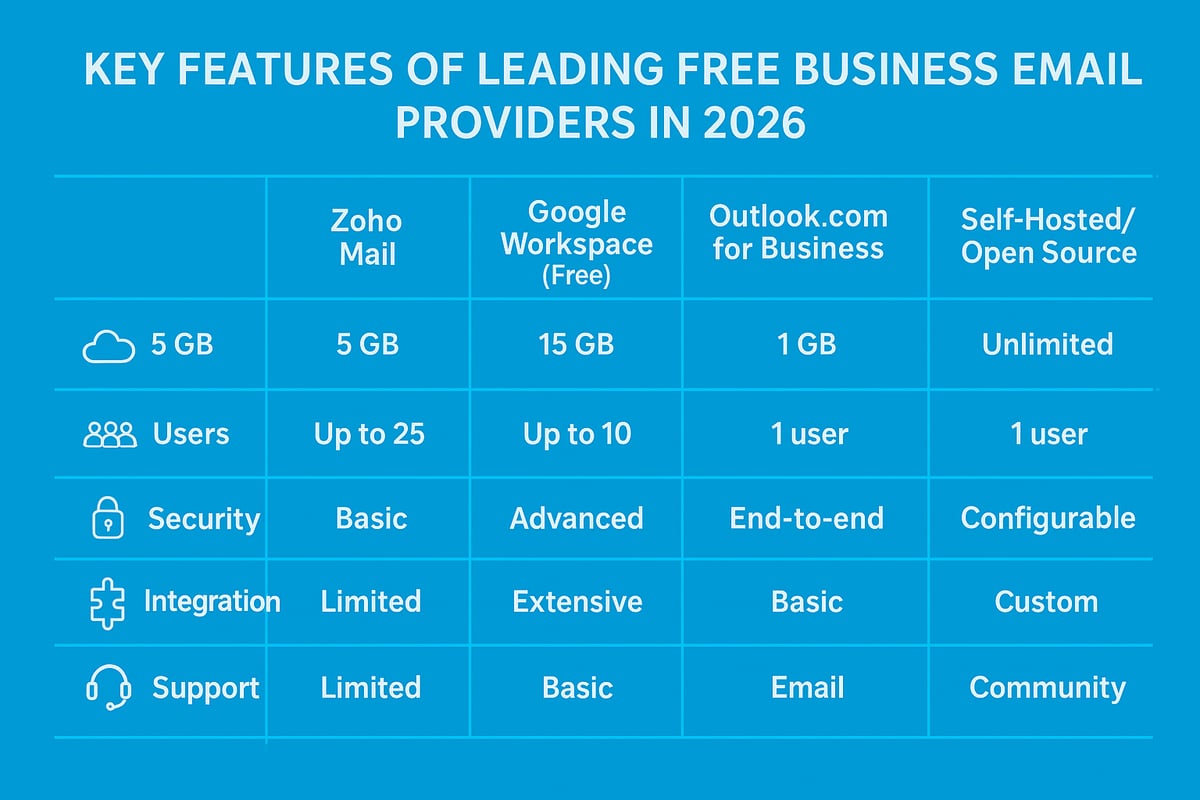
| Provider | Storage (per user) | User Limit | Security Features | Integrations | Notable Limitations |
|---|---|---|---|---|---|
| Zoho Mail | 5GB | 5 | 2FA, spam filtering, DKIM | CRM, Calendar | Branding on free tier |
| Google Workspace | 15GB (shared) | 10 | SPF, DKIM, 2FA | Google Apps | Ads, limited support |
| Outlook.com | 5GB | 5 | Encryption, spam filters | Microsoft 365 | Fewer business features |
| Proton Mail | 1GB | 1 | End-to-end encryption | Calendar, Drive | Only 1 user, low storage |
| Self-hosted | Varies | Unlimited* | Customisable, depends | Custom | Requires tech skills |
*User numbers depend on server/resources.
When creating a free business email, Zoho Mail remains a preferred choice among UK SMEs, offering generous user allowances and solid integration with workplace tools. Google Workspace (free tier) is popular for its robust ecosystem and familiar interface, although free plans now include more visible ads and have stricter storage caps.
Outlook.com for Business attracts those already using Microsoft 365, providing strong integration and reliability, but its business-specific features are limited compared to paid tiers. Proton Mail stands out for security, offering end-to-end encryption, making it appealing for privacy-conscious businesses, though its free plan is limited to a single user and just 1GB of storage.
Open-source or self-hosted solutions, such as Mail-in-a-Box or iRedMail, give ultimate control and scalability for those comfortable with technical setup. This approach is ideal if you want to customise every aspect of your email environment, but it requires ongoing maintenance and security vigilance.
Unique Features and Drawbacks
- Zoho Mail: Free tier supports up to five users, basic branding, and essential security features. However, advanced branding and integrations require a paid upgrade.
- Google Workspace (free): Best for businesses that already use Google tools. Free plan limitations include shared storage and basic support.
- Outlook.com: Reliable and familiar, but lacks advanced business management tools in the free version.
- Proton Mail: Superior security and privacy, but limited capacity and no multi-user support on the free plan.
- Self-hosted: Full control and flexibility, but significant technical demands.
User Feedback and Suitability
According to TechRadar (2025), 60% of UK SMEs rely on Zoho or Google Workspace when creating a free business email, citing ease of use, integration options, and overall reliability. User reviews on platforms such as G2 and Trustpilot praise Zoho’s intuitive setup and Google’s seamless integration, while Proton Mail users highlight its unmatched privacy.
Suitability varies by business size and sector. For start-ups and microbusinesses, Zoho Mail and Google Workspace often suffice. Privacy-focused organisations may prefer Proton Mail, while those with technical resources might choose a self-hosted solution.
Limitations and Upgrade Paths
All free plans carry constraints. These include limited storage, basic support, and occasional provider branding on outgoing emails. If your business grows or needs more advanced features, most providers offer clear upgrade paths to paid plans with better support, enhanced security, and higher capacity.
For a deeper dive into how to get started and what to expect from each option, you can explore this detailed guide on how to get a free email account.
Ultimately, the best provider for creating a free business email depends on your specific needs, technical skills, and future growth plans. Assess each option carefully to ensure it aligns with your business goals and compliance requirements.
Security, Compliance, and Best Practices for Free Business Email
Creating a free business email is a strategic move, but security and compliance must not be overlooked. In 2026, cyber threats targeting small businesses continue to evolve, making robust email protection essential for every organisation. Understanding the risks and adopting best practices ensures your communications remain trustworthy and compliant.
Risks and Threats for Free Business Email
When creating a free business email, businesses face several risks. Free solutions often attract phishing attempts, spam, and malware, especially when lacking advanced security features. According to Cybersecurity UK, 90% of cyberattacks in 2025 began with an email, highlighting the need for vigilance.
Limited customer support in free plans can leave critical issues unresolved, increasing vulnerability. Additionally, some providers impose restrictions on spam filtering and encryption, making it vital to carefully assess your chosen service. Recognising these risks is the first step towards a secure business email environment.
Essential Security Measures
To safeguard your business when creating a free business email, establish strong security foundations. Always use unique, complex passwords for each account and enable two-factor authentication (2FA) wherever possible. Regularly back up your emails and data to prevent loss in case of a breach.
Implement sender authentication protocols such as SPF, DKIM, and DMARC. These reduce the risk of spoofing and ensure legitimate messages reach your recipients. For a detailed breakdown of practical steps, consult this guide on secure email for small business. Following these measures can drastically reduce your exposure to email-based threats.
Compliance and Staff Training
Creating a free business email also brings compliance responsibilities, especially with GDPR and UK data protection laws. Ensure your provider offers necessary encryption and stores data within compliant jurisdictions.
Train your staff to recognise phishing attempts, suspicious links, and social engineering tactics. Simple internal workshops or simulated phishing campaigns can boost awareness. Keeping your workforce informed is as vital as technical security measures, since human error remains a leading cause of breaches.
Upgrading, Audits, and Ongoing Monitoring
While creating a free business email is cost-effective for startups, growth or increased risk may require a paid or managed solution for enhanced security and support. Look for signs such as storage limits, increased spam, or compliance gaps as signals to consider upgrading.
Conduct regular security audits and monitor account activity for unusual behaviour. Review your authentication records and backup routines at least quarterly. Ongoing vigilance ensures your business email remains a trusted asset, protecting both your reputation and your clients’ data.
Frequently Asked Questions About Creating a Free Business Email
Creating a free business email is more popular than ever in 2026, but there are still many questions from business owners before they get started. Here, we answer the most common queries with precise, up-to-date advice.
Can I use my own domain with a free email provider?
Yes, many free business email providers let you connect your own domain. This is essential for professionalism and brand consistency. For example, Zoho Mail allows you to set up addresses like [email protected] on its free tier. Using your domain builds trust and improves deliverability. To learn more about the impact of branding, see Branding your business email.
Are free business emails really secure enough for sensitive communications?
Security features vary by provider, but most reputable services offer strong encryption, spam protection, and authentication tools. When creating a free business email, always enable two-factor authentication and use unique, complex passwords. For highly sensitive data, consider if the free tier meets your compliance needs or if a paid upgrade is prudent.
What happens if I outgrow the free plan?
Free plans often have user or storage limits. As your business grows, you may need more accounts, advanced features, or greater storage. Most providers make upgrading to a paid plan straightforward, so you can scale up without losing your existing emails or settings. Check migration options before committing.
How do I migrate from a free to a paid provider?
When creating a free business email, plan ahead for potential migration. Most providers support standard protocols like IMAP, making it easier to transfer messages, contacts, and calendars. Always back up your data before switching, and review the provider’s migration guides for a smooth transition.
Can I integrate free business email with other business tools (CRM, calendars)?
Many free business email solutions offer basic integrations with calendars, contacts, and productivity apps. Some also connect with third-party tools, but integration depth may be limited compared to paid plans. Review the provider’s app marketplace or documentation for supported integrations.
What support is available for troubleshooting issues?
Support levels differ between providers. Free plans typically offer community forums, help centres, or knowledge bases, but not direct phone or chat support. When creating a free business email, make use of available self-help resources and consider the value of premium support if your business depends on email uptime.
Are there hidden costs or limitations to be aware of?
Always read the fine print. Free plans may include adverts, limited storage, or lack advanced security features. Some providers reserve certain features for paid tiers, such as custom branding or priority support. Regularly review your usage and needs to avoid surprises.