The Expert Guide to Making a Professional Email (2026)
February 12, 2026
In today’s fast-paced digital landscape, making a professional email is more than just creating an address, it is your virtual handshake and often the first impression you make in business or your career. The right email address and signature can instantly build trust, credibility, and open new opportunities.
This expert guide will walk you step by step through making a professional email that stands out in 2026. You will discover the latest strategies, actionable tips, and proven best practices to ensure your communications are polished and secure.
From choosing the right provider to designing an engaging signature, we will cover everything you need to know to present yourself with confidence and professionalism.
Why a Professional Email Matters in 2026
In 2026, first impressions are often digital. Making a professional email is no longer just a formality, but a necessity for anyone serious about their career or business. Whether applying for jobs, networking, or running a company, your email address is a direct reflection of your professionalism.
Establishing Credibility and Trust
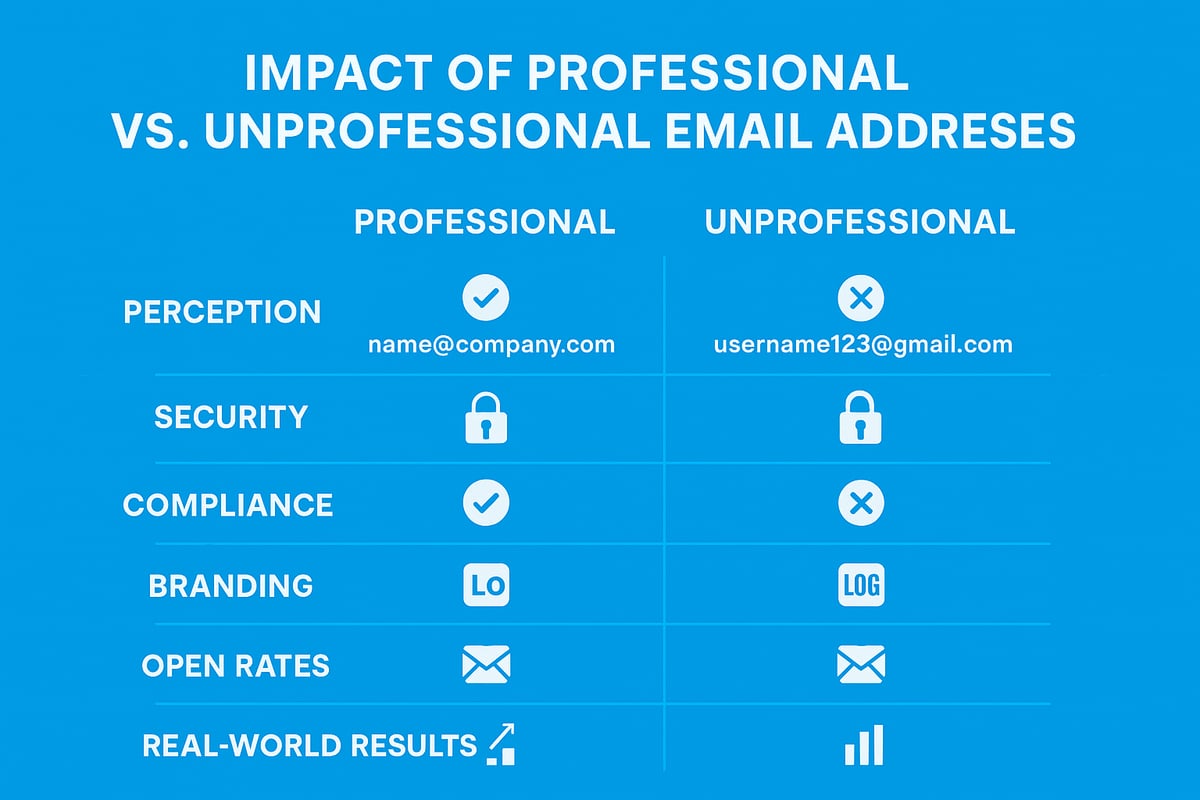
Your email address often speaks before you do. Making a professional email signals credibility to clients, colleagues, and hiring managers alike. In fact, 75% of hiring managers judge candidates by their email address, according to CareerBuilder (2024).
Compare these two examples:
[email protected]
[email protected]
The difference in perception is immediate. The first address inspires trust, while the second can undermine your seriousness. For more on best practices, see Professional Email Address Best Practices.
A professional address is the foundation of a credible digital identity. Making a professional email is the first step towards being taken seriously in any field.
Business Communication Standards
Remote work and digital networking have become the norm in 2026. Making a professional email is crucial, as email remains the primary tool for B2B and B2C interactions.
Industry leaders stress that professionalism in email is no longer optional. A clear, branded address ensures you are recognised and respected in every exchange. Making a professional email helps you stand out in crowded inboxes and supports modern business communication standards.
Regular use of professional email addresses sets the tone for your organisation and helps foster long-term relationships.
Security and Compliance
Cyber threats have increased in both frequency and sophistication. Making a professional email protects you with enhanced security controls and compliance features.
Personal emails are more vulnerable to phishing and malware. Using a business-grade email provider, combined with GDPR-compliant settings, gives you better control over sensitive data.
Making a professional email is essential for anyone handling confidential or regulated information. It reduces risk and demonstrates your commitment to security.
Brand Consistency and Recognition
For entrepreneurs and small businesses, making a professional email is a branding opportunity. Your email address acts as a touchpoint for every client interaction.
A consistent domain name across all communications strengthens brand recognition. It also projects a unified, trustworthy image.
Making a professional email ensures your brand is represented accurately, every time someone receives a message from you.
Improved Deliverability and Response Rates
Professional domains have tangible benefits for your communication strategy. According to Litmus (2025), business emails see 15% higher open rates compared to free services.
| Email Type | Open Rate (%) |
|---|---|
| Professional Domain | 65 |
| Free Email Service | 50 |
Making a professional email means your messages are less likely to be flagged as spam. This leads to more responses and better engagement with clients and partners.
Real-World Success Stories
Many businesses and professionals have transformed their reputation by making a professional email part of their toolkit. Upgrading from a free email to a branded domain led to measurable increases in client trust and engagement.
Statistics show that clients are more likely to respond to and trust communications from a professional address. The benefits extend from job applications to customer retention, making a professional email a smart investment for 2026.
Choosing the Right Email Provider and Domain
Selecting the right provider and domain is foundational when making a professional email. The choices you make here impact your credibility, security, and the long-term success of your communications. Let us explore the essential considerations for UK professionals in 2026.
Free vs. Paid Email Services
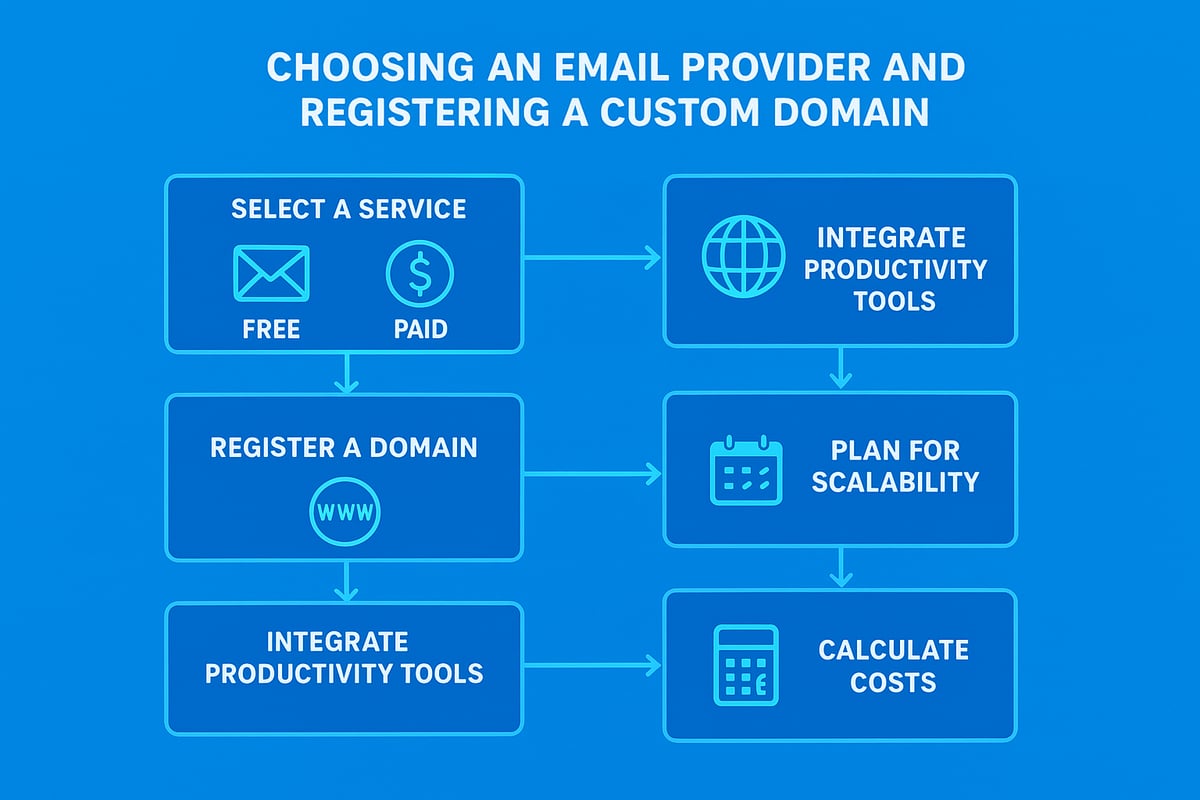
When making a professional email, your first decision is whether to use a free or paid service. Free providers like Gmail and Outlook are familiar, easy to set up, and cost nothing. However, they often lack advanced security, dedicated support, and custom branding options.
Paid services, such as Google Workspace and Microsoft 365, offer custom domains, enhanced security, and business-focused features. For professionals, these added benefits make a significant difference in trustworthiness and data protection.
Consider the following:
- Free services: Easy to start, but limited in branding and scalability.
- Paid services: More secure, support custom domains, and offer advanced features.
- Decision: For making a professional email, a paid provider is usually best for business credibility.
Choosing wisely here sets the stage for future growth and professional success.
Registering a Custom Domain
A custom domain is the core of making a professional email that stands out. Instead of using a generic address, you can create one that matches your brand, such as [email protected].
Steps for registering a domain:
- Choose a memorable, relevant name that reflects your business.
- Check for trademark conflicts and ensure it is easy to spell.
- Register through reputable registrars like Namecheap or GoDaddy.
- Opt for a .co.uk or .uk domain for UK credibility.
By following these steps, you ensure your email address projects professionalism and trust. For a detailed walkthrough, see How to make a business email.
Evaluating Email Hosting Features
When making a professional email, look beyond the basics. Essential features to consider include:
- Spam filtering and virus protection
- End-to-end encryption
- Reliable uptime and support
- Mobile and desktop access
- Ample storage and backup options
Here is a comparison of top providers in 2026:
| Feature | Google Workspace | Microsoft 365 | Zoho Mail |
|---|---|---|---|
| Custom Domain | Yes | Yes | Yes |
| Encryption | Advanced | Advanced | Standard |
| Support | 24/7 | 24/7 | Business Hrs |
| Storage | 30GB+ | 50GB+ | 30GB+ |
According to Statista (2025), 63% of UK SMEs now use custom domains for email, underlining the importance of robust hosting features.
Integrations and Productivity Tools
A key benefit of making a professional email with a modern provider is access to integrated productivity tools. These include shared calendars, contacts, video conferencing, and file storage.
Consider:
- Google Workspace integrates seamlessly with Meet, Drive, and Calendar.
- Microsoft 365 connects email with Teams, SharePoint, and OneDrive.
- Zoho Mail provides built-in CRM and collaboration tools.
Choosing a provider with the right integrations streamlines your workflow and boosts daily efficiency.
Scalability and Future-Proofing
As your business grows, your email needs will evolve. When making a professional email, ensure your provider allows you to add new users, create aliases, and scale storage.
Look for:
- Flexible user management
- Easy migration options
- Support for multiple domains and aliases
A scalable solution ensures your investment remains valuable as your team or brand expands.
Cost Considerations
Budget is always a factor in making a professional email. In 2026, most providers offer monthly or annual subscriptions, typically starting around £4–£8 per user per month.
Watch for:
- Upfront costs for domain registration
- Incremental charges for extra storage or premium features
- Potential migration fees if moving from another provider
Always review the fine print to avoid hidden costs and ensure long-term affordability.
Step-by-Step Guide: Setting Up Your Professional Email
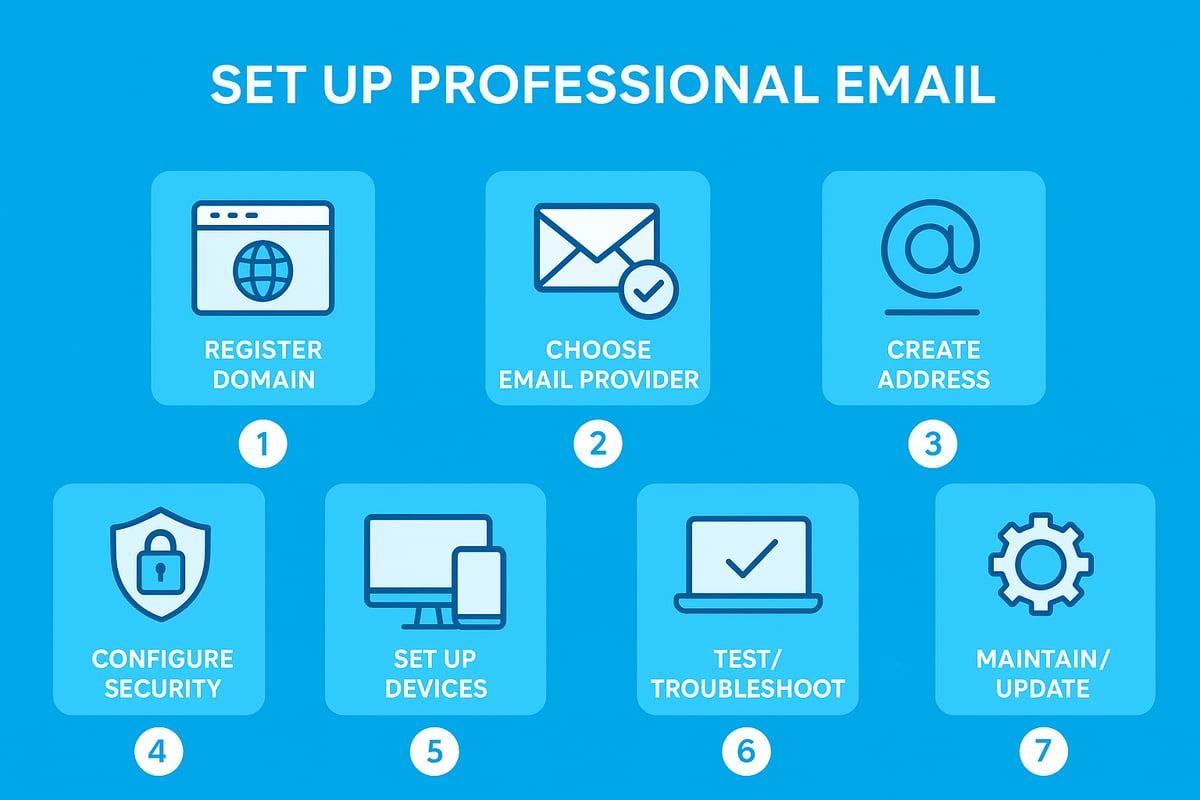
Setting up a professional email account in 2026 is a straightforward process, but each step is crucial for credibility, security, and brand consistency. Follow this detailed guide to ensure you are making a professional email that truly represents you and your business.
Step 1: Register Your Domain Name
Your domain name is the foundation for making a professional email. Start by brainstorming names that reflect your business or personal brand. Keep it short, memorable, and free from complex spellings. Avoid names that could be confused with existing trademarks or brands.
Use a reputable domain registrar to search for availability. Many UK businesses prefer .co.uk for local credibility, but .com or .net remain strong global options. Register your domain for at least two years to avoid accidental expiration.
Before finalising, check for any potential legal conflicts. A simple Companies House search and a quick trademark lookup will help you steer clear of infringement issues. Remember, your domain is not just an address, but a key part of your brand identity.
Once registration is confirmed, keep your login and recovery information secure. This first step lays the groundwork for making a professional email that stands out in every inbox.
Step 2: Choose and Subscribe to an Email Service
With your domain ready, the next phase in making a professional email is selecting the best email hosting provider. Compare options such as Google Workspace, Microsoft 365, and Zoho Mail. Consider factors like security, storage, support, and integration with other business tools.
Here is a quick comparison of leading providers in 2026:
| Provider | Security | Storage | Collaboration Tools | Support |
|---|---|---|---|---|
| Google Workspace | Advanced | 30–100GB | Docs, Meet, Drive | 24/7 chat |
| Microsoft 365 | Enterprise | 50–100GB | Teams, OneDrive | Phone/email |
| Zoho Mail | Strong | 30–100GB | Cliq, Docs | Email/chat |
Look for providers offering robust spam filtering, encryption, and scalability. Evaluate monthly and annual pricing, and be mindful of hidden costs for migration or extra storage.
After selecting, subscribe to the service and follow the setup instructions to link your newly registered domain. This ensures all future communications reflect your brand and support making a professional email process seamless.
Step 3: Create Your Professional Email Address
Now it is time for the heart of making a professional email: crafting your new address. Use clear, businesslike formats such as [email protected] for individuals or [email protected] for general enquiries. Avoid using numbers, nicknames, or anything that could appear unprofessional.
Here are some recommended naming conventions:
[email protected][email protected][email protected](for generic or shared inboxes)[email protected]
Consistency is crucial, especially for teams. Establish guidelines for all staff addresses to reinforce your brand identity.
If you want a detailed walkthrough, refer to this helpful guide on steps to create an email address, which expands on best practices and common pitfalls.
Creating a clear and credible address is the centrepiece of making a professional email that builds instant trust.
Step 4: Configure Security Settings
Security is a non-negotiable when making a professional email. Begin by enabling two-factor authentication (2FA) for all users. This simple step drastically reduces the risk of unauthorised access.
Set strong, unique passwords and encourage regular updates. Most providers offer built-in tools for spam filtering, virus scanning, and suspicious login alerts. Activate these features to protect sensitive information.
Regularly back up your emails and enable automatic security updates. According to the 2025 Verizon DBIR, 92 percent of breaches involved weak or reused passwords, making these precautions essential for anyone making a professional email.
For added peace of mind, review your provider's compliance with GDPR and other regulations. This ensures your communications remain secure and legally compliant.
Step 5: Set Up Email Clients and Devices
The next step in making a professional email functional is configuring it on your devices. Most providers support IMAP, POP3, and Exchange protocols, allowing you to sync emails, contacts, and calendars across platforms.
Here is a sample configuration for IMAP:
Incoming server: imap.yourdomain.co.uk
Outgoing server: smtp.yourdomain.co.uk
Username: your full email address
Password: your secure password
SSL: Enabled
Set up your account on desktops, laptops, tablets, and smartphones. Use official apps for the best integration and security.
Do not forget to sync calendars and contacts for seamless workflow. This ensures making a professional email supports your productivity wherever you work.
Step 6: Test and Troubleshoot
Testing your setup is a critical part of making a professional email. Send test messages to different providers (such as Gmail, Outlook, and Yahoo) to check deliverability and formatting. Confirm that your emails arrive in the inbox, not the spam folder.
Check that your signature, logo, and contact details display correctly on desktop and mobile. If issues arise, consult your provider's troubleshooting resources or support team.
Common problems include incorrect DNS settings, authentication errors, or missing SSL certificates. Address these promptly to maintain the integrity of making a professional email.
A successful test ensures your communications are reliable, helping you make the right impression from the start.
Step 7: Maintain and Update Regularly
Ongoing maintenance is the final pillar of making a professional email system. Review your contact details and recovery options every few months to ensure everything is current.
Regularly audit your security settings, update passwords, and monitor for unusual activity. Keep software and apps up to date to guard against new threats.
As your business grows, add new users and aliases as needed. Periodically review your storage limits and upgrade if necessary.
Staying proactive with updates and reviews means making a professional email remains a strong, secure asset for your brand.
Crafting a Professional Email Signature and Brand
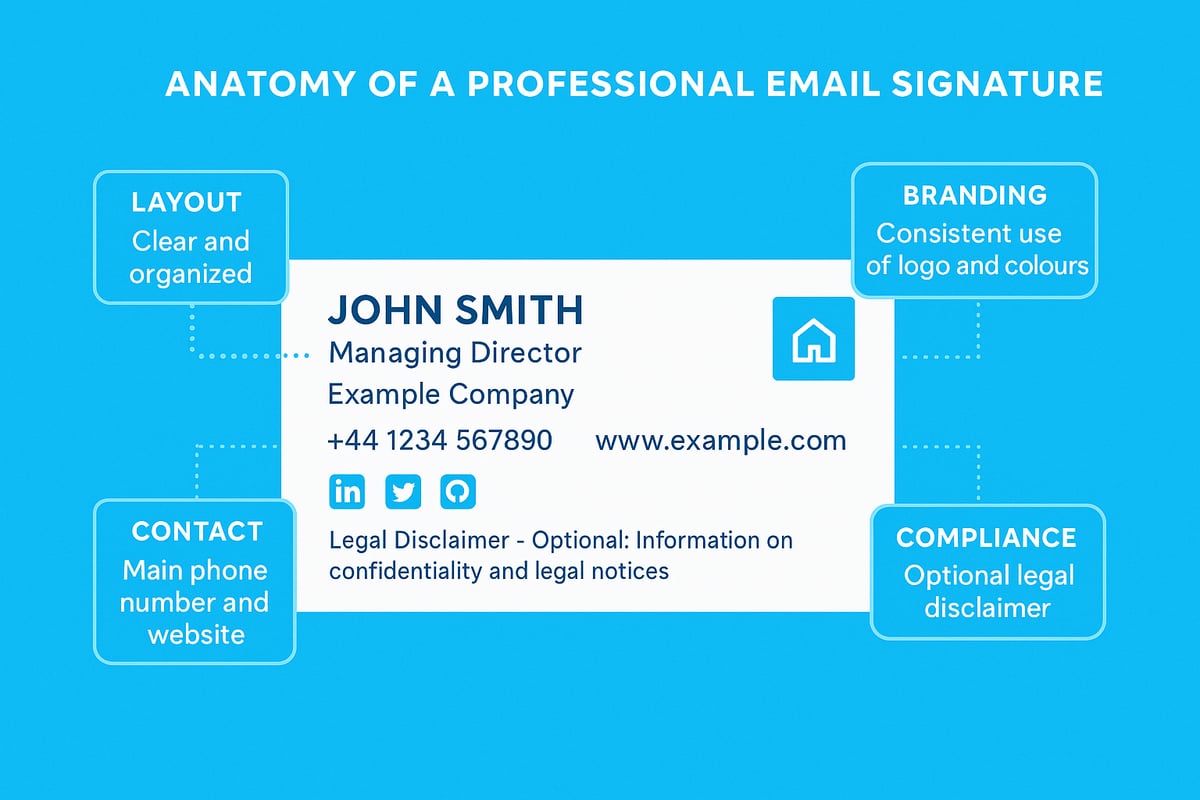
A well-crafted email signature is a key part of making a professional email stand out. It acts as your digital business card, conveying vital information, reinforcing your brand, and establishing trust with every message you send. In 2026, an effective signature is more than just a formality; it is a strategic asset for your business communications.
Elements of an Effective Signature
When making a professional email, always include the essentials: your full name, job title, company name, direct phone number, and website. Adding a logo enhances visual identity, while a physical address can boost credibility for client-facing roles. For inspiration and templates, see Crafting a professional email signature.
Consider industry context when selecting your elements. For instance, a solicitor may add their SRA number, while a sales executive might highlight a direct booking link. Including only what is relevant keeps your signature concise and impactful.
Design and Formatting Best Practices
Design plays a pivotal role in making a professional email memorable. Choose legible fonts and stick to brand colours for consistency. Limit your signature to two colours and a single font family for a clean look.
Logos and images should be optimised for fast loading and display well on both light and dark backgrounds. Ensure adequate contrast and use a font size of at least 11pt for readability. Keep your layout mobile-friendly by using a single column and avoiding wide images.
Legal and Compliance Requirements
Legal compliance is a cornerstone of making a professional email in 2026. UK businesses must include the company name, registration number, and registered address. For limited companies, this is a legal requirement.
It is also best practice to add a GDPR notice or confidentiality disclaimer. For example:This email and any attachments are confidential and intended solely for the use of the individual to whom it is addressed.
Promoting Social Proof and Calls to Action
An effective signature can drive engagement by including calls to action. Add links to your LinkedIn, company Instagram, or recent case studies to demonstrate credibility and encourage interaction.
If you want to highlight a testimonial, keep it short and relevant. Avoid cluttering the signature with too many links, as this can make a professional email appear spammy. One or two social icons are usually sufficient for most industries.
Tools for Creating and Managing Signatures
Signature management tools help maintain consistency and professionalism across your team. Popular solutions in 2026 include WiseStamp, Exclaimer, and HubSpot Email Signature Generator. These platforms allow central management of signatures, ensuring your branding remains uniform.
A recent survey found that 55% of UK SMEs use such tools to streamline making a professional email signature, reducing errors and saving time. Look for features like analytics, compliance checks, and easy updates.
Signature Mistakes to Avoid
Common mistakes can undermine the impact of making a professional email. Avoid using too many images, as they may trigger spam filters or fail to display. Do not overload your signature with excessive details or lengthy disclaimers.
Broken links or outdated contact information reflect poorly on your brand. Always test your signature across devices and email clients to ensure it appears as intended. A concise, visually appealing signature leaves a lasting positive impression.
Essential Security and Privacy Practices for 2026
Making a professional email in 2026 is not just about appearance, it is about security and trust. With email threats on the rise, protecting your digital identity and ensuring privacy are vital. Let us explore the essential steps you need to take when making a professional email that keeps your business and personal data safe.
Protecting Your Email from Threats
Phishing, spoofing, and malware attacks are more sophisticated than ever. In the UK, high-profile breaches have exposed thousands of confidential records, often through compromised email accounts.
Common risks include:
- Phishing emails that mimic trusted contacts
- Spoofed domains tricking recipients
- Malicious attachments or links
Making a professional email means implementing strong filters, educating staff, and regularly reviewing access controls. Staying alert to unusual activity and using updated security tools is your first line of defence.
Advanced Security Features
Modern email platforms offer advanced features for making a professional email secure. End-to-end encryption, secure email gateways, and S/MIME certificates protect sensitive communications from interception.
| Security Feature | Benefit |
|---|---|
| End-to-end Encryption | Prevents unauthorised access |
| S/MIME | Validates sender identity |
| Secure Gateways | Blocks external threats |
By 2026, 80% of UK businesses plan to use encryption as standard. When making a professional email, always enable these features and keep software updated.
Privacy Regulations and Compliance
Staying compliant with regulations like GDPR and the UK Data Protection Act is essential when making a professional email. New laws and proposals, such as those outlined in the Cyber Security and Resilience Bill Overview, set stricter standards for data handling and breach reporting.
To ensure compliance:
- Include privacy notices in signatures
- Store data within approved jurisdictions
- Regularly review policies and adapt to new requirements
Understanding your obligations helps you avoid fines and builds client trust.
Regular Security Audits and Training
Ongoing security audits and staff training are critical for reducing risks. Simulated phishing exercises help employees spot threats before they cause harm.
Benefits of regular training:
- Lower chance of successful attacks
- Increased awareness of current threats
- Stronger team response to incidents
Companies that invest in training see a measurable drop in security breaches, reinforcing the importance of proactive defence.
Backup and Recovery
Automated backups and disaster recovery plans are non-negotiable for making a professional email resilient. Losing access to crucial emails can cripple operations, so regular, secure backups are essential.
Best practices include:
- Daily automated backups
- Encrypted storage for sensitive data
- Clear procedures for restoring lost emails
With robust backup systems in place, you can recover quickly from accidental deletion, hardware failure, or cyber incidents. This ensures your email remains a trustworthy business asset.
Advanced Tips and Trends for Professional Email in 2026
Staying ahead with making a professional email in 2026 means embracing fresh technology, adapting to new etiquette, and ensuring your communication keeps pace with evolving business needs. Here’s how to future-proof your email practices and boost your professional impact.
AI and Automation in Email
Artificial intelligence is transforming making a professional email from a manual task into a streamlined, intelligent process. In 2026, AI-driven features like smart replies, auto-scheduling, and email triage help professionals focus on what matters most. For example, AI tools can flag urgent messages, suggest optimal send times, and even categorise conversations by project or client.
Many platforms now offer built-in automation for routine tasks, such as follow-up reminders and decluttering your inbox. By leveraging these advancements, you can ensure making a professional email remains efficient and responsive. Embracing AI means less time sorting emails and more time building relationships.
Personalisation and Dynamic Content
Personalisation is no longer just a marketing buzzword. When making a professional email, dynamic content and tailored messaging are essential for engagement. Email platforms in 2026 allow users to create signatures that adapt based on recipient or context, such as adding a personalised meeting link or a relevant testimonial.
Data shows that personalised emails achieve up to 29% higher open rates, proving the value of this approach. By integrating dynamic elements into your messages, you make every interaction feel relevant and increase your chances of a positive response. Ultimately, making a professional email that feels personal inspires trust and drives results.
Mobile Optimisation
With over 60% of business emails read on mobile devices, making a professional email that is mobile-friendly is non-negotiable in 2026. Responsive design ensures your emails and signatures look sharp on any screen. Use concise subject lines, simple formatting, and clear calls to action.
Avoid large images or complex layouts that may not render well on smaller devices. Test your emails on various smartphones and tablets before sending. By prioritising mobile optimisation, you ensure making a professional email delivers the right impression, wherever your recipient is.
Integrating Email with Other Business Tools
Making a professional email in 2026 goes beyond basic communication. Seamless integration with CRM systems, project management platforms, and marketing automation tools is now standard. For example, connecting your email to a CRM ensures every client interaction is logged and actionable.
Many providers offer APIs or built-in connectors for popular platforms. Look for services that support calendar sync, document sharing, and workflow triggers. By integrating email with your other business tools, making a professional email becomes a central hub for productivity and client management.
Monitoring and Analytics
Data-driven insights are crucial for making a professional email strategy that works. Advanced analytics allow you to track open rates, click-throughs, and response times. Dashboards can spotlight trends, highlight top-performing subject lines, and identify potential deliverability issues.
For those seeking cutting-edge guidance, reviewing Email Deliverability Best Practices 2026 can help you stay compliant and boost sender reputation. Monitoring your results ensures making a professional email consistently reaches its audience and achieves its goals.
The Future of Email Etiquette
Professional norms are evolving quickly. In 2026, making a professional email involves understanding new etiquette, such as the appropriate use of emojis, concise messaging, and even video signatures. Recipients expect clarity, brevity, and a touch of personality without sacrificing professionalism.
Stay updated on trends and adapt your approach for different audiences. Making a professional email that feels modern yet respectful will set you apart as a forward-thinking communicator. Etiquette is not static, so remain open to change.
Sustainability in Email Communication
Sustainability is now part of making a professional email. Eco-conscious professionals and businesses are choosing green hosting providers and minimising unnecessary attachments to reduce digital carbon footprints. Simple actions, like compressing images and using efficient servers, make a measurable difference.
By embedding sustainability into your email strategy, you demonstrate responsibility and appeal to environmentally aware clients. Making a professional email in 2026 means thinking not just about appearance and function, but also about long-term impact.