Good Business Email Address: Professional Setup Guide
April 2, 2026
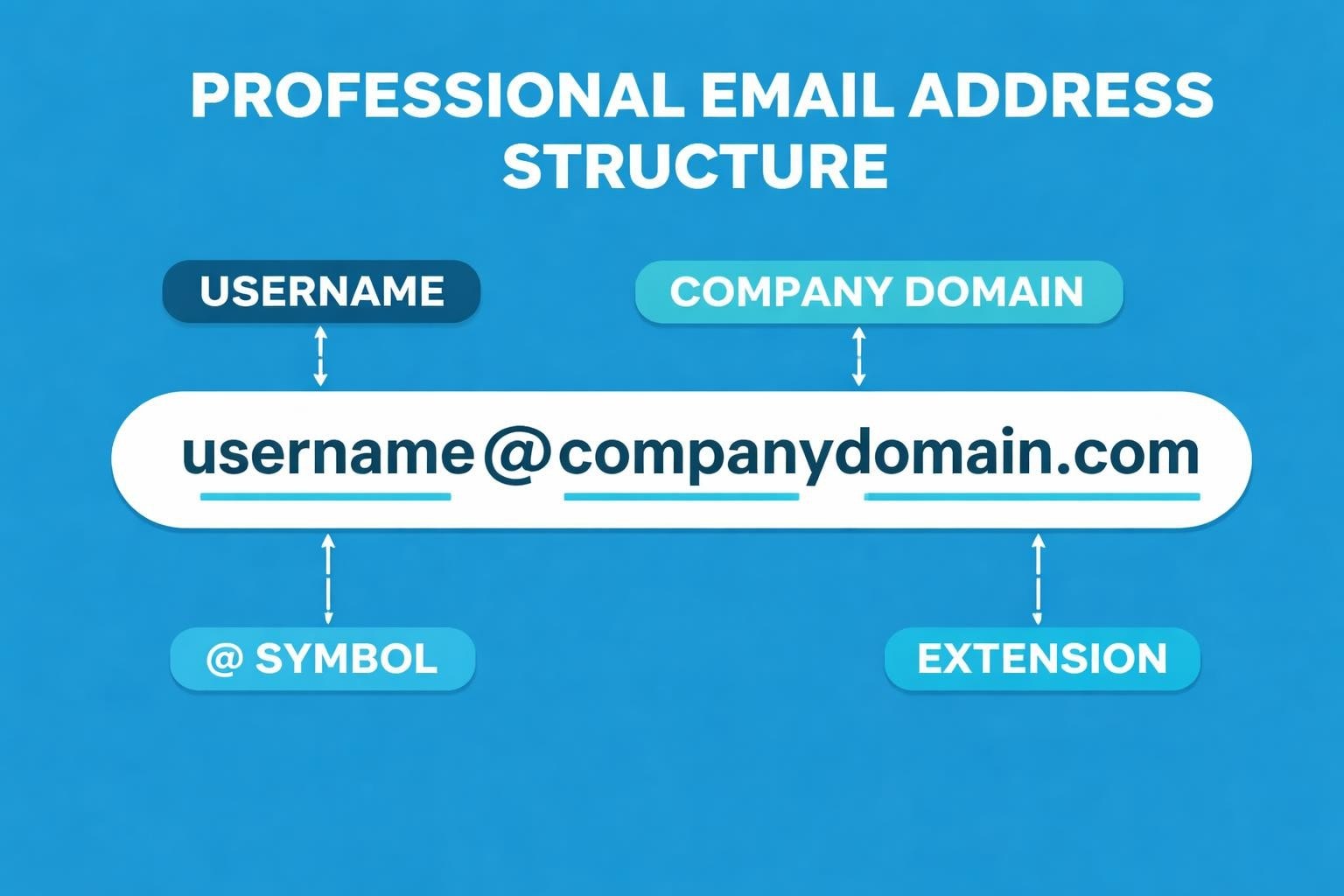
Your email address is often the first digital handshake you offer to clients, partners, and prospects. In 2026, with remote work continuing to dominate and digital communication serving as the primary business channel, establishing a good business email address isn't just recommended-it's essential. A professional email instantly communicates credibility, separates your personal life from your business operations, and builds trust before you've even written your first message. Whether you're launching a startup, rebranding an established company, or simply refining your digital presence, understanding what constitutes a good business email address will set the foundation for effective communication and lasting professional relationships.
Understanding What Makes a Good Business Email Address
A good business email address combines clarity, professionalism, and brand consistency. The fundamental structure follows a simple pattern: a recognizable username followed by your company's domain name. This format immediately distinguishes business correspondence from personal messages and ensures recipients know exactly who they're communicating with and which organization you represent.
The core characteristics of a good business email address include:
- Clear identification of the sender
- Use of the company's custom domain
- Professional formatting without numbers or special characters
- Easy-to-remember structure
- Consistency across the organization
When you choose a professional business email address, you're making a strategic decision about your brand's perception. Generic addresses using free providers like Gmail or Yahoo for business communications can undermine your credibility. A custom domain demonstrates investment in your brand and suggests a level of permanence and professionalism that free email services simply cannot match.
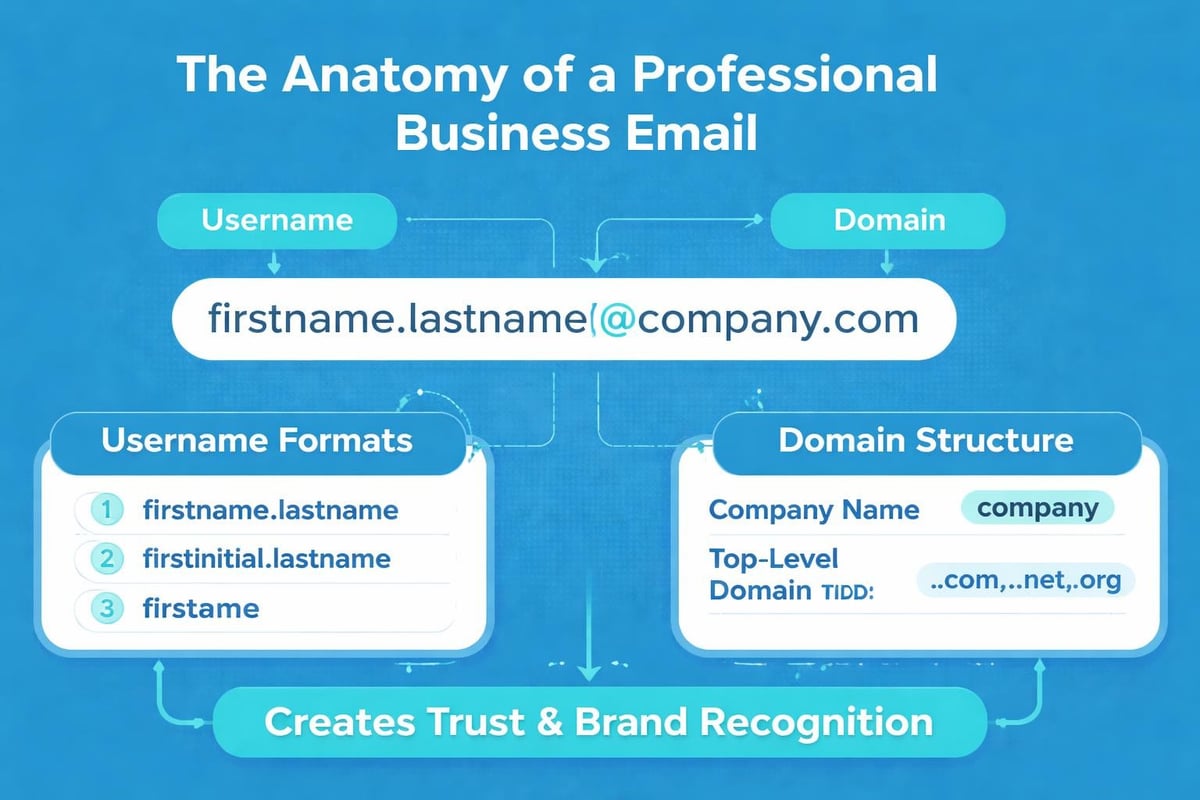
Professional Email Address Formats That Work
Different roles within your organization require different email address structures. The format you select should balance professionability with functionality, ensuring employees and customers alike can easily identify the purpose and recipient of each address.
Standard Employee Email Formats
The most common and effective formats for individual employees follow predictable patterns that make them easy to remember and use. Professional email address formats have evolved over decades of business communication, with certain structures proving more effective than others.
| Format | Example | Best For | Considerations |
|---|---|---|---|
| [email protected] | [email protected] | Most employees | May create long addresses |
| [email protected] | [email protected] | Small teams, executives | Limited to one person per first name |
| [email protected] | [email protected] | Larger organisations | Less personal but scalable |
| [email protected] | [email protected] | Alternative to dot separator | Underscores less common in 2026 |
Selecting a format requires considering your company's size and growth trajectory. A startup with five employees might comfortably use first names only, whilst a scaling business should implement a system that accommodates hundreds of potential team members. Whatever format you choose, consistency remains paramount. Mixing formats across your organization creates confusion and diminishes the professional image you're working to establish.
Departmental and Functional Email Addresses
Beyond individual addresses, every business needs functional email addresses for departments and specific purposes. These serve as central contact points and ensure continuity even when individual employees change roles or leave the company.
Essential departmental addresses include:
- [email protected] for general inquiries
- [email protected] for customer assistance
- [email protected] for commercial enquiries
- [email protected] as a friendly alternative to info
- [email protected] for recruitment matters
These addresses should route to appropriate teams or ticketing systems rather than individual inboxes. This approach ensures no message falls through the cracks during holidays, sick leave, or staff transitions. When you're ready to set up a business email system, planning these functional addresses from the start saves considerable reorganization later.
Avoiding Common Email Address Mistakes
Even experienced business owners sometimes create email addresses that undermine their professional image. Understanding these pitfalls helps you avoid them from the outset and ensures your email communications start on the strongest possible footing.
Numbers and Special Characters
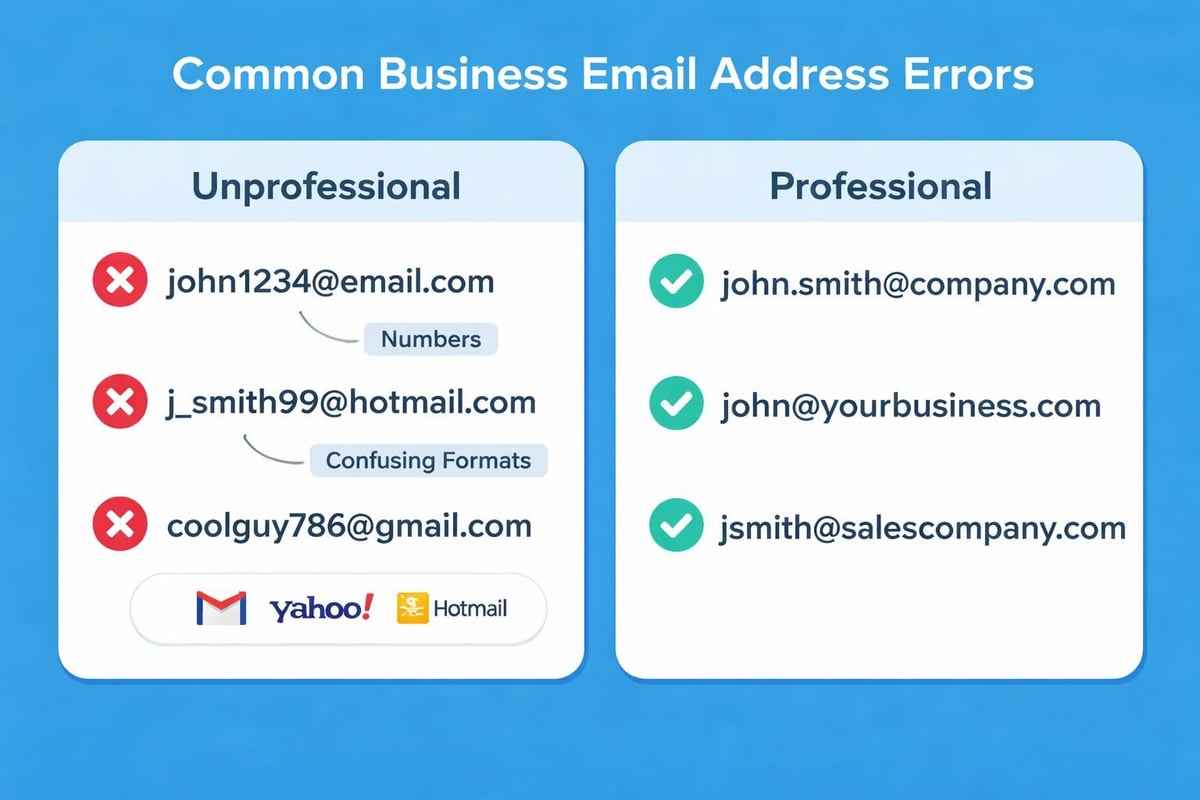
Adding numbers to email addresses rarely improves them. The practice typically signals that your preferred address was already taken, suggesting you're either late to your own domain or lack creativity in solving the problem. Instead of [email protected], consider variations like [email protected] or [email protected].
Special characters beyond the standard dot (.) and hyphen (-) create problems. Underscores work technically but confuse recipients when dictating addresses verbally. Symbols like plus signs, whilst supported by email protocols, often cause issues with form validation and appear unprofessional.
Generic and Unclear Addresses
An email address should clearly identify its purpose or recipient. Vague addresses like [email protected] or [email protected] create uncertainty. Recipients wonder whether they're reaching the right person and whether their message will receive attention.
Replace unclear addresses with specific alternatives:
- Instead of admin@, use operations@ or office@
- Replace contact@ with the specific department name
- Avoid abbreviations that aren't universally understood
- Skip cute or clever names that don't age well
The best formats for professional email addresses prioritize clarity over creativity. Your email should communicate instantly, without requiring recipients to guess or verify they've selected the correct contact.
Setting Up Your Business Email System
Creating a good business email address requires more than simply choosing a format. The technical setup, security measures, and integration with your broader communication strategy all contribute to a professional email system that serves your business effectively.
Choosing Your Email Provider
Small businesses in 2026 face an abundance of email hosting options. The decision extends beyond price, encompassing features, reliability, and integration capabilities with your existing tools and workflows.
When you're ready to get a business email, evaluate providers based on these criteria:
- Custom domain support that allows unlimited addresses
- Storage capacity adequate for your communication volume
- Security features including spam filtering and encryption
- Mobile accessibility through dedicated apps
- Integration options with CRM and marketing tools
Many small businesses benefit from email marketing platforms that combine standard email hosting with advanced marketing capabilities. These integrated solutions streamline operations and ensure consistency across all email communications, whether you're sending individual messages or launching campaigns to thousands of subscribers.
Domain Selection and Email Alignment
Your email address is only as professional as the domain it uses. Ideally, your email domain matches your website domain exactly. This alignment reinforces brand recognition and builds trust with every message you send.
Purchasing a custom domain through a reputable registrar costs minimal annual fees but delivers substantial credibility. Once secured, your domain serves as the foundation for all your professional email addresses, providing a consistent identity regardless of how many addresses you create or which employees join your team.
Email Address Strategy for Growing Businesses
A good business email address isn't a one-time decision but an evolving component of your communication infrastructure. As your business grows, your email strategy should scale accordingly, maintaining professionalism whilst accommodating new team members, departments, and communication needs.
Planning for Scalability
Forward-thinking email address planning prevents future headaches. Before creating your first address, document your naming conventions, formatting rules, and approval processes. This documentation ensures consistency as new employees join and prevents the chaotic mix of formats that plague organizations without clear standards.
| Growth Stage | Email Considerations | Recommended Actions |
|---|---|---|
| Solo entrepreneur | Single professional address | [email protected] or [email protected] |
| 2-10 employees | Individual addresses plus functional addresses | Implement consistent format, create department addresses |
| 11-50 employees | Department structure, role-based addresses | Document standards, consider email management system |
| 50+ employees | Complex hierarchy, multiple departments | Automated provisioning, centralized administration |
As you expand, consider how new departments, regional offices, or product lines might require additional email addresses. Planning these scenarios in advance allows you to create a flexible system that grows with your business without requiring complete reorganization.
Managing Multiple Email Addresses
Most business owners eventually manage several email addresses simultaneously. You might have a personal address for company ownership matters, a public-facing address for customer communications, and functional addresses for specific projects or partnerships.
Email clients in 2026 excel at consolidating multiple addresses into unified inboxes whilst maintaining the ability to send from specific addresses as needed. This functionality allows you to monitor all communications from a single interface whilst ensuring responses originate from the appropriate address.
Establishing clear rules about when to use each address maintains consistency and prevents confusion. Your public address handles general enquiries, your direct address serves existing clients, and functional addresses route to appropriate teams.
Email Address Best Practices for 2026
The fundamentals of professional email remain constant, but best practices evolve with technology and changing communication norms. Implementing current standards ensures your email addresses serve you effectively both now and as your business develops.
Security and Privacy Considerations
A good business email address incorporates modern security practices from inception. Enable two-factor authentication on all business email accounts, implement strong password policies, and educate team members about phishing threats. These measures protect not just your email but the sensitive business and customer information that flows through it.
Consider creating role-specific addresses for sensitive functions. Your finance team uses [email protected] for invoicing, whilst [email protected] handles contracts and compliance matters. This segmentation contains potential security breaches and makes auditing communications simpler.
Email security checklist:
- Two-factor authentication enabled on all accounts
- Regular password updates using password management tools
- SPF, DKIM, and DMARC records configured
- Employee training on phishing recognition
- Backup systems for email data retention
When you're ready to create a professional email address, prioritize providers offering robust security features as standard rather than premium add-ons.
Consistency Across Communication Channels
Your email address should align with your other professional identities. If you use LinkedIn, your profile should reference your business email. Your website contact page should display the same addresses you use in email signatures. This consistency reinforces your brand and makes it easier for clients and partners to reach you through their preferred channels.
Maintaining updated contact information across platforms requires periodic audits. Schedule quarterly reviews to ensure your email addresses remain current everywhere they appear, from email signatures to social media profiles to printed materials.
Integration with Email Marketing Strategies
A good business email address serves dual purposes: handling day-to-day communications and supporting your broader marketing initiatives. The addresses you create and how you structure them can significantly impact your marketing effectiveness and customer perception.
Sender Reputation and Deliverability
Every email address gradually builds a reputation with email providers. Messages from well-maintained addresses with positive engagement histories reach inboxes reliably. Addresses associated with spam complaints or poor engagement suffer deliverability problems that can cripple your marketing efforts.
Separating transactional emails from marketing communications protects both functions. Customer service responses originate from [email protected], whilst marketing campaigns send from [email protected] or [email protected]. This separation ensures that if marketing emails encounter deliverability issues, they don't compromise your critical business communications.
Understanding how professional email addresses work within email marketing ecosystems helps you make strategic decisions about which addresses to use for different communications. Your newsletter might benefit from a personal sender name paired with a branded address, whilst automated receipts work best from a clear functional address like [email protected].
Building Trust Through Email Authentication
Technical elements like SPF (Sender Policy Framework), DKIM (DomainKeys Identified Mail), and DMARC (Domain-based Message Authentication, Reporting, and Conformance) records verify that emails genuinely originate from your domain. These authentication methods have become increasingly important as email providers tighten security measures against phishing and fraud.
Properly configured authentication improves deliverability and builds recipient trust. When major email providers see authenticated messages from your domain, they're more likely to deliver them to primary inboxes rather than spam folders. This technical credibility complements the professional image your well-chosen email address projects.
Practical Examples and Implementation
Theory matters, but practical application transforms knowledge into results. Examining specific scenarios helps you understand how to implement a good business email address strategy within your unique business context.
Industry-Specific Considerations
Different industries have varying expectations around email professionalism. A creative agency might successfully use [email protected] for all employees, embracing a casual, approachable image. A legal firm typically requires more formal structures like [email protected], reflecting the gravity and tradition of the profession.
Business email name ideas vary by sector, but universal principles apply across industries. Clarity, consistency, and professionalism remain essential whether you're running a tech startup, a consulting practice, or a retail business.
Consider your clients' expectations and your industry's norms when selecting your format. Research competitors' email address structures, not to copy them, but to understand what your target audience considers normal and professional in your field.
Transitioning from Free to Professional Email
Many businesses start with free email services before graduating to custom domain addresses. This transition, whilst valuable, requires careful management to prevent communication disruptions and maintain professional continuity.
Steps for smooth email transition:
- Secure your custom domain and set up new professional addresses
- Configure forwarding from old addresses to new ones
- Update all online profiles and printed materials
- Announce the change to clients and contacts
- Maintain the old address active for 6-12 months
- Gradually phase out the old address entirely
During transition periods, include both addresses in your signature, noting that the new address is preferred. This approach ensures contacts update their records whilst providing a safety net for those who haven't yet made the change.
Managing Email Addresses as Your Business Evolves
Business evolution demands email strategy evolution. Mergers, rebrands, product launches, and market expansions all impact your email address needs and how you present your organization through digital communications.
Rebranding and Domain Changes
Rebranding presents unique email challenges. Your new domain might differ from your established one, requiring a complete email address transition whilst maintaining communication continuity with existing clients.
Plan rebranding email transitions months in advance. Secure your new domain early, configure professional addresses matching your established format, and implement forwarding from old to new addresses. Communicate changes clearly and repeatedly, ensuring customers, partners, and suppliers all update their records before you discontinue the old addresses.
Some businesses maintain both old and new domains indefinitely, with the legacy domain forwarding to the current one. This approach prevents lost communications from contacts using outdated information, though it requires ongoing domain renewal costs.
International Expansion and Multiple Domains
Expanding internationally often involves registering country-specific domains (.co.uk, .de, .com.au) alongside your primary .com domain. These localized domains can support region-specific email addresses that enhance local credibility whilst maintaining connection to your global brand.
A business operating in multiple countries might use [email protected] for UK staff and [email protected] for US employees. Alternatively, all employees might use the primary .com domain regardless of location, with country-specific domains reserved for regional marketing initiatives.
The approach you select depends on your organizational structure, brand strategy, and how your different markets perceive and interact with your business. There's no universal solution, but consistency within each region and clarity about your structure prevent confusion.
Establishing a good business email address forms the cornerstone of professional digital communication, combining brand identity, credibility, and functional efficiency into every message you send. From selecting the right format and avoiding common mistakes to implementing security measures and scaling your system as you grow, each decision contributes to how clients, partners, and prospects perceive your business. Astonish Email helps small businesses create professional email marketing systems that complement your business addresses, ensuring every communication reinforces your brand whilst reaching customers effectively. Start building your professional email presence today and transform how the world connects with your business.