Set Up a Business Email: Complete 2026 Guide
March 28, 2026
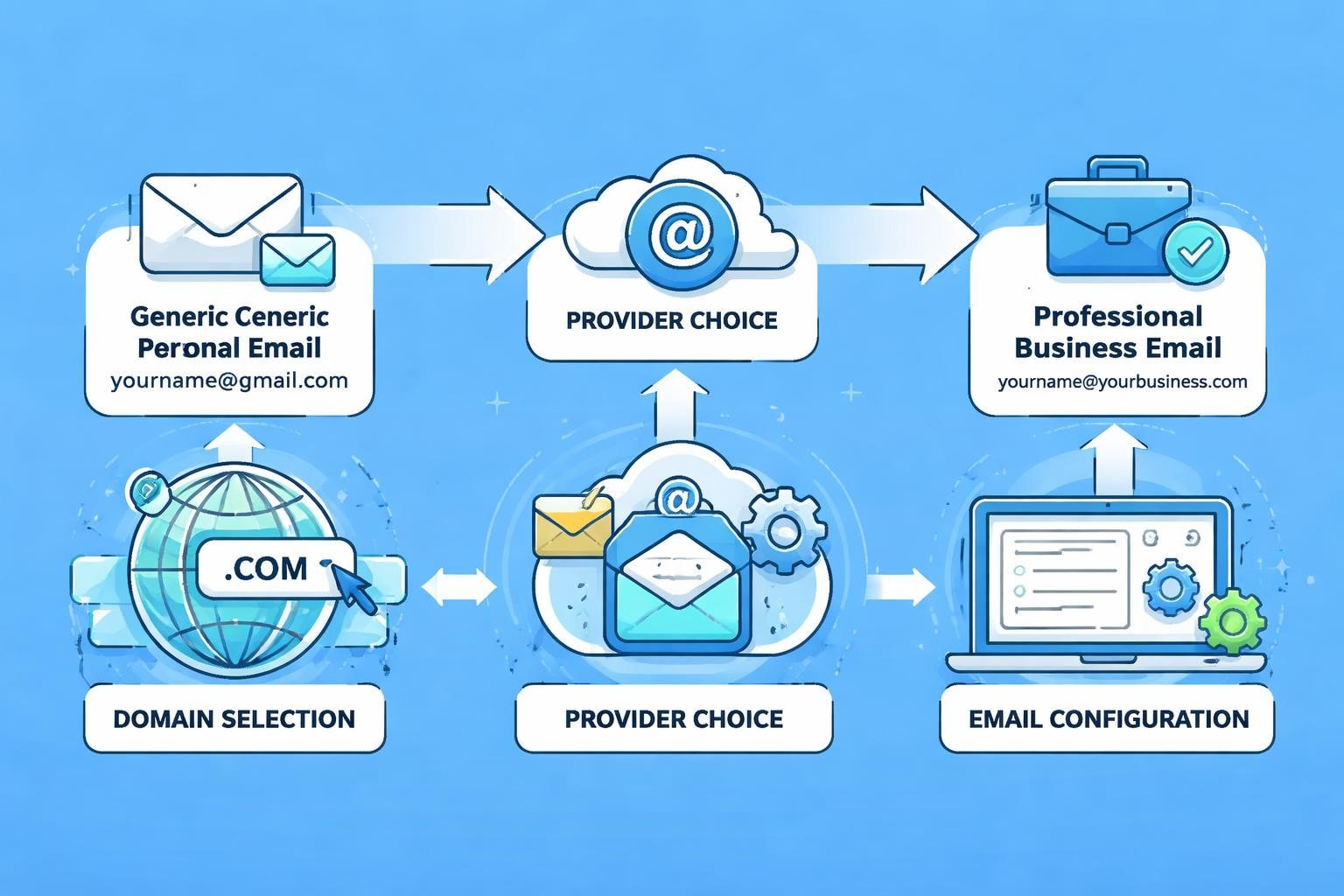
Professional communication starts with the right infrastructure. For small business owners looking to establish credibility and streamline operations, a custom business email address represents one of the most critical first steps. Using a generic email service diminishes your brand's authority and creates unnecessary friction in client relationships. When you set up a business email properly, you signal professionalism, improve deliverability, and create a foundation for scalable email marketing efforts that grow alongside your company.
Why Business Email Addresses Matter for Small Businesses
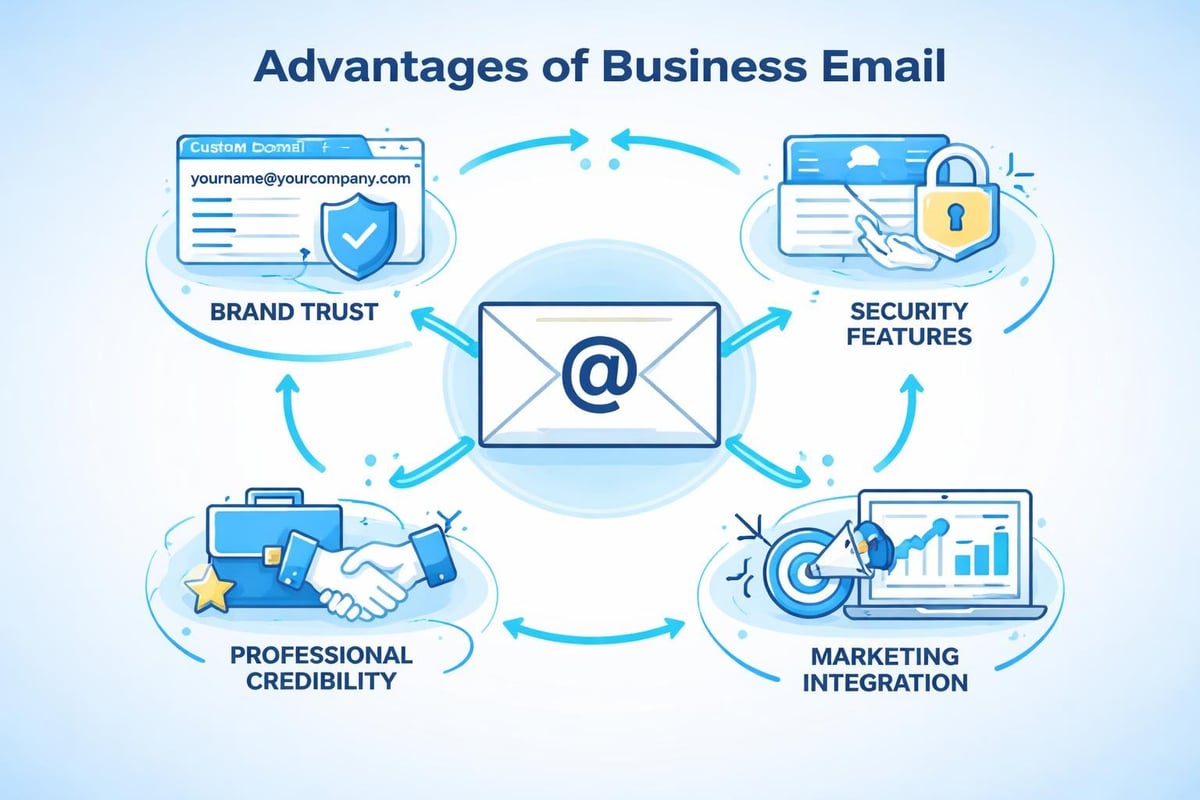
A professional email address builds immediate trust with potential clients. Studies consistently show that customers are more likely to engage with businesses using domain-based email addresses rather than free providers.
Brand consistency starts with every touchpoint, including your email signature. When clients receive messages from [email protected] instead of [email protected], they perceive your organisation as established and legitimate.
The security benefits cannot be overstated. Business email services typically include:
- Advanced spam filtering to protect your inbox from malicious content
- Two-factor authentication to prevent unauthorised access
- Data encryption for sensitive client communications
- Administrative controls to manage team access and permissions
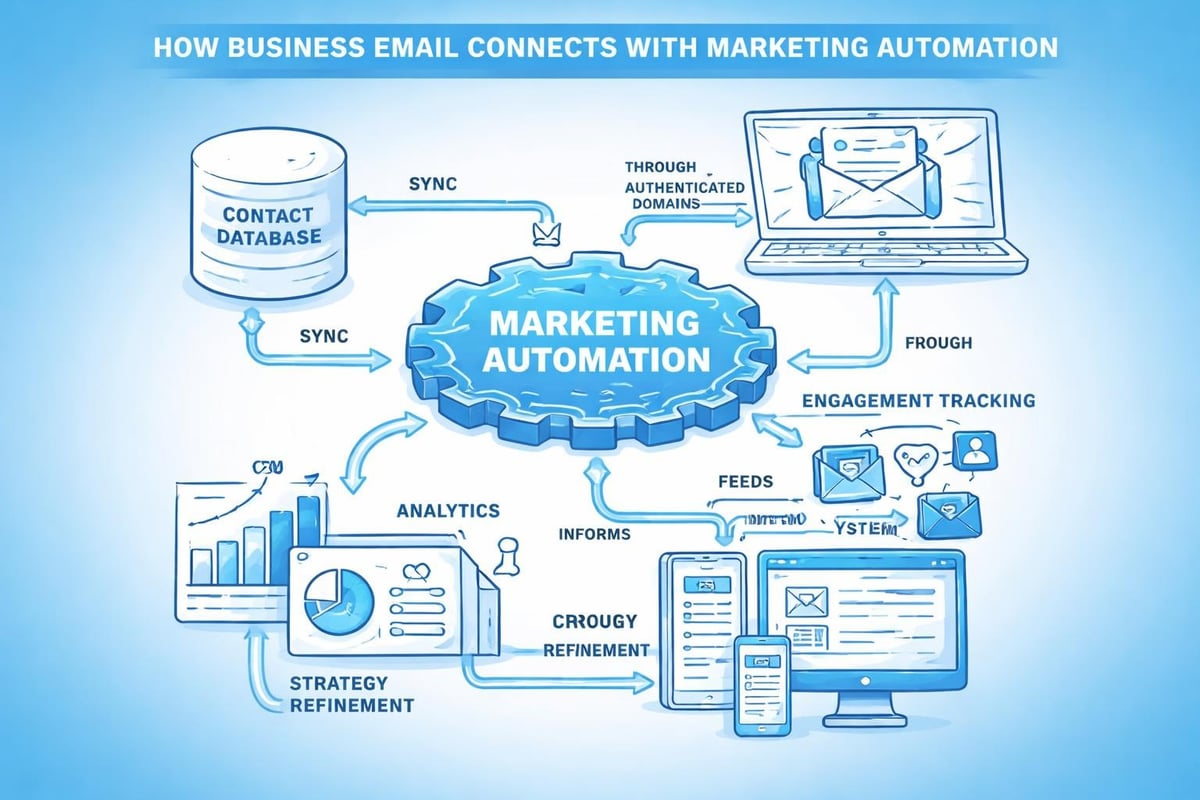
Marketing automation tools integrate seamlessly with business email platforms. Creating a professional email address allows you to connect with email marketing software, customer relationship management systems, and analytics platforms that drive growth.
Choosing the Right Email Provider Platform
When you set up a business email, provider selection determines your long-term functionality and costs. The best email providers of 2026 offer varying features suited to different business models.
Google Workspace Features and Benefits
Google Workspace dominates the business email market through integration with productivity tools. The platform combines Gmail's interface with Drive, Calendar, Meet, and collaborative documents.
| Feature | Basic Plan | Business Standard | Business Plus |
|---|---|---|---|
| Storage | 30GB | 2TB | 5TB |
| Email Accounts | Unlimited | Unlimited | Unlimited |
| Video Meeting Capacity | 100 participants | 150 participants | 500 participants |
| Monthly Cost per User | £4.60 | £9.20 | £13.80 |
Google Workspace's official platform provides comprehensive setup guidance and 24/7 support for businesses of all sizes.
Microsoft 365 Business Solutions
Microsoft 365 excels for organisations already invested in Windows ecosystems. Outlook integration with Teams, SharePoint, and OneDrive creates a unified workspace.
The platform offers superior calendar management and scheduling features. Enterprise-level security includes threat protection, data loss prevention, and compliance tools that exceed basic business requirements.
Dedicated Email Hosting Services
Specialist providers focus exclusively on email delivery and management. These services often provide better deliverability rates and more granular control over server settings.
Benefits include custom mail server configurations, enhanced privacy protections, and dedicated IP addresses that improve sender reputation for email marketing campaigns.
Domain Registration and DNS Configuration
Before you can set up a business email, you need a registered domain name that reflects your brand identity. This becomes your email address foundation.
Selecting Your Business Domain Name
Choose a domain that matches your company name precisely. Short, memorable domains improve recall and reduce typing errors when clients send messages.
Consider these domain selection criteria:
- Avoid hyphens and numbers that complicate verbal communication
- Select appropriate extensions (.com, .co.uk, or industry-specific options)
- Check trademark availability to prevent legal complications
- Verify social media handle consistency across platforms
Domain registrars like GoDaddy, Namecheap, and Google Domains offer competitive pricing and management interfaces. Annual costs typically range from £8 to £15 for standard extensions.
Configuring MX Records Correctly
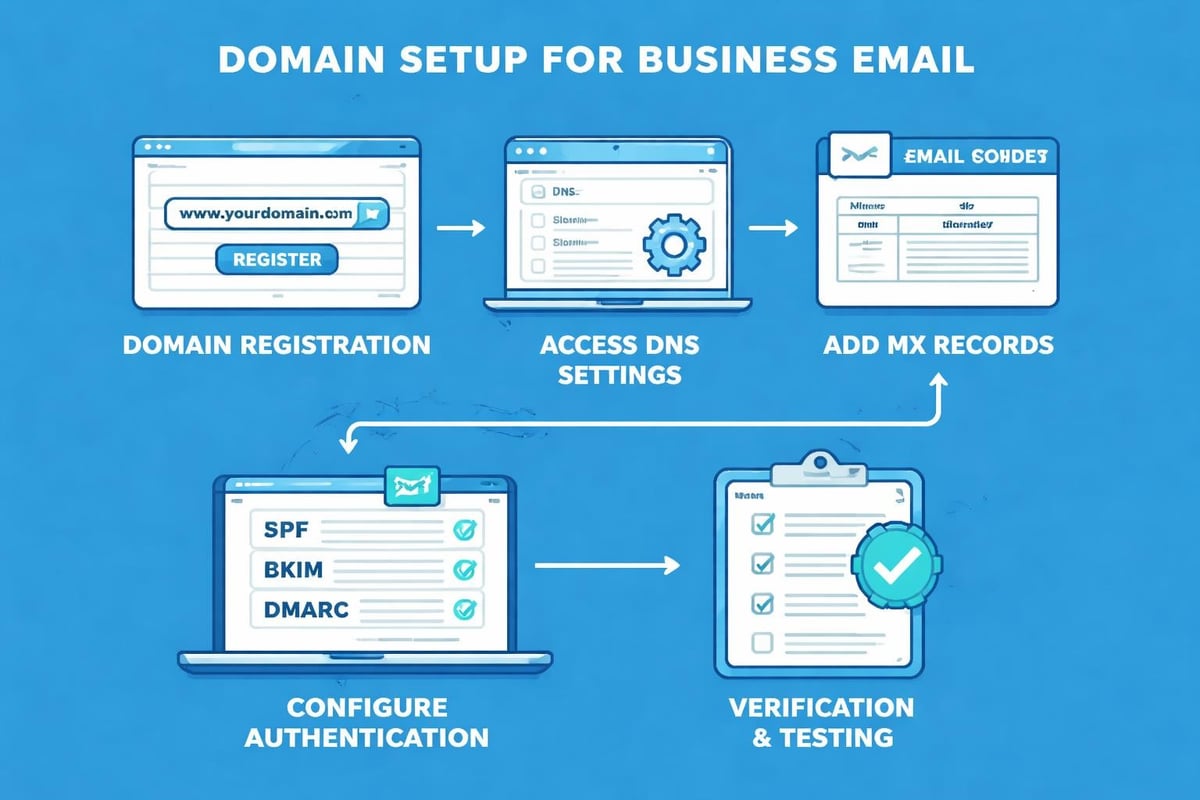
MX (Mail Exchange) records direct incoming email to your chosen provider's servers. Setting up these DNS records requires accessing your domain registrar's control panel.
The configuration process involves:
- Logging into your domain management dashboard
- Locating the DNS or Zone File settings section
- Adding MX records provided by your email service
- Setting priority values that determine mail routing order
- Configuring SPF and DKIM authentication records
DNS propagation typically completes within 24-48 hours, though changes may appear faster in some regions.
Step-by-Step Business Email Setup Process
To set up a business email effectively, follow this systematic approach that ensures proper configuration from the start.
Creating Your First Email Account
Access your chosen provider's administration console and navigate to user management. Define your primary email address carefully, as changing it later disrupts communications.
Standard naming conventions include:
- [email protected] for individual staff members
- [email protected] for general enquiries
- [email protected] for customer service requests
- [email protected] for commercial communications
Create strong passwords combining uppercase letters, lowercase letters, numbers, and symbols. Enable two-factor authentication immediately to protect against unauthorised access.
Configuring Email Client Applications
Desktop and mobile email clients provide offline access and improved productivity. Popular options include Microsoft Outlook, Apple Mail, and Thunderbird.
| Email Client | Platform | Key Strengths | Cost |
|---|---|---|---|
| Microsoft Outlook | Windows, Mac, Mobile | Calendar integration, Office compatibility | £4.60/month |
| Apple Mail | Mac, iOS | Native integration, simplicity | Free |
| Thunderbird | Windows, Mac, Linux | Open source, extensive add-ons | Free |
| Mailbird | Windows | Unified inbox, modern interface | £2.30/month |
Understanding different email clients helps you select tools that match your workflow preferences and technical requirements.
Setting Up Email Forwarding and Aliases
Email aliases allow multiple addresses to route into a single inbox. This simplifies management whilst maintaining professional appearance across different functions.
Configure catch-all forwarding to capture messages sent to unrecognised addresses on your domain. This prevents lost communications when clients mistype recipient names.
Essential Email Security Configurations
Security measures protect your business from data breaches, phishing attacks, and reputation damage. When you set up a business email, implement these safeguards immediately.
Implementing SPF, DKIM, and DMARC
Sender Policy Framework (SPF) verifies that emails claiming to come from your domain originate from authorised servers. Add an SPF record to your DNS settings listing approved sending IP addresses.
DomainKeys Identified Mail (DKIM) adds encrypted signatures to outgoing messages. Recipients' servers verify these signatures to confirm message authenticity and detect tampering.
Domain-based Message Authentication, Reporting, and Conformance (DMARC) builds upon SPF and DKIM by instructing receiving servers how to handle failed authentication. Set policies to quarantine or reject suspicious messages.
Best practices for business email emphasise these authentication protocols as non-negotiable security requirements.
Password Policies and Access Management
Enforce minimum password complexity requirements across all email accounts. Mandate regular password updates every 90 days and prohibit password reuse across multiple services.
Implement role-based access controls that limit administrative functions to designated team members. Regular access audits identify unused accounts that represent security vulnerabilities.
Professional Email Signature Design
Email signatures extend your brand identity into every message. They provide recipients with essential contact information and legal disclosures.
Essential Signature Components
Include your full name, job title, company name, and primary contact number. Add your company website URL to drive traffic and provide additional context about your services.
Professional signatures typically contain:
- Direct phone number with international dialling code
- Physical business address for credibility
- Links to primary social media profiles
- Company logo sized appropriately (maximum 600 pixels wide)
- Legal disclaimers required by your industry or jurisdiction
Avoid cluttering signatures with excessive graphics, animated elements, or inspirational quotes that dilute professionalism.
Mobile Signature Optimisation
Create simplified mobile signatures that load quickly and display correctly on small screens. Reduce image sizes and limit text to critical information only.
Test signatures across different devices and email clients to ensure consistent rendering. What appears perfect in one application may break formatting in another.
Organising Your Business Inbox Efficiently
Effective inbox management prevents important messages from disappearing into chaos. Setting up an organised email system improves response times and reduces stress.
Folder Structures and Labelling Systems
Create folders based on project categories, client names, or functional areas. Consistent naming conventions enable quick navigation and search functionality.
Implement these organisational strategies:
- Archive processed messages to maintain a clean primary inbox
- Use colour-coding to prioritise urgent communications visually
- Set up filters that automatically sort incoming mail into relevant folders
- Create templates for frequently sent responses to save time
- Schedule regular inbox maintenance to prevent digital clutter accumulation
Automated Rules and Filters
Email rules execute predefined actions based on message characteristics. Configure filters that move newsletters to dedicated folders, flag messages from key clients, or forward specific enquiries to team members.
Priority inbox features highlight important messages based on sender history and previous engagement patterns. Train these algorithms by consistently marking critical emails appropriately.
Integrating Email with Marketing Platforms
Business email serves as the foundation for customer communications beyond simple messaging. When you set up a business email properly, integration possibilities multiply.
CRM Synchronisation Benefits
Customer relationship management systems aggregate email communications alongside purchase history, support tickets, and engagement metrics. This unified view enables personalised interactions that increase conversion rates.
Exploring email marketing benefits reveals how proper business email setup amplifies campaign effectiveness and deliverability rates through authenticated sending domains.
Marketing Automation Workflows
Automated email sequences nurture leads through personalised content triggered by specific behaviours. Welcome series, abandoned cart reminders, and re-engagement campaigns operate automatically whilst maintaining brand consistency.
Segmentation capabilities allow targeted messaging to different audience groups based on demographics, purchase history, or engagement levels. This precision improves open rates and reduces unsubscribe rates.
Mobile Email Access Configuration
Modern business requires email access across multiple devices. Configure mobile applications properly to maintain security whilst enabling productivity.
iOS and Android Setup Procedures
Download your email provider's official mobile application for the best feature integration. Native apps typically offer superior push notification management and offline access compared to generic email clients.
Mobile configuration steps include:
- Installing the provider's official app from trusted app stores
- Entering your complete email address and password
- Confirming two-factor authentication prompts
- Adjusting sync settings to balance battery life with update frequency
- Configuring notification preferences to avoid constant interruptions
Test sending and receiving messages from mobile devices before relying on them for critical communications.
Managing Multiple Accounts
Many professionals manage several email accounts across different organisations or roles. Unified inbox features consolidate multiple accounts into a single interface whilst maintaining separate sending identities.
Configure default sending accounts carefully to prevent accidentally sending personal messages from business addresses or vice versa. Clear visual indicators help identify which account you're currently using.
Cost Considerations and Budgeting
Email service costs vary dramatically based on features, storage capacity, and user numbers. Understanding pricing structures helps small businesses allocate resources effectively.
Comparing Provider Pricing Models
Most business email providers charge per-user monthly fees. Volume discounts apply when purchasing licences for larger teams, whilst annual commitments typically offer 10-20% savings compared to monthly billing.
Hidden costs to consider include:
- Domain registration and annual renewal fees
- Additional storage beyond included allocations
- Premium support services for priority assistance
- Advanced security features like data loss prevention
- Compliance archiving for regulated industries
Free email services lack the professionalism and features necessary for serious business use. The minimal investment in proper business email delivers substantial returns through improved credibility and functionality.
Scaling Costs as Teams Grow
Plan for expansion when selecting your initial provider. Migrating email services disrupts operations and risks data loss, making it preferable to choose scalable solutions from the start.
Calculate total cost of ownership including setup time, training requirements, and ongoing administration. Enterprise Nation's guide to business email explores different provider tiers and their suitability for various business stages.
Compliance and Data Protection Requirements
Email communications often contain sensitive information subject to regulatory requirements. When you set up a business email, configure compliance features appropriate to your industry and location.
GDPR Considerations for UK Businesses
The General Data Protection Regulation mandates specific handling of personal data in email communications. Implement retention policies that automatically delete old messages after defined periods.
Obtain explicit consent before adding contacts to marketing lists. Include clear unsubscribe mechanisms in every promotional message and process removal requests within 30 days.
Email Retention Policies
Define how long different message categories should remain accessible. Financial records might require seven-year retention, whilst general correspondence can be deleted after two years.
Automated archiving solutions preserve deleted messages for compliance purposes whilst removing them from active mailboxes. This balances storage costs against regulatory requirements and potential litigation needs.
Training Team Members on Email Best Practices
Technical setup represents only half the equation. Establishing email usage guidelines ensures consistent, professional communication across your organisation.
Creating Email Communication Guidelines
Document expectations for response times, tone, formatting, and appropriate content. Specify when email is preferable to phone calls, instant messaging, or face-to-face conversations.
Professional email standards should cover:
- Maximum acceptable response times for different message types
- Appropriate use of CC and BCC fields to prevent information overload
- Guidelines for attachment sizes and file formats
- Protocols for handling confidential information
- Expectations for out-of-office notifications during absences
Regular training sessions reinforce these standards and address emerging challenges as your team grows.
Security Awareness Training
Phishing attacks target employees through convincing impersonation attempts. Train staff to recognise suspicious messages, verify sender identities, and report potential threats promptly.
Conduct simulated phishing exercises quarterly to assess vulnerability and provide targeted education. Track improvement over time and adjust training content based on identified weaknesses.
Troubleshooting Common Email Issues
Even properly configured systems encounter occasional problems. Understanding common issues and their solutions minimises disruption to business operations.
Deliverability Problems and Solutions
Messages landing in spam folders indicate authentication issues or poor sender reputation. Verify SPF, DKIM, and DMARC records are correctly configured and actively monitoring your sending patterns.
Avoid spam trigger words in subject lines and message content. Maintain clean contact lists by removing invalid addresses and respecting unsubscribe requests immediately.
Connectivity and Sync Errors
Connection failures often stem from incorrect server settings or network restrictions. Verify you're using the correct IMAP/SMTP server addresses and port numbers specified by your provider.
Firewall and antivirus software sometimes block email traffic. Configure exceptions for your email client applications whilst maintaining appropriate security protections.
Advanced Features for Growing Businesses
As operations expand, sophisticated email capabilities become increasingly valuable. Evaluate these features when you set up a business email system designed for long-term growth.
Shared Mailboxes and Delegation
Shared mailboxes enable multiple team members to access common addresses like [email protected] or [email protected] without sharing passwords. This improves collaboration whilst maintaining individual accountability.
Delegation features allow assistants to manage executives' email communications without compromising security. Granular permissions control whether delegates can send messages on behalf of others.
Email Analytics and Reporting
Track metrics including response times, message volumes, and team performance indicators. Analytics reveal bottlenecks, identify training opportunities, and quantify productivity improvements.
Integration with business intelligence platforms correlates email activity with sales outcomes, customer satisfaction scores, and operational efficiency metrics.
Setting up a business email properly establishes the foundation for professional communication and effective marketing campaigns. The investment in custom domains, secure infrastructure, and proper configuration pays dividends through improved credibility, enhanced deliverability, and seamless integration with growth tools. Whether you're launching a new venture or upgrading from personal email services, implementing these best practices positions your small business for sustainable success. Astonish Email provides the email marketing capabilities small businesses need to leverage professional email infrastructure for customer engagement, automated campaigns, and measurable results that drive growth.