Guide to Choosing the Best Email Address for Email Marketing 2026
January 9, 2026
In 2026, your email address for email marketing is more than a contact detail, it shapes how customers see your business from the very first message. Many small companies still find it challenging to choose the right email address for email marketing, putting their campaigns at risk of low engagement and deliverability.
This guide breaks down the critical steps for selecting and managing the best email address for email marketing. You will discover proven strategies, expert tips, and up-to-date best practices designed for small businesses.
Learn how a well-chosen sender address can boost your open rates, build trust with your audience, and help keep your emails out of spam. Ready to improve your results? Read on for a step-by-step guide that covers technical essentials, branding, setup, and practical examples to ensure your email marketing thrives in 2026.
Why Your Email Address Matters in Email Marketing
Your email address for email marketing is more than just a technical detail. It is a critical factor that shapes deliverability, trust, and engagement. Choosing the right sender address can mean the difference between your messages landing in inboxes or being lost to spam. Understanding why your sender address matters helps you build a stronger foundation for every campaign you send.
The Impact of Sender Address on Deliverability
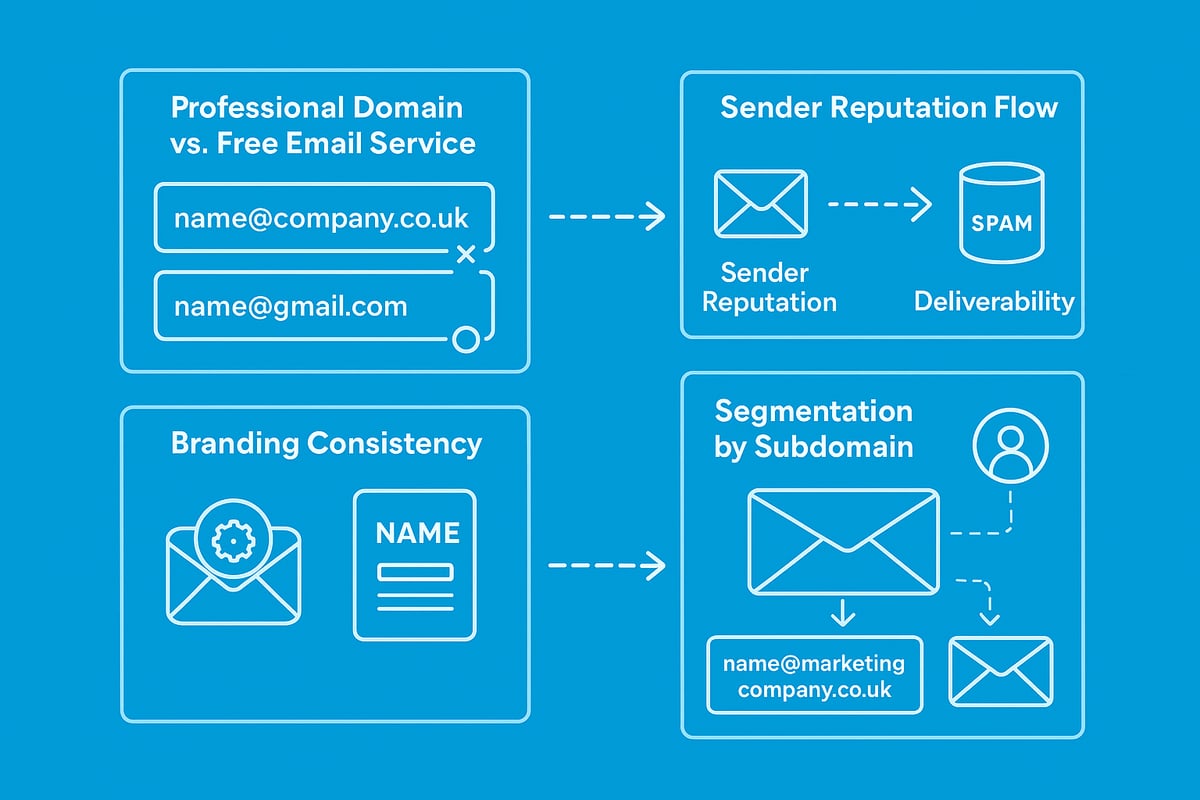
Deliverability is at the heart of every successful email campaign. Internet service providers and spam filters closely analyse the email address for email marketing to determine if your messages are trustworthy. Sender reputation is built over time, and a poor sender address can quickly damage it.
Consider this: 45% of all emails globally are classified as spam. Using a generic or unbranded sender address increases your risk of being flagged. Free email services like Gmail or Yahoo may be convenient, but they lack the authority and control of a professional domain. The table below highlights the key differences:
| Feature | Professional Domain | Free Email Service |
|---|---|---|
| Custom Branding | Yes | No |
| Deliverability | High | Low |
| Perception | Trustworthy | Unprofessional |
A branded sender address improves open and response rates, as recipients are more likely to trust and engage with familiar domains. For example, companies using branded addresses consistently see higher engagement compared to those using free providers. Avoiding no-reply addresses is also crucial, as these can suppress replies and damage your reputation.
Compliance is another factor. Your email address for email marketing must align with regulations like GDPR and CAN-SPAM, making it essential to use a professional, monitored address. For guidance on setting up a compliant and effective sender address, see this step-by-step guide to creating a business email address.
Building Trust and Brand Recognition
Trust is the cornerstone of any email marketing strategy. Recipients instinctively look at the sender's address and name before deciding to open an email. Consistent branding in your email address for email marketing signals professionalism and reliability.
The psychological impact is clear. Emails from familiar, branded addresses such as "[email protected]" inspire confidence, while random or generic addresses like "[email protected]" often raise suspicion. This distinction directly influences open rates, click-throughs, and conversions.
Consider the display name alongside your address. For instance, "Sarah from YourBrand [email protected]" feels personal and authentic, encouraging recipients to engage. The reply-to address plays a role as well. A monitored, reply-able address invites conversation, while a no-reply discourages interaction and may be seen as unfriendly.
Maintaining consistent branding across all campaigns helps reinforce your identity. Recipients are more likely to remember and trust your communications, which can lead to long-term loyalty and higher engagement.
Segmentation and Sender Address Strategy
A smart segmentation strategy involves using different email addresses for various functions. For example, you might use "info@", "hello@", or "news@" for separate campaign types. This approach not only clarifies the purpose of each message but also protects your sender reputation by isolating transactional and marketing streams.
For e-commerce businesses, using unique subdomains for each store or department can further enhance deliverability. "[email protected]" for newsletters and "[email protected]" for customer service are clear, purposeful distinctions.
List management becomes easier when each type of communication has its own address. You can monitor engagement more precisely, respond to replies efficiently, and reduce the risk of one campaign affecting the reputation of another. This segmentation, when aligned with a professional email address for email marketing, ensures your campaigns remain effective and compliant.
Key Considerations When Choosing Your Email Address
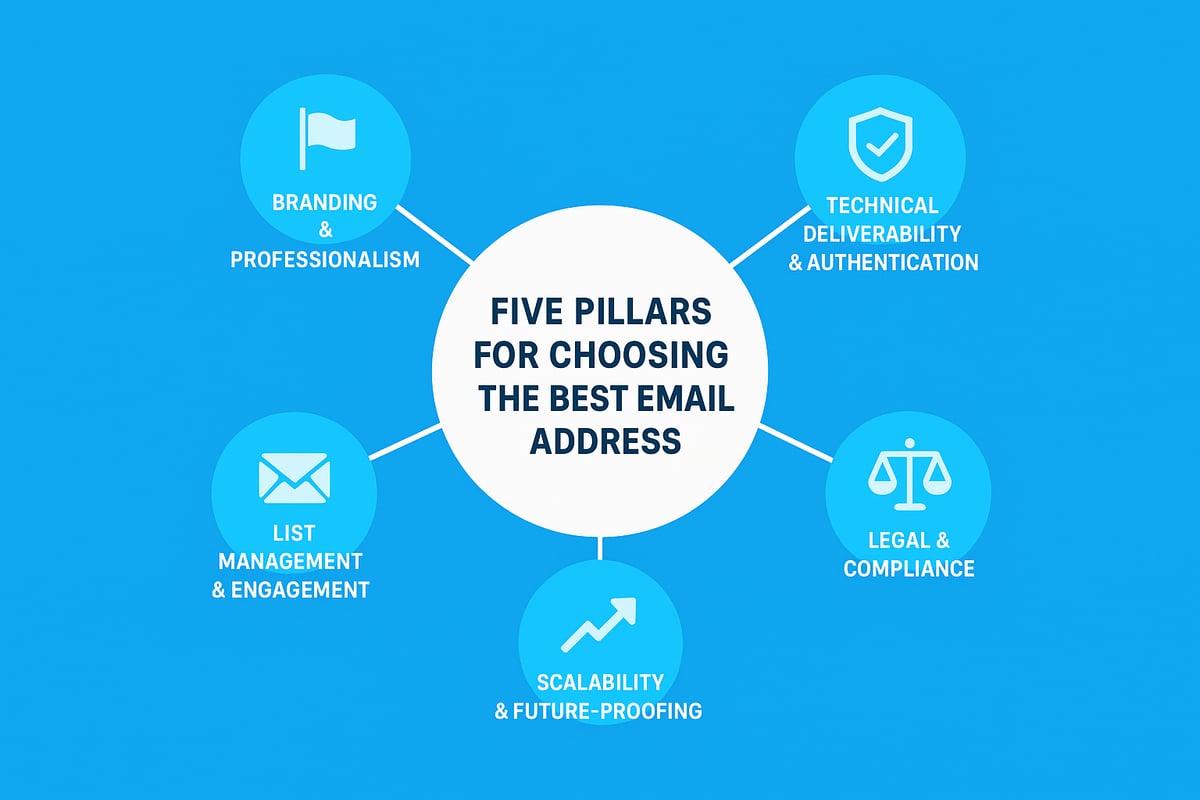
Selecting the right email address for email marketing is crucial for long-term success. The address you choose affects deliverability, trust, compliance, and your ability to scale. Below, we explore the key factors every business should consider.
Branding and Professionalism
A professional image starts with your sender identity. Always use your own domain, such as [email protected], rather than free services like Gmail or Yahoo. This approach signals credibility and sets the tone for every interaction. Keep your email address for email marketing short, clear, and relevant, using formats like hello@ or newsletter@. The sender name displayed alongside the address is equally important. For instance, “Sarah from YourBrand [email protected]” builds personal recognition. For more on aligning addresses with your brand, see Branding your email address. Consistent branding increases trust and open rates.
Technical Deliverability and Authentication
Behind the scenes, technical configuration determines if your messages reach inboxes. Implement SPF, DKIM, and DMARC records on your domain to authenticate your email address for email marketing. Align the “from” address with your sending domain to avoid mismatches that trigger spam filters. Using subdomains, such as [email protected], helps separate marketing traffic and maintain reputation. Email platforms like Klaviyo recommend dedicated sending subdomains per store to further enhance deliverability. Testing and monitoring your setup is essential for ongoing success.
List Management and Engagement
Your email address for email marketing should encourage two-way communication. Use reply-able addresses instead of “no-reply” to foster engagement. Set up systems to handle bounces, auto-replies, and unsubscribe requests efficiently. Monitoring list engagement by sender address helps identify issues early and refine your approach. For example, keep support@ for customer queries and offers@ for promotions. This separation streamlines management and ensures each message resonates with its intended audience.
Legal and Compliance Factors
Compliance is non-negotiable in email marketing. Your email address for email marketing must meet regional laws such as GDPR and CAN-SPAM. Always include a valid physical business address and a genuine reply-to option in your campaigns. Avoid misleading or spoofed addresses, as these can result in fines and reputational damage. Ensuring transparency and honesty in your sender identity builds trust and keeps your business on the right side of regulations.
Scalability and Future-Proofing
Think ahead when choosing your email address for email marketing. If you plan to expand with multiple brands, stores, or departments, use a scalable structure from the start. For example, e-commerce businesses often deploy subdomains like send.brand.com for each shop. This approach allows for easy growth, flexible use of aliases, and clear segmentation. Planning now means your email infrastructure can adapt smoothly as your business evolves.
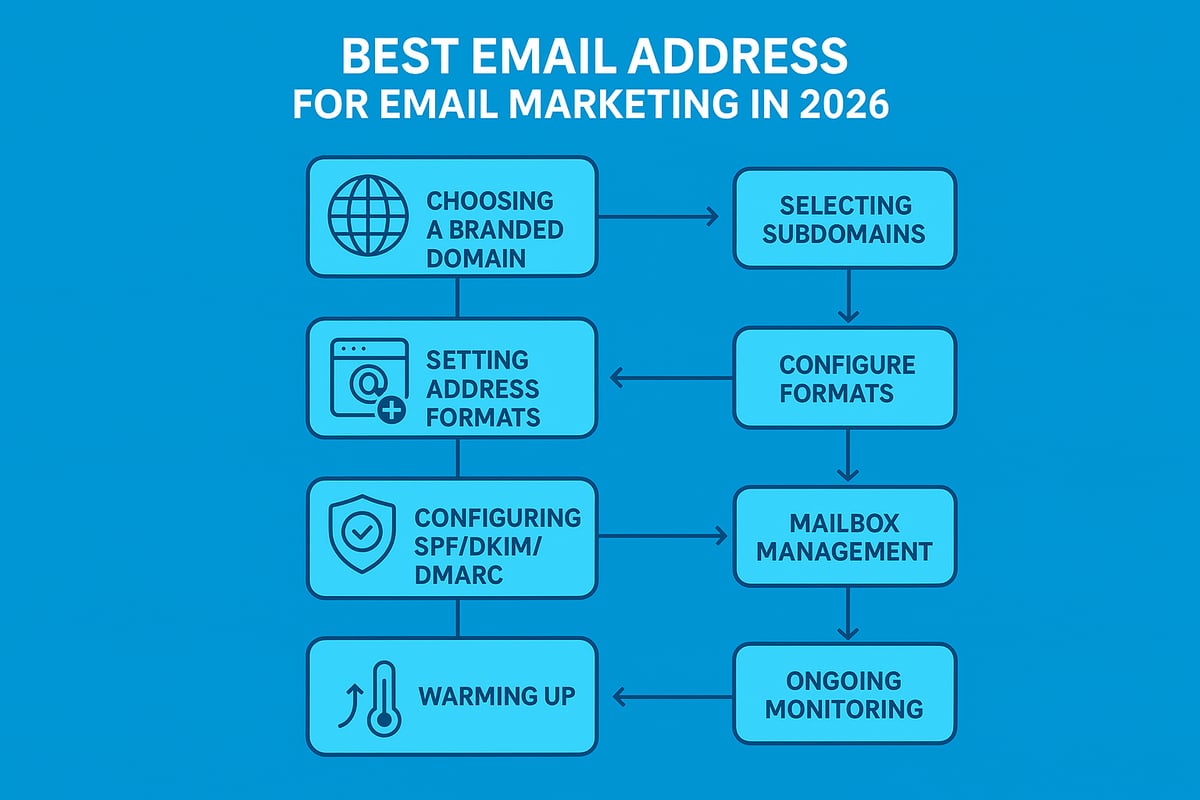
Step-by-Step Guide: Setting Up the Best Email Address for Marketing in 2026
Choosing and setting up the right email address for email marketing is critical to success in 2026. Each step in this process builds a foundation for strong deliverability, compliance, and brand trust.
Step 1: Choose the Right Domain and Subdomain
Your domain is the foundation of your email address for email marketing. Start by registering a branded domain if you do not already have one. This instantly signals professionalism and builds trust with recipients.
Consider creating a dedicated subdomain for marketing emails. For example, use emails.yourbrand.com or send.yourbrand.co.uk to separate marketing activities from transactional or internal communication. This approach helps protect your main domain’s reputation if issues arise.
If you operate multiple stores or brands, assign a unique subdomain for each, such as send.store1.com and send.store2.com. This structure supports scalability and reputation management.
A table can help summarise the structure:
| Purpose | Example Address |
|---|---|
| Main Brand | [email protected] |
| Marketing Subdomain | [email protected] |
| Store 1 | [email protected] |
| Store 2 | [email protected] |
The right domain and subdomain choice is the first step in building a reliable email address for email marketing.
Step 2: Select the Appropriate Address Format
The format of your email address for email marketing affects both deliverability and brand perception. Use clear, role-based addresses such as hello@, news@, offers@, or team@ paired with your branded domain.
Avoid generic or spammy addresses like marketing123@ or no-reply@. These can reduce engagement and may trigger spam filters. Instead, match the address to the campaign type. For example, use support@ for customer service and newsletter@ for regular updates.
Pair each address with a recognisable sender name, such as “Sarah from YourBrand [email protected]”. This combination builds trust and increases open rates.
Always ensure your chosen email address for email marketing is short, memorable, and easy to associate with your business.
Step 3: Configure Email Authentication
Proper authentication is essential for any email address for email marketing. Set up SPF, DKIM, and DMARC records on your sending domain or subdomain. These protocols prove your emails are legitimate and help prevent spoofing or phishing attacks.
Align your “from” address with the authenticated domain to avoid mismatches that may cause deliverability issues. Many platforms, like Klaviyo, recommend using dedicated sending subdomains for extra protection.
For a detailed walkthrough on best practices, consult the Email authentication best practices guide from Cisco. This resource provides step-by-step instructions for configuring SPF, DKIM, and DMARC.
Setting up these records is a non-negotiable step to protect your email address for email marketing and ensure your messages reach inboxes.
Step 4: Establish Mailbox and Alias Management
Creating an organised mailbox system supports efficient management of your email address for email marketing. Set up dedicated inboxes or use aliases and forwarding to route messages to the right team members.
For example, you might use a catch-all address to collect replies or set up specific mailboxes for offers@, support@, and info@. Monitoring these inboxes ensures prompt responses to customer queries, bounces, and auto-replies.
Many businesses use one main mailbox with multiple aliases for efficiency. This approach allows you to manage all communications from a single dashboard while maintaining separate addresses for different purposes.
Proper mailbox management is key to maximising the effectiveness of your email address for email marketing.
Step 5: Warm Up Your Sending Address and Domain
A new email address for email marketing must be warmed up before sending bulk campaigns. Start by sending small batches to your most engaged subscribers, then gradually increase the volume.
This process helps establish a positive sender reputation with ISPs and reduces the risk of your emails being marked as spam. Monitor key metrics such as open rates, bounce rates, and spam complaints during the warm-up phase.
Many platforms provide ramp-up plans to guide you through this process. Stick to a consistent sending schedule and avoid large spikes in volume.
A properly warmed-up email address for email marketing lays the groundwork for high deliverability and long-term success.
Step 6: Monitor, Test, and Optimise
Ongoing monitoring is essential for the continued success of your email address for email marketing. Regularly test inbox placement using tools that check for spam and blacklists.
Track sender reputation, engagement rates, and authentication status. Use A/B testing to refine sender names, subject lines, and address formats for optimal results.
If you notice deliverability issues, adjust your strategy promptly. Review your authentication settings, clean your list, and ensure your sending practices meet current standards.
Constant optimisation ensures your email address for email marketing remains a valuable asset that drives engagement and conversions.
Step 7: Maintain Consistency and Compliance
Consistency and compliance are the final pillars of an effective email address for email marketing. Use the same sender address and display name across all campaigns to reinforce brand recognition.
If your business rebrands or expands, update your addresses and authentication records accordingly. Always include a valid reply-to address and physical business address in your emails to comply with laws like GDPR and CAN-SPAM.
Ensure that unsubscribe links are clear and functional. Regularly review your practices to stay aligned with changing regulations.
By maintaining consistency and compliance, you protect the reputation of your email address for email marketing and build lasting trust with your audience.
Advanced Strategies for Multiple Brands, Stores, or Departments
Managing more than one brand, store, or department requires an advanced approach to your email address for email marketing. As your business grows, the right strategies help you maintain high deliverability, brand clarity, and customer trust. Let’s explore how to structure your email setup for multi-entity success.
Using Subdomains for Segmentation
When managing more than one brand, a segmented subdomain approach is essential for your email address for email marketing. Assigning a unique subdomain to each store or brand, like emails.brandA.com and emails.brandB.com, keeps sender reputations isolated and prevents issues from crossing over.
Consider this structure:
| Brand | Subdomain | Example Address |
|---|---|---|
| Brand A | emails.brandA.com | [email protected] |
| Brand B | emails.brandB.com | [email protected] |
This setup makes it easy to pinpoint deliverability issues and maintain control over each brand’s sender reputation.
Dedicated Addresses for Different Email Types
Each department or function should use a unique email address for email marketing to enhance clarity and engagement. For instance, use info@, support@, or offers@ to separate transactional from promotional emails.
Benefits include:
- Easier tracking of engagement for each campaign type
- Reduces confusion for recipients
- Simplifies compliance and unsubscribe management
By separating your email streams, you protect critical communications and optimise marketing performance.
Managing Replies and Customer Engagement
Centralising replies is vital when using more than one email address for email marketing. Use a monitored shared inbox or set specific reply-to addresses to ensure customer queries do not fall through the cracks.
Best practices:
- Route all replies to a central team
- Use auto-responses for common queries
- Monitor for bounces and feedback regularly
This approach ensures every customer receives attention, boosting satisfaction and trust.
Scaling with Growth
As your business expands, having a scalable email address for email marketing strategy is crucial. Plan for future brands or departments by replicating successful address structures and authentication processes. Secure, segmented setups help you adapt quickly and maintain compliance.
For small businesses, following secure setup guidelines, such as those found in Secure email for small business, ensures your sender addresses remain protected as you scale.
Case Studies and Real-World Examples
E-commerce businesses often share how separate subdomains and dedicated sender addresses transformed their deliverability rates. For example, members of the Klaviyo Community report that isolating marketing and transactional streams for each shop led to higher engagement and fewer spam issues.
Strategic planning, consistent branding, and robust authentication are the foundation for multi-entity email marketing success.
Technical Pitfalls and Mistakes to Avoid
Overlooking technical details with your email address for email marketing can quickly undermine your campaigns. Even the best content will not succeed if your sender setup is flawed. Let us explore the most common errors and how to avoid them, so your efforts reach the inbox every time.
Common Sender Address Errors
Many small businesses use a free Gmail or Yahoo address for their email address for email marketing. This immediately signals unprofessionalism and can trigger spam filters. Another frequent mistake is using a "no reply" sender, which discourages engagement and frustrates recipients.
Mismatched domains are another red flag. If your "from" address does not match your authenticated sending domain, many email providers will treat your messages with suspicion. Over time, these issues can erode trust, damage your sender reputation, and reduce inbox placement.
- Avoid free, consumer-grade addresses
- Use a reply-able sender whenever possible
- Match domain and subdomain to your brand
Authentication and DNS Issues
Correct authentication is critical for any email address for email marketing. Failing to set up SPF, DKIM, and DMARC records can cause your emails to land in spam or not be delivered at all. Sometimes, DNS records are missing or misconfigured, which breaks authentication.
To understand how these standards work together to prevent fraud and improve deliverability, see SPF, DKIM, and DMARC explained.
Always test your authentication setup after any changes. Regularly monitor for DNS issues, as even minor errors can have significant consequences.
List Hygiene and Security
Sending from an email address for email marketing that has been flagged for spam in the past can hurt your campaigns. Poor bounce management and ignoring engagement metrics lead to declining sender reputation. Not monitoring your address exposes you to list scraping, phishing, and malicious sign-ups.
Good practice includes:
- Removing hard bounces and unengaged users
- Monitoring sender reputation tools
- Securing your sending accounts with strong passwords and 2FA
Legal and Compliance Risks
Your email address for email marketing must comply with regulations such as GDPR and CAN-SPAM. Using misleading sender names or spoofing addresses can lead to fines and loss of trust. Every campaign should include a valid business address and an easy unsubscribe option.
Not following these rules can result in blacklisting and legal action. Double-check your settings before each send to ensure compliance.
Tips for Troubleshooting and Recovery
If you discover your email address for email marketing is blacklisted or suffering from poor deliverability, immediate action is needed. Start by gradually warming up the address again, sending to your most engaged contacts first. Review all authentication records and correct any mistakes.
Monitor performance closely, and consider rotating to a new, properly configured sender address if reputation does not improve. Always focus on engagement and compliance to rebuild trust with inbox providers.
Astonish Email: The Simple Solution for Small Business Email Marketing
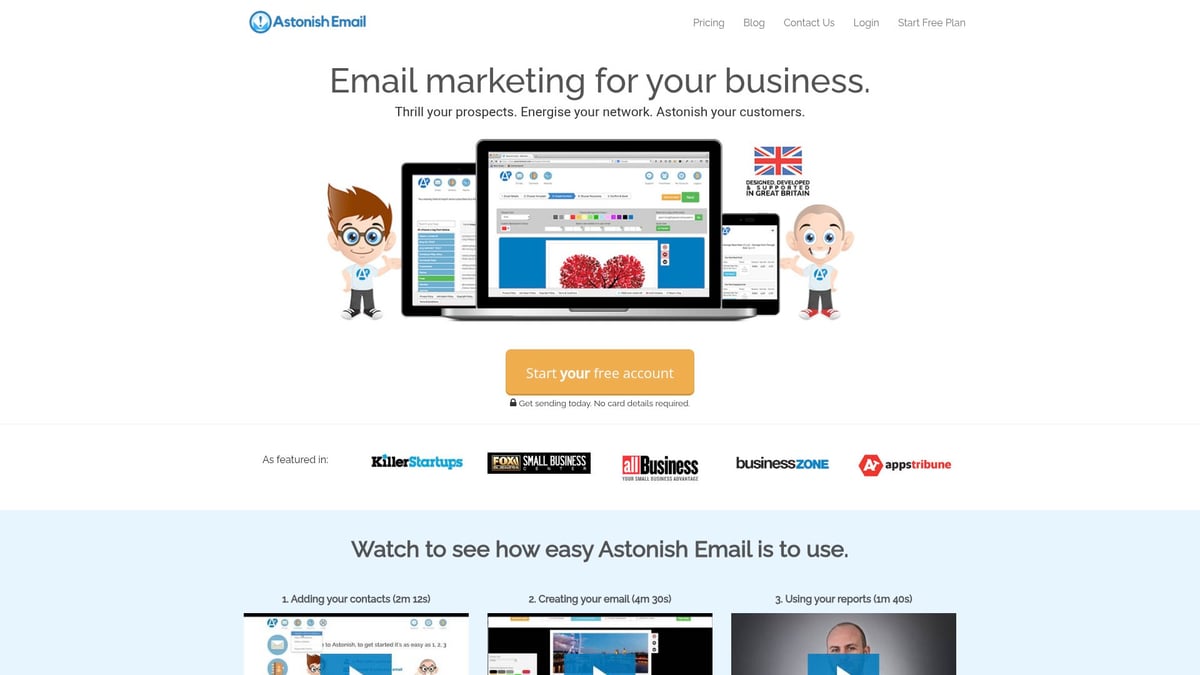
For small businesses seeking the easiest way to set up the perfect email address for email marketing, Astonish Email is designed just for you. The platform offers a drag-and-drop email builder, real-time analytics, responsive templates, and automatic unsubscribe management, all tailored for entrepreneurs with no technical background. UK-based customer support ensures your campaigns stay compliant and effective, while advanced security protects your sender identity. Whether you are just starting or ready to grow, Astonish Email provides a free plan for small lists and affordable paid options. For more guidance on building a successful email address for email marketing, explore their Email marketing for small business resource.
Practical Examples: Choosing the Best Email Address by Business Type
Selecting the right email address for email marketing is not one size fits all. Different business types benefit from tailored strategies to maximise deliverability, engagement, and trust. Below, discover practical examples and tested approaches to help you choose the best email address for email marketing, whatever your business model.
E-commerce Stores
For e-commerce brands, structuring your email address for email marketing can directly influence your sender reputation and customer trust. It is best practice to use unique subdomains and addresses for each store and email type.
Example setup:
[email protected]for order updates[email protected]for promotions[email protected]for customer service
Many e-commerce businesses follow recommendations from platforms like Klaviyo, using subdomains such as send.domain1.com and send.domain2.com to isolate marketing streams. This approach helps maintain deliverability and manage reputation across multiple stores. Choosing a clear and branded email address for email marketing ensures customers know who is contacting them, reducing the risk of emails being ignored or marked as spam.
Service Providers and Consultants
For consultants and service providers, personal connection is key. Using a personalised email address for email marketing, such as [email protected], can foster stronger relationships and higher open rates.
Address examples:
[email protected]for direct communication[email protected]for general inquiries[email protected]for updates
A reply-able, branded sender address for email marketing reassures clients and prospects that real people are behind the messages. This approach builds credibility and trust, which are critical in service-driven industries.
Local Retailers and Small Businesses
Local businesses thrive on approachability. A friendly, clear email address for email marketing like [email protected] or [email protected] signals authenticity and encourages engagement.
Sample addresses:
[email protected]for personalisation[email protected]for deals[email protected]for updates
Using a recognisable sender name, such as "Emma at The Corner Shop," alongside your email address for email marketing, can further boost open rates. This personal touch helps build lasting connections with the local community.
Non-Profits and Community Groups
Non-profits need to communicate trust and clarity. Role-based addresses for email marketing, like [email protected] or [email protected], make it easy for supporters to identify the purpose of each message.
Recommended structure:
[email protected]for fundraising[email protected]for general queries[email protected]for updates
Ensuring your email address for email marketing is accessible and compliant also supports inclusivity, making it easier for recipients to reply, ask questions, or unsubscribe if needed.
B2B Companies
B2B organisations benefit from segmenting communication channels. Assigning specific email addresses for email marketing, such as [email protected] for leads, [email protected] for service, and [email protected] for newsletters, allows for efficient management.
Example structure:
[email protected]for invitations[email protected]for promotions[email protected]for general communication
This segmented approach ensures that each message is relevant to its audience and helps maintain a strong sender reputation. A clear email address for email marketing also streamlines internal processes and improves customer experience.
Lessons from Real Businesses
Real-world experience highlights the impact of strategic sender address setup. Companies that shift from generic or free addresses to branded, authenticated domains often see higher open rates and fewer spam complaints. For example, a retailer moving from [email protected] to [email protected] noticed a significant boost in engagement.
| Scenario | Before | After | Result |
|---|---|---|---|
| Sender Address | [email protected] | [email protected] | Higher trust |
| Deliverability | Inconsistent | Improved | More inbox placement |
| Spam Complaints | Frequent | Rare | Better reputation |
As highlighted in recent email deliverability statistics, up to 20 percent of emails never reach inboxes due to suboptimal sender setups. By implementing the right email address for email marketing, businesses can avoid these pitfalls and achieve measurable results.
Frequently Asked Questions About Email Addresses for Marketing
Choosing the right email address for email marketing is crucial for deliverability, compliance, and engagement. Below, we answer the most common questions to help you optimise your strategy and achieve the best results from every campaign.
Can I use a free Gmail or Yahoo address for my business email marketing?
No, using a free Gmail or Yahoo email address for email marketing is not recommended. These addresses reduce professionalism and increase the risk of your emails being flagged as spam. Always use a custom, branded domain to build trust and improve deliverability.
What’s the difference between “from” address and “reply-to” address?
The “from” address is what recipients see as the sender in their inbox, while the “reply-to” address determines where replies are directed. For effective email address for email marketing use, both should be set thoughtfully to encourage engagement and ensure responses reach the right inbox.
How do I avoid my emails going to spam?
To keep your emails out of spam, use a reputable email address for email marketing, authenticate your domain with SPF, DKIM, and DMARC, and send relevant content to engaged subscribers. For a deeper understanding, see this Email authentication standards overview.
Should I use a person’s name or a generic address for better engagement?
Personal names (e.g., “Sarah from Brand”) often feel more approachable and can increase open rates. However, for newsletters or transactional messages, a role-based email address for email marketing like “news@” or “support@” can work well, especially when paired with a clear, branded display name.
How many sender addresses should my business have?
Most businesses benefit from at least two sender addresses: one for marketing emails and another for transactional or customer service messages. This separation protects your sending reputation and helps manage responses more effectively.
What are the legal requirements for my sender address?
Your sender address for email marketing must not be misleading and should include a valid reply-to option. Emails also need to provide your physical business address and an easy unsubscribe method to comply with laws like GDPR and CAN-SPAM.
How do I change my sender address without losing deliverability?
When updating your email address for email marketing, gradually introduce the new address, warm it up by sending to your most engaged subscribers first, and monitor deliverability metrics closely. Always keep authentication records updated to prevent disruptions.
What’s the best way to monitor sender reputation and engagement?
Use your email marketing platform’s analytics to track open, click, bounce, and spam complaint rates by sender address. Third-party tools can provide sender score and blacklist checks, helping you maintain a strong reputation.
Can I use the same sender address for multiple brands or stores?
It’s best to create separate sender addresses or subdomains for each brand or store. This approach protects deliverability and makes it easier to manage engagement and compliance for each entity.
What tools and services help manage sender addresses efficiently?
Email marketing platforms like Astonish Email, Mailchimp, or Klaviyo offer features for managing multiple sender addresses, monitoring authentication, and automating compliance. Choose a service that supports your structure and keeps your email address for email marketing effective.
A well-chosen email address for email marketing makes a measurable difference in deliverability, compliance, and customer trust. By following best practices and staying informed, you can ensure your campaigns reach the right inbox every time.