How to Send an Email Message: A Complete Guide for 2026
March 31, 2026
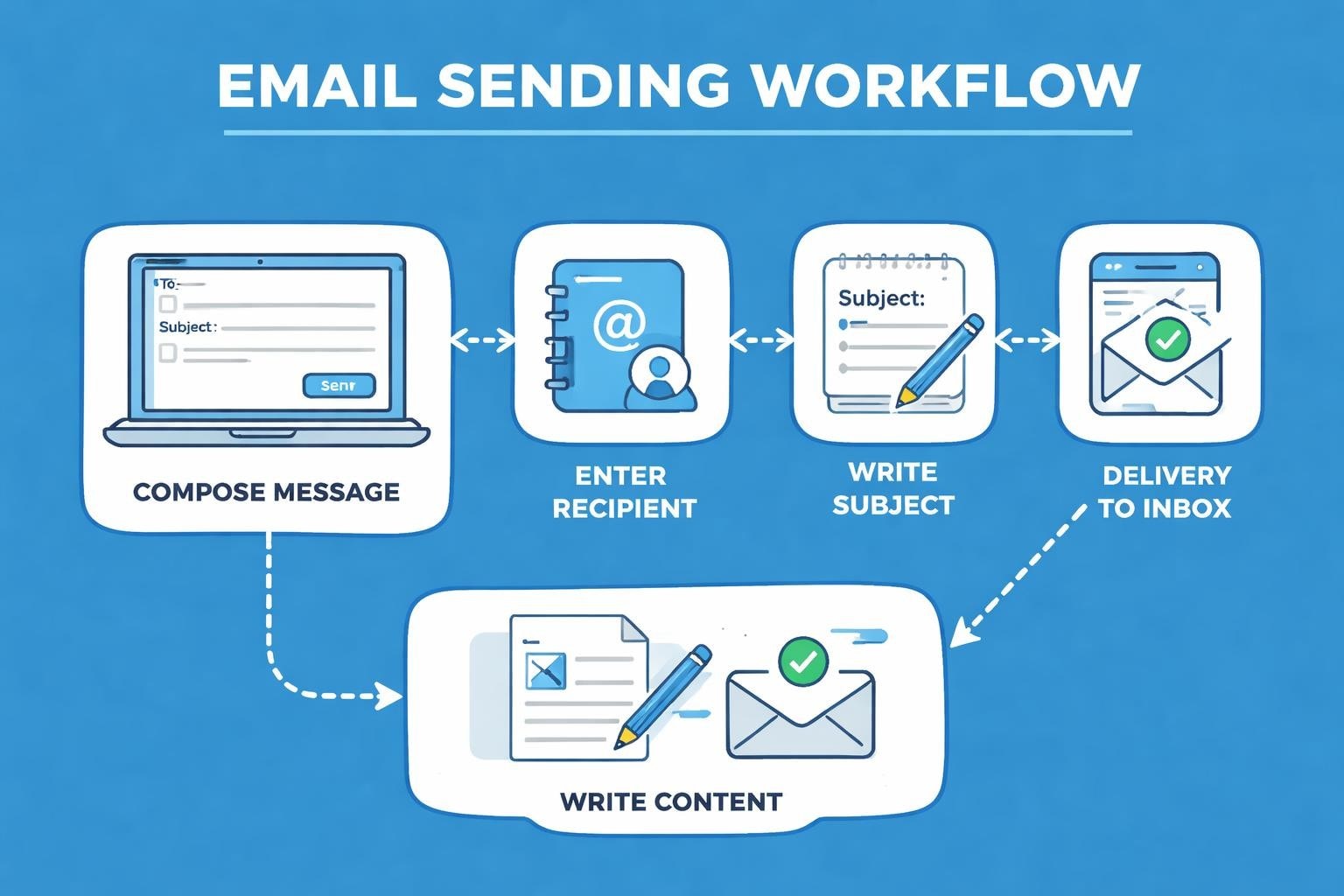
Email remains the cornerstone of professional communication in 2026, with billions of messages exchanged daily across the globe. Whether you're reaching out to potential customers, coordinating with colleagues, or maintaining client relationships, knowing how to send an email message properly makes all the difference. For small business owners especially, mastering email communication isn't just about clicking 'send'-it's about crafting messages that get opened, read, and acted upon. This comprehensive guide walks you through everything you need to know about composing and delivering effective email messages that achieve your business objectives.
Understanding Email Fundamentals
Before you send an email message, it's essential to grasp the underlying structure that makes email work. Every email consists of several key components: the sender address, recipient address, subject line, message body, and optional attachments. These elements work together to deliver your communication successfully.
The technical process behind email delivery involves multiple servers and protocols, but as a business user, you primarily need to focus on the user-facing elements. When you compose a message, your email client formats your content and transmits it through Simple Mail Transfer Protocol (SMTP) servers to reach your recipient's inbox.
Choosing the Right Email Platform
Small businesses have numerous options when selecting an email platform. Your choice impacts deliverability, professional appearance, and functionality.
Key considerations include:
- Domain-based addressing for professional credibility
- Integration with existing business tools
- Deliverability rates and spam filtering
- Storage capacity and organizational features
- Mobile accessibility for on-the-go communication
Many small businesses benefit from setting up a business email rather than relying on free consumer services, as custom domain addresses enhance brand perception and trustworthiness.
Crafting Your Email Message
The composition phase is where your communication skills truly matter. To send an email message that resonates, you must consider your audience, purpose, and desired outcome.
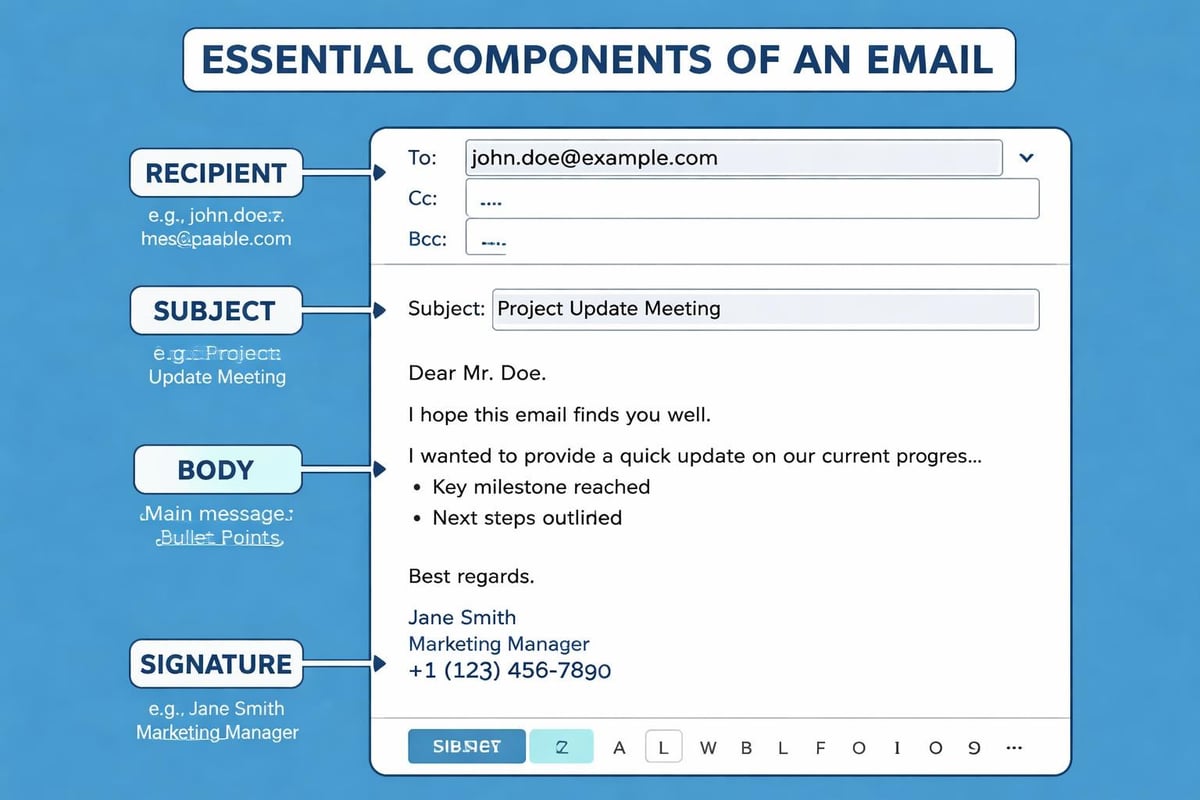
Start by identifying your primary objective. Are you seeking information, making a sale, scheduling a meeting, or providing updates? According to Stanford Graduate School of Business best practices, clarity of purpose should guide every element of your message.
Subject Line Strategy
Your subject line determines whether recipients open your message or consign it to the deleted folder. Effective subject lines are:
- Concise (40-50 characters maximum for mobile visibility)
- Specific (clearly indicating message content)
- Action-oriented (when appropriate for the context)
- Personalised (including recipient names or relevant details)
- Honest (avoiding clickbait tactics that damage trust)
Research from Carnegie Mellon University demonstrates that personalised subject lines can increase open rates by up to 26% compared to generic alternatives.
Message Body Best Practices
When you send an email message, the body content should immediately engage your reader. Begin with a clear greeting that matches your relationship with the recipient-formal for new contacts, warmer for established relationships.
| Element | Professional Approach | Common Mistakes |
|---|---|---|
| Opening | Address recipient by name, state purpose | Generic greetings, burying the lead |
| Body | Short paragraphs, bullet points, clear structure | Wall of text, meandering content |
| Tone | Professional yet personable | Too casual or overly stiff |
| Length | Concise-200-300 words ideal | Excessive length, irrelevant details |
| Closing | Clear next steps, professional sign-off | Abrupt ending, no call to action |
The University of California, Berkeley's security guidelines emphasise keeping messages focused and avoiding unnecessary complexity that could confuse recipients or trigger security filters.
Technical Execution: Sending Your Message
Once you've composed your content, the technical process to send an email message involves several critical steps. First, verify all recipient addresses for accuracy-a simple typo can send confidential business information to the wrong person or result in bounce-backs that harm your sender reputation.
Recipient Fields Explained
Understanding the difference between To, Cc, and Bcc fields prevents communication mishaps:
- To: Primary recipients who should take action
- Cc (Carbon Copy): Secondary recipients kept informed
- Bcc (Blind Carbon Copy): Hidden recipients, useful for protecting privacy in bulk sends
When you send an email message to multiple recipients, consider whether everyone needs visibility of other addresses. Mass emails with exposed addresses appear unprofessional and may violate privacy regulations.
Attachment Considerations
Attachments require special attention before you send an email message. According to Ohio University's IT security guidelines, attachments present potential security risks for both sender and recipient.
Attachment best practices:
- Scan files for viruses before attaching
- Keep file sizes under 10MB when possible
- Use widely compatible formats (PDF, DOCX, JPEG)
- Reference attachments in your message body
- Consider cloud sharing links for large files
Many email systems now offer built-in file sharing that's more secure and efficient than traditional attachments, particularly for sensitive business documents.
Professional Email Etiquette
Proper etiquette ensures your messages reflect well on your business when you send an email message. Professional standards have evolved considerably, but certain principles remain constant.
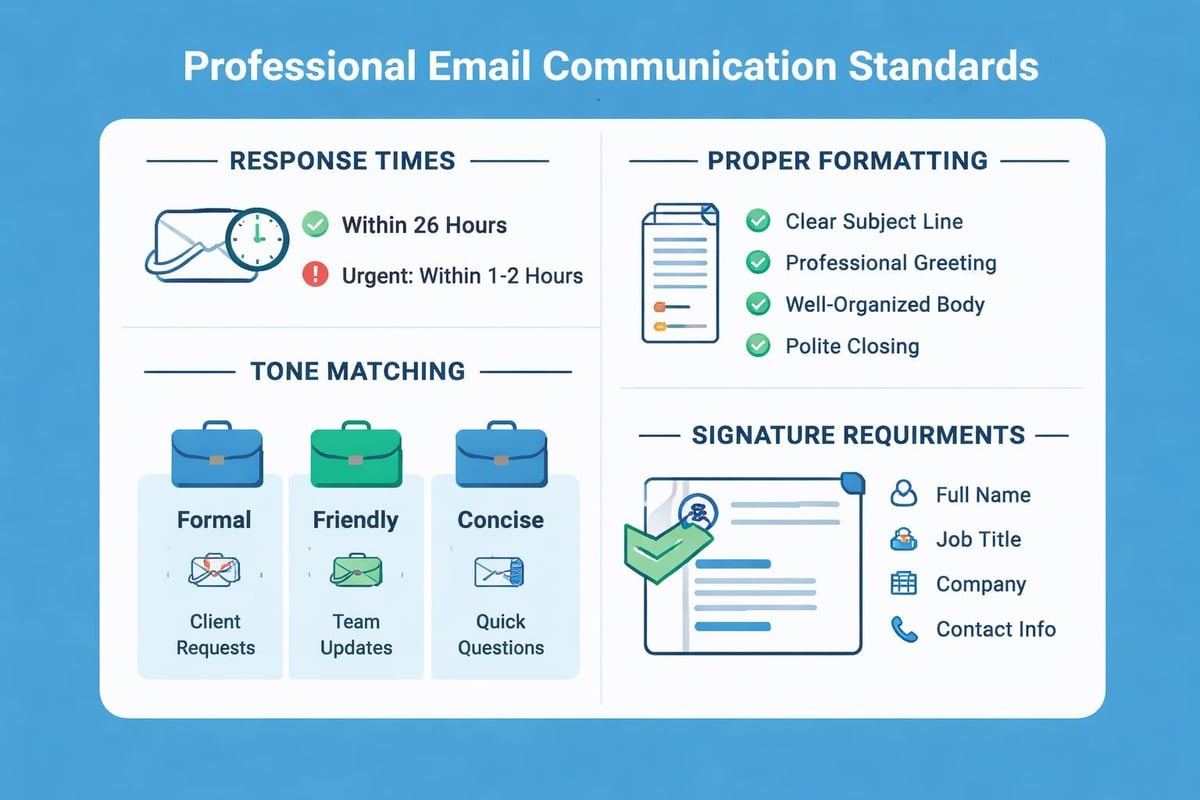
Kiplinger's email etiquette guidelines emphasise treating email with the same professionalism as written correspondence, despite its informal reputation.
Response Time Expectations
Timely responses demonstrate respect for your correspondents' time:
| Message Type | Expected Response Window | Best Practice |
|---|---|---|
| Urgent client requests | Within 2 hours | Acknowledge immediately, provide detailed response ASAP |
| Standard business emails | Within 24 hours | Respond same business day when possible |
| Non-urgent inquiries | Within 48 hours | Don't let messages linger beyond 2 days |
| Out-of-office periods | Set auto-responder | Provide alternative contact for urgent matters |
When you send an email message, you're also setting expectations for response patterns. If you respond within minutes, recipients will expect that speed consistently.
Tone and Language
Written communication lacks vocal inflection and body language, making tone particularly important. When you send an email message for business purposes, err on the side of formality until you've established rapport.
Tone calibration tips:
- Read messages aloud before sending
- Remove potentially inflammatory language
- Use exclamation marks sparingly
- Avoid all caps (perceived as shouting)
- Proofread for typos that undermine professionalism
Time Magazine's guidance from Google executives suggests keeping business emails brief, direct, and focused on actionable items.
Optimising for Marketing Communications
Small businesses using email for marketing face unique challenges when they send an email message. Unlike personal correspondence, marketing emails must navigate spam filters, comply with regulations, and compete for attention in crowded inboxes.
Permission-Based Marketing
Legitimate email marketing requires explicit consent from recipients. When you send an email message for promotional purposes, ensure you have proper authorisation through:
- Opt-in forms on your website
- Subscription confirmations (double opt-in)
- Clear unsubscribe mechanisms
- Compliance with anti-spam legislation
Understanding professional email standards helps small businesses build lists ethically whilst maintaining sender reputation.
Personalisation and Segmentation
Generic mass emails achieve poor results compared to targeted, personalised communications. Before you send an email message to your list, segment recipients based on:
- Purchase history
- Engagement levels
- Geographic location
- Industry or business type
- Position in sales funnel
Personalisation extends beyond inserting first names. Relevant content based on recipient behaviour and preferences significantly improves open and click-through rates.
Deliverability and Technical Considerations
Even perfectly crafted messages fail if they never reach the inbox. When you send an email message, numerous technical factors influence deliverability.
Sender Reputation Management
Email service providers assign reputation scores to sending addresses and domains. Poor reputation results in messages being filtered to spam folders or rejected entirely.
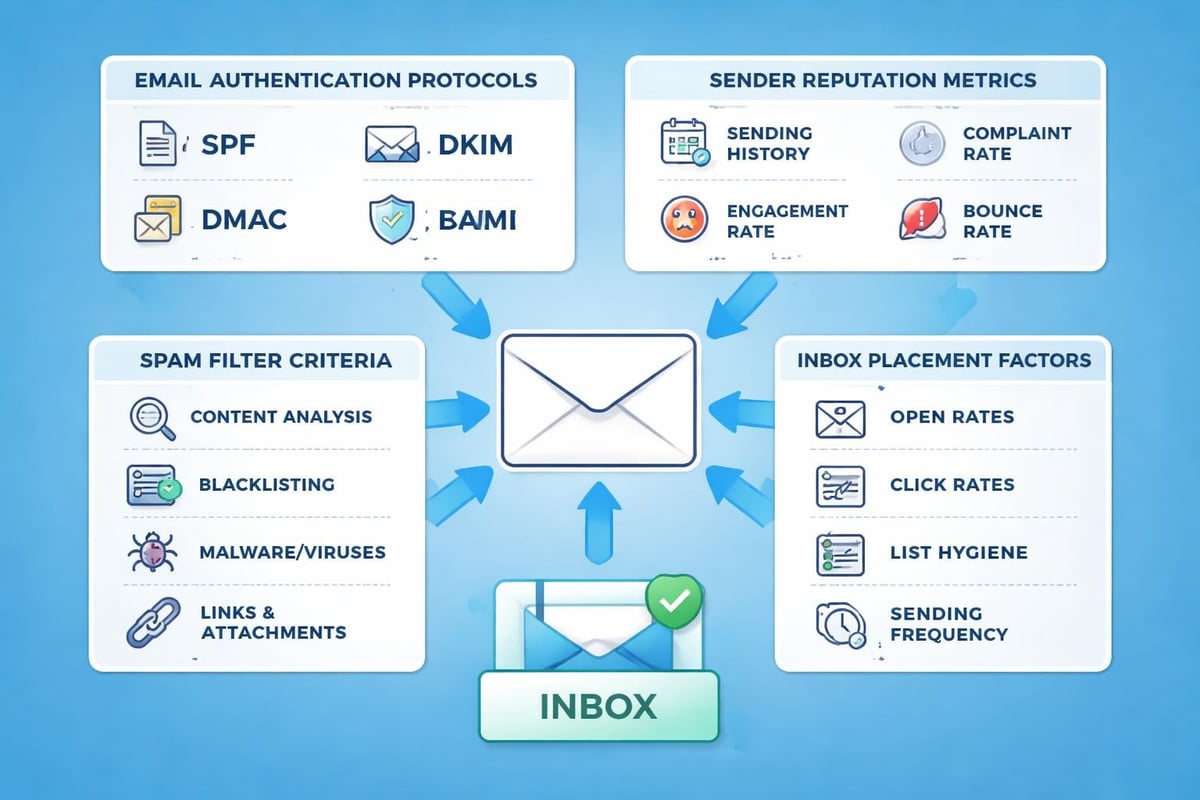
Factors affecting sender reputation:
- Bounce rates (addresses that don't exist)
- Spam complaint frequency
- Sending volume patterns
- Authentication protocols (SPF, DKIM, DMARC)
- List hygiene and engagement rates
Maintaining a clean, engaged list is crucial for small businesses that rely on email communication. Regularly removing inactive subscribers and validating addresses before you send an email message protects your sender reputation.
Authentication Protocols
Modern email requires proper authentication to verify sender identity. These technical standards work behind the scenes when you send an email message:
| Protocol | Purpose | Impact |
|---|---|---|
| SPF (Sender Policy Framework) | Authorises servers to send on your behalf | Prevents spoofing, improves deliverability |
| DKIM (DomainKeys Identified Mail) | Cryptographically signs messages | Verifies message integrity, reduces tampering |
| DMARC (Domain-based Message Authentication) | Defines handling of failed authentication | Protects brand reputation, provides reporting |
Most reputable email platforms configure these protocols automatically, but small businesses should verify proper implementation through their hosting provider or email service.
Mobile Optimisation
Over 60% of emails are now opened on mobile devices, making mobile optimisation essential when you send an email message. Messages that display poorly on smartphones frustrate recipients and damage engagement.
Mobile-Friendly Design Principles
Responsive design ensures your messages adapt to various screen sizes. Key considerations include:
- Single-column layouts for easy scrolling
- Larger font sizes (minimum 14pt for body text)
- Touch-friendly buttons (minimum 44x44 pixels)
- Compressed images for faster loading
- Pre-header text optimisation for preview panes
TechRadar's accessibility guidelines note that mobile optimisation often aligns with accessibility requirements, benefiting all recipients.
Testing Before Sending
Professional communicators test before they send an email message, particularly for marketing campaigns or important business correspondence.
Essential testing elements:
- Spelling and grammar (using tools beyond basic spell-check)
- Link functionality (every hyperlink clicks through correctly)
- Rendering across email clients (Gmail, Outlook, Apple Mail display properly)
- Mobile display (readability on various device sizes)
- Spam score (using testing tools to identify potential issues)
For small businesses, platforms offering test email functionality allow you to preview exactly how messages appear to recipients before committing to full distribution.
A/B Testing for Improvement
When you send an email message for marketing purposes, systematic testing reveals what resonates with your audience. Test variables include:
- Subject line variations
- Send time and day
- Content structure and length
- Call-to-action wording and placement
- Personalisation approaches
Even small businesses can conduct simple A/B tests by splitting their list and comparing performance metrics between variations.
Timing and Frequency
When you send an email message matters as much as what you send. Research consistently shows certain times yield higher open and engagement rates.
Optimal Send Times
| Day/Time | Open Rate Performance | Best For |
|---|---|---|
| Tuesday-Thursday, 10am-11am | Highest overall engagement | B2B communications, newsletters |
| Tuesday-Thursday, 8pm-9pm | Strong for consumer emails | Retail, entertainment, personal services |
| Weekend mornings | Lower competition, engaged readers | Lifestyle content, special offers |
| Monday mornings | Generally avoid | Inboxes too crowded |
| Friday afternoons | Generally avoid | Low attention, weekend mindset |
These patterns provide starting points, but optimal timing varies by industry and audience. Track your own data to identify when your specific recipients are most responsive.
Finding the Right Frequency
Sending frequency balances staying top-of-mind against annoying recipients. When you send an email message too frequently, unsubscribe rates climb. Too infrequently, and recipients forget they subscribed.
For small businesses, weekly or bi-weekly schedules often work well for newsletters, whilst promotional messages might be less frequent. According to TechRadar's outreach effectiveness research, consistency matters more than specific frequency-recipients appreciate predictable communication patterns.
Security and Privacy Considerations
Responsible businesses prioritise security when they send an email message, protecting both their data and recipients' information.
Sensitive Information Handling
Email inherently lacks security for confidential data. Best practices include:
- Never sending passwords or financial details via standard email
- Using encrypted email services for sensitive communications
- Implementing data retention policies
- Training staff on phishing recognition
- Verifying recipient addresses before sending confidential content
For businesses handling customer data, understanding Microsoft's secure email practices provides foundation-level security knowledge.
Compliance Requirements
Various regulations govern commercial email, including GDPR in Europe and CAN-SPAM in the United States. Before you send an email message for marketing, ensure compliance with:
- Clear sender identification
- Accurate subject lines
- Physical postal address inclusion
- Functional unsubscribe mechanism
- Prompt honour of opt-out requests
Small businesses operating internationally must comply with the strictest applicable regulations to avoid penalties.
Automation and Efficiency
Modern email platforms allow businesses to automate routine communications whilst maintaining personalisation. When you send an email message through automation, you free time for higher-value activities.
Automated Email Types
Strategic automation applies to various business communications:
- Welcome sequences for new subscribers or customers
- Abandoned cart reminders for e-commerce
- Birthday or anniversary messages
- Re-engagement campaigns for inactive contacts
- Transactional confirmations and receipts
Platforms designed for email marketing for small businesses offer automation features that rival enterprise-level tools whilst remaining accessible and affordable.
Maintaining Personal Touch
Automation shouldn't feel robotic. When you send an email message automatically, incorporate:
- Dynamic personalisation fields
- Behavioural triggers based on recipient actions
- Segment-specific content variations
- Natural language that sounds human-written
- Appropriate delays between automated messages
The goal is efficiency without sacrificing the personal connection that builds customer relationships.
Measuring Email Success
Data-driven improvement requires tracking performance when you send an email message. Key metrics reveal what's working and what needs adjustment.
Essential email metrics:
| Metric | What It Measures | Healthy Benchmark |
|---|---|---|
| Open Rate | Subject line and sender effectiveness | 15-25% for most industries |
| Click-Through Rate | Content relevance and calls-to-action | 2-5% of delivered emails |
| Conversion Rate | Ultimate action completion | Varies by goal; track trends |
| Bounce Rate | List quality and technical issues | Under 2% |
| Unsubscribe Rate | Content relevance and frequency | Under 0.5% per campaign |
Monitoring these metrics over time reveals patterns and opportunities for optimisation in your email strategy.
Learning from Data
Every time you send an email message, you generate data that informs future communications. Analyse:
- Which subject lines generate highest opens
- What content drives clicks and conversions
- How list segments respond differently
- Which send times perform best for your audience
- What causes unsubscribes or spam complaints
Small businesses that systematically review performance data consistently improve results over time, turning email into an increasingly effective channel.
Mastering how to send an email message effectively transforms this everyday activity into a powerful business tool. From technical fundamentals to strategic optimisation, each element contributes to successful communication that drives business results. Whether you're reaching out to a single client or broadcasting to thousands of subscribers, applying these principles ensures your messages achieve their intended purpose. Astonish Email provides small businesses with the tools, deliverability, and features needed to implement these best practices effortlessly, helping you connect with customers through email marketing that actually works.