Guide to Test Email Clients Effectively in 2026
February 10, 2026

Email client environments are more fragmented and complex than ever in 2026. With new platforms, frequent updates, and diverse user preferences, a single rendering error can damage brand reputation or cost valuable conversions.
Poorly displayed emails frustrate users and undermine trust. Brands that ignore these risks often see decreased engagement and missed business opportunities.
This guide will show you exactly how to test email clients with confidence. You will discover the latest trends, essential tools, practical workflows, automation strategies, and troubleshooting techniques.
If you want your emails to look perfect everywhere and drive real results, follow this step-by-step guide for optimal email performance.
The Evolving Email Client Landscape in 2026
The way we test email clients has changed dramatically in recent years. With 2026 bringing even greater complexity to the email ecosystem, brands must stay vigilant to ensure their messages reach every inbox as intended.
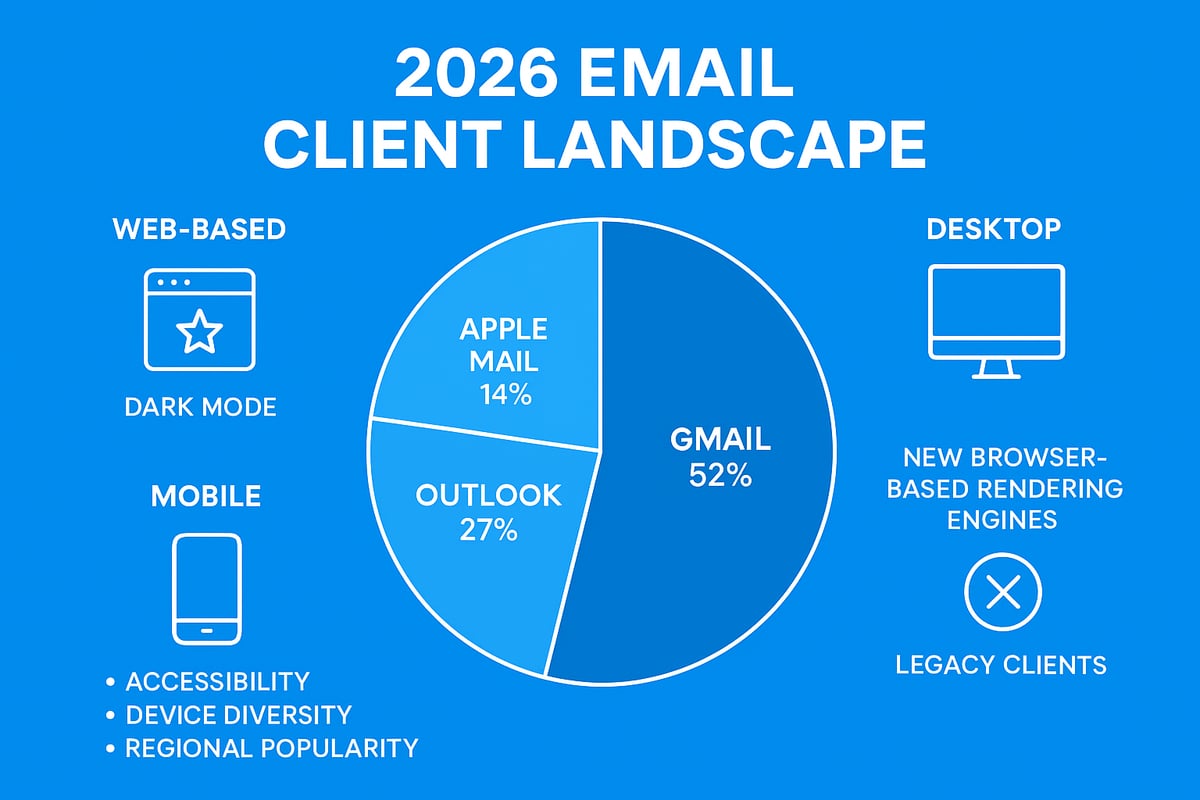
The Expanding Email Client Ecosystem
In 2026, the email client ecosystem is more fragmented than ever. We now see a mix of web-based, desktop, and mobile clients, each with its own quirks and requirements.
Web-based platforms like Gmail and Outlook.com remain dominant, but desktop software such as Microsoft Outlook and Apple Mail still hold significant market share. Mobile apps, including native email clients on iOS and Android, have surged in popularity, especially among younger users.
This diversity means that when you test email clients today, you must account for a wider variety of environments than just a few years ago.
Key Changes Since 2024
Since 2024, several new email clients have entered the scene. Many now use browser-based rendering engines, leading to even greater variation in how emails are displayed.
Some notable changes include:
- The rise of Chromium-based rendering in new clients
- Increased use of AI-driven sorting and filtering features
- Expanded support for interactive email elements
With more devices and operating systems in use, the need to consistently test email clients has grown. Legacy clients, meanwhile, still persist in certain sectors, requiring ongoing support and compatibility checks.
Market Statistics and Client Fragmentation
The competition among major email clients has intensified. According to the Email Industry Data Report 2025–2026, Gmail leads the global market, but Outlook and Apple Mail remain strong contenders. Emerging clients are also gaining ground, especially in specific regions.
| Email Client | Global Share (2026) | UK/EU | US | APAC |
|---|---|---|---|---|
| Gmail | 37% | 35% | 38% | 33% |
| Outlook | 29% | 31% | 32% | 24% |
| Apple Mail | 21% | 18% | 20% | 28% |
| Others | 13% | 16% | 10% | 15% |
When you test email clients, these statistics underline the importance of targeting the right platforms for your audience.
Rendering Challenges: Dark Mode, Accessibility, and Device Diversity
Dark mode support has become a standard expectation. Yet, implementation varies widely between clients, leading to unexpected rendering issues.
Accessibility is also a top priority. Clients interpret semantic HTML, ARIA roles, and contrast ratios differently. Device diversity adds to the challenge, as emails must adapt seamlessly to screens ranging from large monitors to compact smartphones.
Testing for these factors is crucial. For example, failing to test email clients under dark mode can result in unreadable text or invisible buttons.
Regional Variations and Real-World Pitfalls
Not every region favours the same clients. In the UK and EU, Outlook and Gmail are most common, while Apple Mail dominates in APAC markets. Some emerging clients are popular only in specific countries, making it essential to analyse your subscriber base before you test email clients.
A real-world example: In early 2025, a major retailer launched a campaign that rendered perfectly in Gmail and Outlook, but completely broke in a new European client using a custom rendering engine. The result was thousands of unreadable emails and a measurable drop in engagement.
Why Comprehensive Testing Is Now Business-Critical
The days of testing a single email client are long gone. With increased fragmentation, regional variation, and rapid feature evolution, comprehensive efforts to test email clients are now essential to protect brand reputation and maximise campaign ROI.
Investing in robust testing processes is no longer optional, but a business-critical requirement for every organisation relying on email marketing.
Core Principles of Effective Email Client Testing
Modern marketers and developers face an increasingly fragmented email landscape. To test email clients effectively, you must embrace core principles that ensure messages display and function flawlessly across all environments. Without a rigorous approach, even small design flaws can undermine campaigns or brand trust.
Differentiating Previewing, Rendering, and Functional Testing
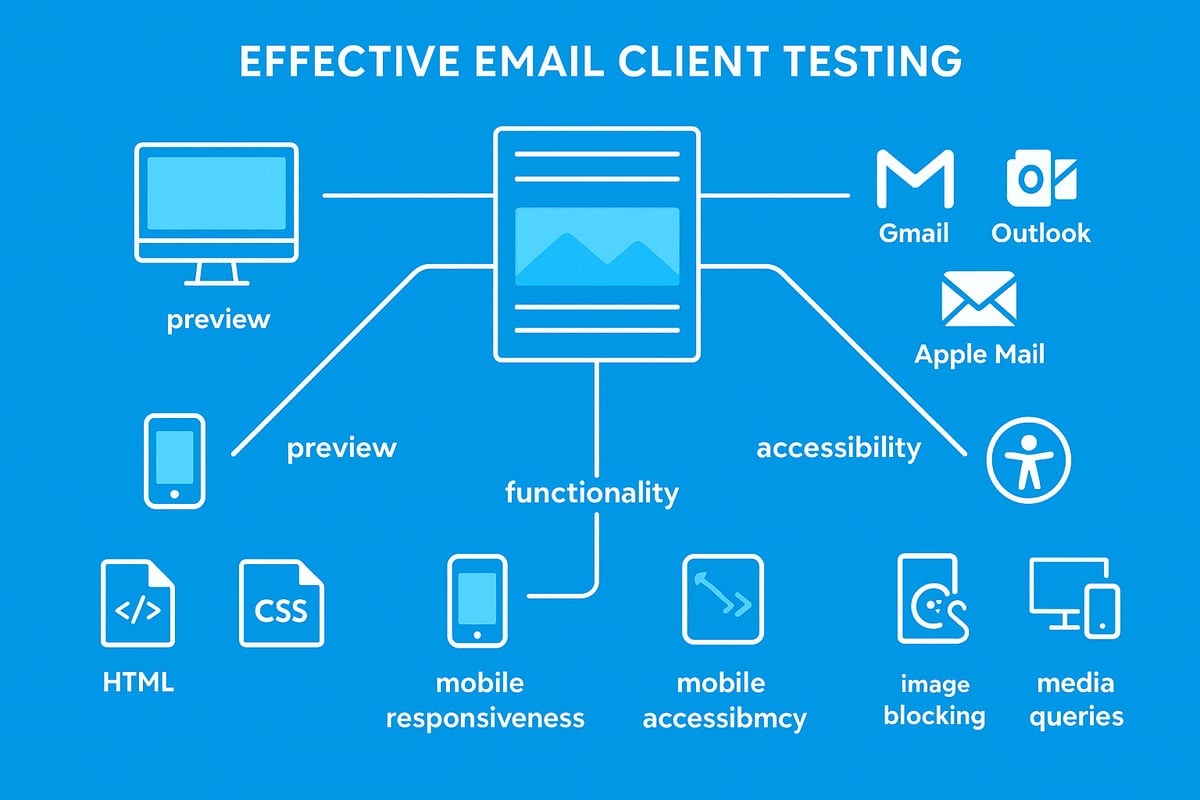
First, it is crucial to understand the distinctions between previewing, rendering, and functional testing when you test email clients.
- Previewing provides a visual snapshot of how emails look in different clients.
- Rendering dives deeper, checking how code is interpreted by each client.
- Functional testing ensures all links, buttons, and interactive elements perform as intended.
By clearly separating these stages, you avoid missing key issues that only surface in specific environments.
Key Areas to Test in Every Email
To thoroughly test email clients, focus on several critical aspects:
- Layout: Verify columns, spacing, and alignment remain consistent.
- Images: Check for proper loading, alt text, and display when images are blocked.
- Fonts: Test fallback fonts and font sizes.
- Links: Ensure all links are clickable and direct users correctly.
- Interactive Elements: Confirm buttons, forms, and dynamic content work everywhere.
- Accessibility: Validate screen reader support, colour contrast, and keyboard navigation.
A practical workflow includes creating a checklist for each area and systematically reviewing results across major clients.
HTML, CSS Standards and Email Client Limitations
Email clients interpret HTML and CSS differently, often ignoring or altering code in unexpected ways. Unlike web browsers, many clients use proprietary engines, which can cause unique challenges when you test email clients.
For example, Outlook may not support certain CSS properties, while Gmail strips out others. Reviewing resources like the Email Client Compatibility Guide 2025 helps teams stay updated on supported features and avoid common pitfalls.
Mobile Responsiveness and Common Pitfalls
With over 65% of emails opened on mobile devices in 2026, mobile responsiveness is essential when you test email clients. Use media queries and touch-friendly designs to ensure usability across screens.
| Platform | % Opens (2026) |
|---|---|
| Mobile | 65% |
| Desktop | 28% |
| Tablet | 7% |
Common pitfalls include:
- Relying on external fonts that are blocked
- CSS resets breaking legacy layouts
- Media queries ignored by certain clients
- Images not displaying due to blocking settings
Testing for these issues reduces surprises at launch.
Iterative Testing and Real-World Example
Testing should be iterative, woven throughout the email creation process. Each design adjustment warrants a new round of checks to test email clients for newly introduced issues.
Consider a scenario: a designer adds display: flex for layout in Outlook. While it works in Gmail, Outlook ignores it, causing broken layouts. Using inline styles and fallback code can resolve such discrepancies.
By adopting these principles, teams strengthen their ability to deliver emails that look and perform as intended, no matter the client.
Essential Tools and Platforms for Email Client Testing
Choosing the right tools is essential for anyone who wants to test email clients effectively in today’s complex landscape. With new platforms, devices, and rendering engines in play, a robust toolkit helps ensure your emails display consistently and function as intended across every environment.
Independent Email Client Testing Tools
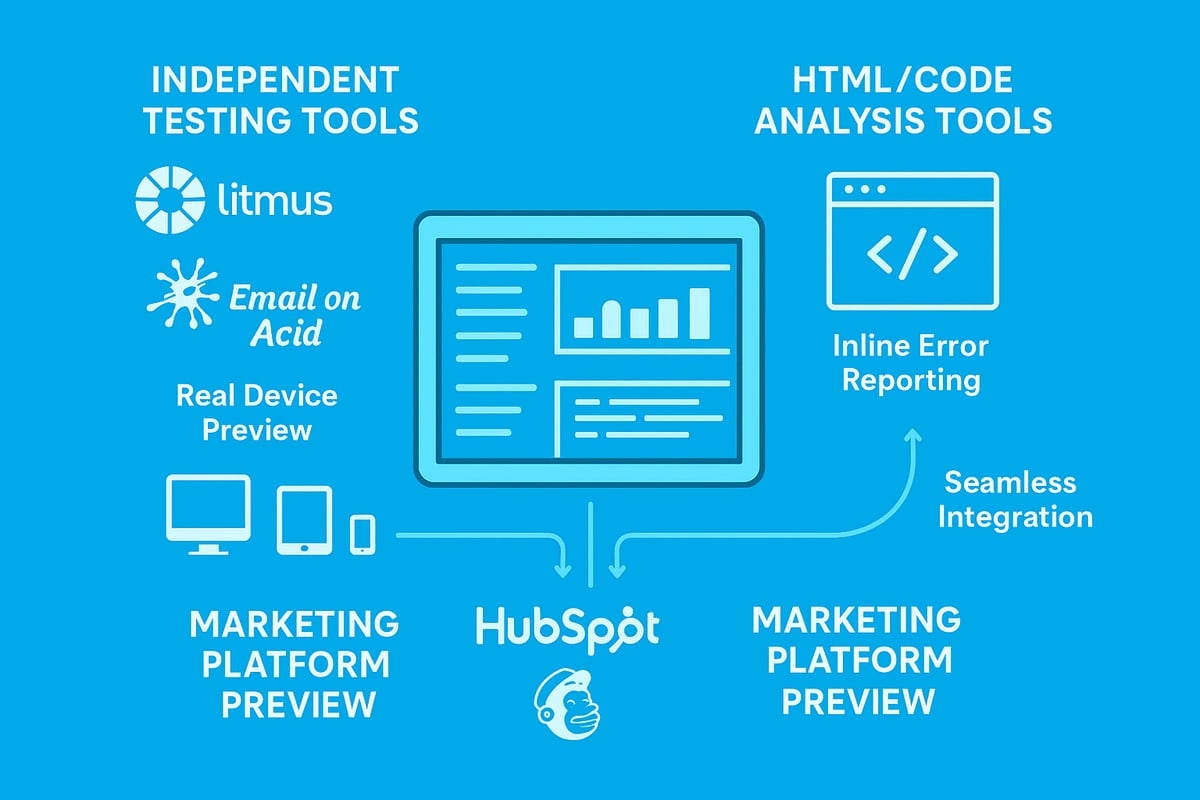
For those who need to test email clients across a wide range of platforms, independent testing tools are indispensable. These solutions provide comprehensive previews, allowing teams to see exactly how an email will render in dozens of web-based, desktop, and mobile clients. Popular choices include Litmus, Email on Acid, and Mailtrap Email Sandbox. Each offers unique features such as real-time previews, advanced analytics, and workflow integrations.
A key distinction among these tools is the difference between real-device previews and emulated environments. Real-device previews show precisely how an email will appear on actual devices, while emulated previews use software to mimic client behaviour. Both approaches are valuable, but real-device testing often uncovers subtle rendering issues missed by emulation.
According to recent industry surveys, over 70 percent of email marketers and developers now rely on at least one independent testing platform. The following table summarises the key features of leading tools:
| Tool | Real Device Preview | Analytics | Integrations |
|---|---|---|---|
| Litmus | Yes | Advanced | CI/CD, ESPs |
| Email on Acid | Yes | Standard | ESPs, Slack |
| Mailtrap Sandbox | No (Emulated) | Basic | API, DevOps |
Dedicated tools form the foundation for anyone serious about efforts to test email clients at scale. For guidance on sending test emails during this process, see the Email send test guide.
HTML and Code Analysis Tools
Beyond visual previews, code analysis tools are critical for those who test email clients methodically. These solutions scan your HTML and CSS, flagging elements that may cause rendering issues in specific clients. Features typically include automated linting, detailed error reports, and suggestions for compatibility fixes.
Examples include HTML Email Checkers and CSS support guides, many of which are available as standalone tools or as plugins for code editors. By catching errors early, these tools help prevent issues such as broken layouts, missing images, or unsupported fonts before an email is even sent.
A typical workflow might involve running your code through a linting tool, which highlights problematic CSS properties or unsupported HTML tags. For instance, using a code analysis tool can identify a CSS property that could break layouts in Outlook but display fine in Gmail.
Research indicates that teams who integrate code analysis into their process experience a 45 percent reduction in rendering errors. When you test email clients with this approach, you not only save time but also boost your emails’ reliability and user experience.
Email Client Preview Features in Marketing Platforms
Many marketing platforms and CRMs now offer built-in preview features to help users test email clients without leaving their workflow. Platforms like HubSpot (powered by Litmus), Campaign Monitor, Mailchimp, and ActiveCampaign enable users to preview emails in popular clients directly within their interface.
The primary benefit is seamless integration. Non-technical users can quickly check rendering in key clients, making it easier to spot issues before launch. However, these built-in solutions may offer fewer customisation options and sometimes have limited coverage compared to independent tools.
For example, Campaign Monitor’s inbox preview lets marketers catch template issues early, reducing the risk of broken layouts or missing images. Here’s a quick list of typical benefits and limitations:
Benefits:
- Easy access for all team members
- Quick previews without switching tools
- Integrated reporting and issue tracking
Limitations:
- Limited to supported clients
- Fewer advanced testing options
- Less control over specific test cases
Despite some constraints, these features make it more practical for small businesses and teams to test email clients regularly, helping maintain high standards of email quality.
Step-by-Step Guide: How to Test Emails Across Different Clients in 2026
Testing your email campaigns across a diverse landscape of clients is essential in 2026. In this step-by-step guide, you will learn how to test email clients efficiently and ensure your messages look perfect for every recipient.
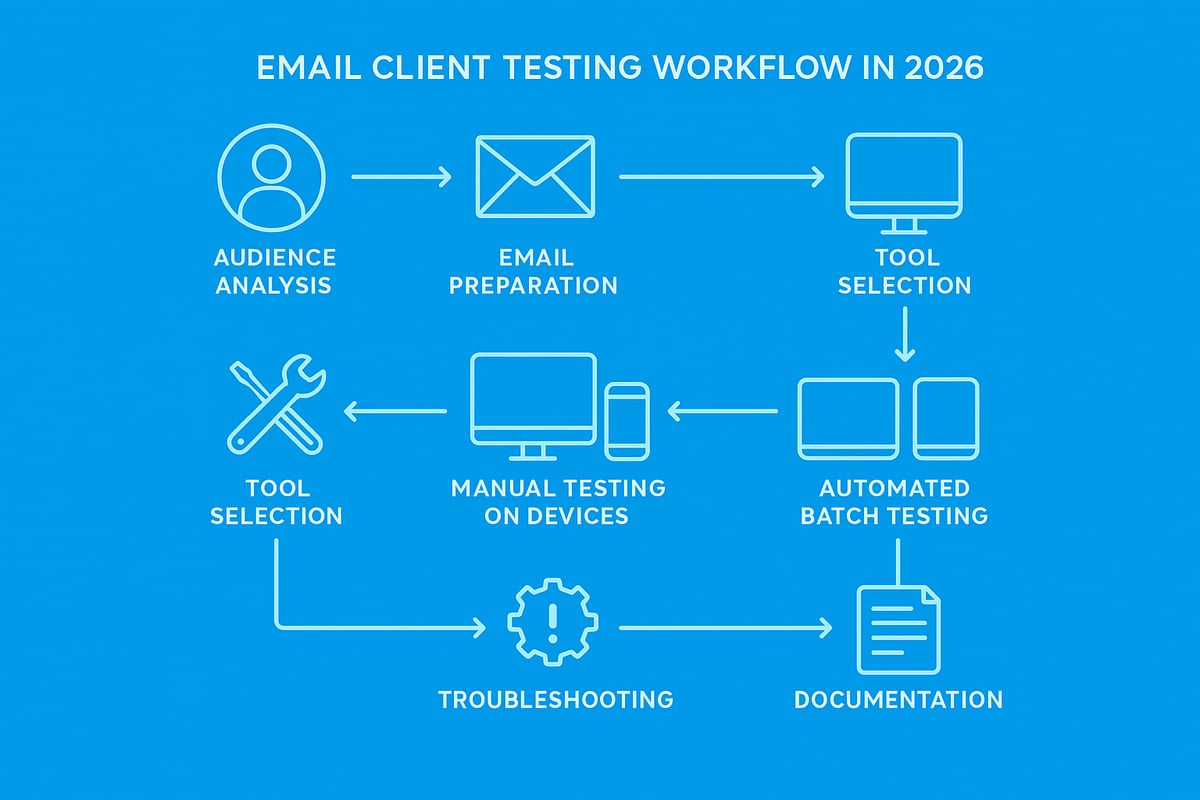
Step 1: Define Your Target Audience and Key Email Clients
Begin by identifying the main email clients your recipients use. This data often comes from analytics within your email marketing platform. Segment your audience by device type, region, and whether they are B2B or B2C.
For example, B2B audiences typically open emails in Outlook, while B2C users often prefer Gmail or Apple Mail. Understanding which clients are most popular allows you to prioritise how you test email clients and focus on the combinations that matter most.
Make a list of primary and secondary clients, such as Gmail, Outlook, Apple Mail, and emerging platforms. This approach ensures your testing covers the broadest reach and reduces the risk of rendering issues going unnoticed.
Step 2: Prepare Your Email for Testing
Before you start to test email clients, ensure your designs follow best practices for maximum compatibility. Use inline CSS, set fallback fonts, and check that images are optimised. Prepare both light and dark mode versions, as client support for these modes varies.
A helpful preparation checklist includes:
- Inline all CSS styles
- Specify web-safe fallback fonts
- Optimise images for fast loading
- Include alt text for accessibility
- Create variants for light and dark modes
For more on this, see Email creation best practices, which covers essential steps to avoid rendering problems before you send.
This preparation reduces time spent fixing issues later and ensures you are ready to test email clients effectively.
Step 3: Select the Right Testing Tools
Choosing the right tools is crucial when you test email clients. Consider whether you need standalone platforms, code analysis tools, or integrated previews in your marketing software.
Standalone platforms like Litmus and Mailtrap offer comprehensive previews across many clients. Code analysis tools can catch HTML and CSS issues early. Integrated previews in platforms such as Mailchimp or HubSpot are convenient for quick checks.
If you run frequent campaigns, look for tools with automation or CI/CD integration. This saves time and helps maintain consistent quality when you test email clients at scale.
Evaluate your needs and budget, then select a combination of tools that fits your workflow.
Step 4: Execute Manual Testing
Manual testing remains a vital part of the process to test email clients. Start by sending test emails to real accounts on your target platforms, including Gmail, Outlook, and Apple Mail.
Check how emails render on desktop, mobile, and tablet devices. Pay close attention to layout, images, links, and interactive elements. Test both light and dark modes.
Use this workflow for manual testing:
- Send a test email to each client and device combination
- Open and review in different browsers and apps
- Click all links and interact with elements
- Take screenshots of any issues
Document every finding, so you have a clear record of problems to address. This hands-on approach ensures you catch issues specific to each environment as you test email clients.
Step 5: Use Automated and Batch Testing Workflows
To streamline how you test email clients, implement automated testing wherever possible. Many platforms offer APIs or integrations for batch testing multiple templates across dozens of clients at once.
Configure automated workflows to send test emails on every template update. Use reporting dashboards to view aggregated results and spot recurring issues.
For example, automating regression testing for recurring campaigns can cut manual effort by over 50 percent. Batch testing reduces the risk of missing issues and accelerates your campaign turnaround when you need to test email clients frequently.
Track time savings and error reduction to measure your automation’s effectiveness.
Step 6: Troubleshoot and Fix Rendering Issues
When you find rendering problems as you test email clients, diagnose the root cause using preview reports and code analysis tools. Apply targeted fixes, such as using Outlook-specific CSS hacks or adjusting media queries for mobile devices.
After each fix, retest the email in affected clients to confirm resolution. For example, if a button looks broken in Outlook 2026, adjust your CSS and verify the fix before final deployment.
Keep troubleshooting focused and systematic, addressing one issue at a time as you test email clients to maintain quality.
Step 7: Document Findings and Optimise Future Campaigns
Maintain a log of issues discovered as you test email clients, along with solutions. Update your email templates and workflows based on these insights.
Share learnings with your team to foster continuous improvement and reduce future errors. Over time, this documentation will make every campaign more resilient and efficient.
Advanced Strategies: Automation, CI/CD, and Collaboration
As the number and complexity of email clients continue to surge, businesses face mounting pressure to ensure flawless campaigns. The need to test email clients efficiently is now a cornerstone of successful email marketing. Automation, CI/CD integration, and collaborative workflows have become essential, especially as the Email Client Software Market Forecast 2025–2032 predicts even greater diversity ahead. This section explores advanced strategies to help your team master the art of cross-client testing, streamline processes, and stay ahead of rendering issues.
Integrating Email Testing into Development Pipelines (CI/CD)
Embedding the process to test email clients directly into your CI/CD pipeline ensures every template update is automatically checked before deployment. This integration minimises human error and accelerates feedback loops. By triggering automated tests at each commit or merge, issues are caught early, preventing costly post-launch fixes.
A typical setup involves connecting email testing tools to your version control system. When developers push changes, test suites run across all major clients, producing detailed reports. As the market continues to expand, this approach guarantees your workflow adapts to new and legacy platforms alike. The result is consistent, reliable email rendering that keeps your brand reputation intact.
Leveraging APIs and Webhooks for Continuous Testing
To truly test email clients at scale, APIs and webhooks play a pivotal role. Modern testing platforms offer robust APIs that enable you to automate test creation, execution, and reporting within your existing systems. Webhooks allow real-time notifications of test results, making it easy to respond instantly to failures or rendering discrepancies.
By leveraging these integrations, your team can set up continuous testing for every template change. This means batch testing hundreds of variations across multiple clients without manual intervention. The automation not only increases coverage but also reduces time-to-market for campaigns. Consistently using these methods ensures no critical rendering issues slip through undetected.
Collaboration Features: Enhancing Teamwork and Efficiency
Collaboration is critical when you test email clients as part of a larger marketing or development team. Leading tools now provide shared dashboards, annotation features, and approval workflows, allowing everyone to contribute insights and track fixes in real time. These collaborative elements help bridge the gap between designers, developers, and marketers.
For example, when troubleshooting layout issues, teammates can flag, comment, and resolve problems within a central platform. The Layout of email design article highlights the importance of understanding and sharing layout challenges during testing. By fostering transparent communication, your team accelerates problem-solving and reduces repeated errors in future campaigns.
Real-World Example: Automation in Action
Consider a SaaS business running frequent, high-volume email campaigns. By deciding to test email clients through automation, they integrated tools like Litmus and Email on Acid into their CI/CD pipeline. Every template revision triggered automated tests, generating previews across all relevant clients and devices.
The results were immediate. Campaign approval cycles shortened, and design inconsistencies dropped significantly. Teams could quickly identify and resolve issues before launch, boosting deliverability and engagement rates. This approach demonstrates how automation transforms email quality assurance from a bottleneck into a competitive advantage.
Security and Privacy Considerations
As you test email clients with third-party tools and automation, security and privacy must remain top priorities. Always ensure your testing providers comply with GDPR and other relevant regulations, especially when handling customer data or proprietary templates.
Use secure connections and limit access to sensitive information within your testing workflows. Regularly review permissions, audit logs, and vendor policies to maintain compliance. By embedding these safeguards, your team can confidently leverage automation while protecting both brand and user trust.
Common Challenges and Troubleshooting Tips
Navigating the landscape as you test email clients in 2026 presents more obstacles than ever. Marketers and developers face a shifting ecosystem where a single overlooked detail can undermine an entire campaign. Recognising these common challenges is crucial to ensuring every recipient experiences your email as intended.
Inconsistent Rendering Across Clients
When you test email clients, inconsistent rendering is a persistent challenge. Outlook, Gmail, and Apple Mail each interpret HTML and CSS differently. For instance, Outlook's use of the Microsoft Word rendering engine often breaks layouts designed for web-based clients. Gmail’s engine strips out certain styles, which can disrupt responsive designs.
A real-world example: In 2025, Apple Mail updated its rendering engine, causing widespread layout shifts in emails that previously displayed perfectly. Many brands saw distorted headers and broken navigation bars overnight. This highlights why ongoing testing is critical for every campaign.
| Client | Common Rendering Issue | Example Impact |
|---|---|---|
| Outlook | Ignores CSS floats, margins | Misaligned columns |
| Gmail | Strips style tags | Lost branding, inconsistent fonts |
| Apple Mail | Engine updates | Layout shifts, broken menus |
Dark Mode and Accessibility Complications
Dark mode adoption surged in 2026, making it essential to test email clients for both light and dark themes. Unoptimised emails might display illegible text or invisible buttons when dark mode is enabled. Accessibility requirements also demand proper contrast ratios, semantic HTML, and descriptive alt text.
Failing to address these needs can result in lost engagement, particularly among users with visual impairments. Regular testing for both modes and using accessible code patterns are now non-negotiable steps in the workflow.
Images, Fonts, and Broken Links
Images are frequently blocked by default in many clients, leaving emails looking empty or incomplete. Font choices can also fall back to generic alternatives, undermining brand consistency. Broken links erode trust and can directly impact conversions.
To mitigate these issues, always include descriptive alt text, use web-safe fonts as fallbacks, and double-check every link before launch. For a comprehensive guide on images in email troubleshooting, explore proven solutions that address blocked or missing visuals when you test email clients.
Staying Updated with Client Changes
The email client landscape is fluid, with frequent updates and new entrants. Gmail, for example, remains dominant in many markets, and its updates can disrupt established layouts. Reviewing Gmail Statistics 2026 can help you prioritise which clients to monitor most closely.
Subscribe to vendor updates and participate in community forums to stay informed. Proactive monitoring ensures that you are not caught off guard by sudden changes when you test email clients.
Efficient Troubleshooting Techniques
When problems arise, structured troubleshooting accelerates resolution. Use code snippets and testing logs to isolate issues. Engage with community forums or reach out to vendor support for complex problems. Maintain a shared knowledge base to document recurring issues and solutions, fostering a culture of continuous improvement as you test email clients.
Conclusion
Ultimately, proactive troubleshooting and knowledge sharing are your best defences against rendering errors. By systematically addressing each challenge, you can confidently test email clients and deliver consistent, high-performing campaigns in 2026.