Master the schedule e mail: Campaigns That Convert
December 1, 2025
Scheduling an email is about shifting from a reactive mindset to a proactive one. It’s about making sure your message doesn't just get sent, but gets seen. This is the real difference between firing off an email whenever you get a spare moment and strategically placing it in someone's inbox right when they're most likely to pay attention.
Why Strategic Email Scheduling Is a Game Changer
When you look past the basic convenience of a 'send later' button, you start to see just how much timing can give you an edge. Scheduling an email is a deliberate move that directly influences your open rates, click-throughs, and ultimately, your conversions. You’re no longer leaving it to chance; you're aligning your outreach with your audience's daily rhythm.
Think about it in real terms. A retail brand could schedule a flash sale announcement for 1 p.m. on a Friday, hitting inboxes just as people are taking their lunch break and scrolling through their phones. Or, a B2B firm in Manchester could send a new case study to prospects in New York so it lands at 9 a.m. their time—right as their workday begins, all while the UK team is sound asleep.
Maximise Your Impact and Efficiency
This kind of planning does more than just give your engagement metrics a lift; it builds the kind of consistency that brands thrive on. When your subscribers know your weekly newsletter arrives every Tuesday morning like clockwork, it becomes a familiar, reliable touchpoint. This simple act helps you avoid the audience fatigue that comes from a chaotic sending schedule and establishes a much more professional tone.
The numbers back this up, too. Recent UK data from the DMA’s Email Benchmarking Report showed that the average delivery rate for scheduled emails was an impressive 98%. Even better, open rates reached 35.9%, a figure that comfortably beats the global average. It just goes to show how powerful well-timed, properly segmented campaigns can be. You can dive deeper into the data on scheduled email performance in the UK to see the full picture.
By mastering your email schedule, you transform email from a manual task into an automated, strategic asset. This frees up your team to focus on bigger-picture goals instead of being tied to the 'send' button.
In the end, learning to schedule an email is about taking complete control of your communication timeline. It’s how you ensure your hard work—all that carefully crafted copy and design—gets in front of the right people at the right moment. That’s how a simple email becomes a powerful engine for business growth, and it’s why scheduling should be at the very core of your strategy.
Crafting a Schedule-Ready Email Campaign
Before you can even think about hitting 'schedule', the campaign itself needs to be bulletproof. I always think of this part as my pre-flight checklist. It's the essential quality control that stops you from sending an email with an embarrassing typo, a broken link, or a wonky image to thousands of people.
It all kicks off with the very first thing your subscribers see: the subject line and the preview text. These two have to work together to earn that open. A great subject line is clear, concise, and gives a compelling reason to look inside, while the preview text should add a bit more flavour and build intrigue. Together, they have to answer the reader's unspoken question: "What's in this for me?"
From Subject Line to Signature
Your subject line needs to match the email's goal perfectly. It’s less about being clever and more about being clear. For example, if you're promoting a webinar, something like "Save your seat for our SEO masterclass" is direct and tells people exactly what to do. If it's a new product, "It's here! Meet the new collection" works beautifully to create a bit of excitement.
A vague subject line is a death sentence in a crowded inbox, but a specific one sets the right expectations and gives your open rates a real boost. Once you've hooked them, the body of your email has to deliver on that promise. That means a clean, professional design and content that’s easy to scan.
A great email is more than just words; it’s a seamless experience for the reader. Every single element, from the headline to the final call-to-action, must be optimised for readability and engagement—especially on a phone.
Your Technical Pre-Flight Checklist
Once you're happy with the words and images, it's time for a quick technical once-over. A stunning email is completely useless if it doesn't actually work. This is where paying attention to the small details really pays off when you’re preparing to schedule an email that gets results.
Here’s a step-by-step guide to running this check:
- Compress Images: Before uploading, use a free online tool like TinyPNG or your computer's built-in image editor to reduce the file size of your images. Aim for under 100 KB per image to ensure fast loading times.
- Verify All Links: In your email editor's preview mode, systematically click every link. This includes your main call-to-action, any text links, image links, and social media icons. Ensure each one directs to the correct URL and that any tracking parameters (like UTMs) are present.
- Check Mobile View: Use your platform's built-in mobile preview tool. Scroll through the entire email, looking for text that runs off the screen, images that don't scale correctly, and buttons that are too small to tap easily. If you spot an issue, return to the editor and adjust the layout, often by simplifying columns or increasing font size.
Most modern email platforms have tools that make this a lot easier. When you look into the features of an email marketing platform, you’ll usually find things like mobile previews and link checkers that can automate these vital checks for you. Spending those few extra minutes here is the best insurance policy for a smooth, professional delivery every single time.
Nailing the Perfect Send Time for Your Audience
Let's be honest, the timing of your email can make or break a campaign. You could write the most compelling email in the world, but if you send it at 2 a.m., it's just going to get buried. It's like telling a great joke to an empty room. The real trick is to slide into your audience's inbox right when they're most likely to be looking.
This isn’t about guesswork; it's about listening to your data. Here’s a simple guide to finding your best send time using your platform’s analytics:
- Navigate to the 'Reports' or 'Analytics' section of your email marketing tool.
- Look for reports on your last 5-10 campaigns. Find the data that shows open rates by time of day and day of the week.
- Identify the consistent peaks. Do you see a spike every Tuesday at 10 a.m.? Or on Friday afternoons? This is your starting point for scheduling future campaigns.
Platforms like Mailchimp or HubSpot will show you exactly which days and times consistently deliver the best open and click rates. Are your subscribers early birds on a Tuesday morning, or are they scrolling through emails during their Thursday lunch break? Your own data has the definitive answer.
What About a Global Audience?
Things get a bit more complicated if your audience is spread out. If you're a UK business with subscribers in Manchester, London, and maybe a growing following overseas, time zones can trip you up. An email sent at 9 a.m. UK time is perfect for your home crowd, but it's already 10 a.m. in Paris and a rather unsociable 4 a.m. in New York.
This is exactly why time-zone-aware sending is a non-negotiable feature for any brand with a diverse audience. Look for options in your email tool labelled "send time optimisation" or "deliver in recipient's time zone." These clever features do the heavy lifting for you, automatically dispatching the email to land at the same local time for everyone. So, an email scheduled for "9 a.m. local time" hits a London inbox at 9 a.m. GMT and a New York inbox at 9 a.m. EST. Simple, effective, and it ensures nobody gets a notification in the middle of the night.
This map of European time zones really drives home how quickly things can change, even with audiences that feel right next door.
Even a single hour's difference can have a noticeable impact on your engagement rates. Automating delivery based on a recipient's location is one of the smartest moves you can make.
The whole point is to make your communication feel personal and convenient. Using a recipient's time zone for scheduling is a small detail that shows you're thinking about their daily routine. It's a subtle but powerful way to build a stronger connection.
Getting to know your audience's habits is a fundamental skill. It's the same logic you'd apply when figuring out the best time to post on social media for the biggest impact. You're simply meeting your audience where they are, when they are.
A Starting Point for Your Tests
While your own analytics are the ultimate source of truth, general industry benchmarks can give you a fantastic starting point for A/B testing your send times. Think of the data below as a launchpad for your first experiments—a way to form a hypothesis before you start fine-tuning.
Here’s a quick guide based on general engagement patterns we see across different UK sectors. Use it to inform your initial tests, but always let your own results have the final say.
Recommended Email Send Times by Industry
| Industry | Recommended Day(s) | Recommended Time Window (UK Time) | Rationale |
|---|---|---|---|
| B2B / Professional | Tuesday - Thursday | 9 AM - 11 AM | Catches professionals just as they're settling into their workday and clearing emails. |
| E-commerce / Retail | Friday - Sunday | 12 PM - 2 PM & 7 PM - 9 PM | Aligns with lunchtime browsing and the more relaxed shopping habits of evenings and weekends. |
| Hospitality / Events | Wednesday - Friday | 3 PM - 5 PM | Reaches people right when they're starting to make plans for the weekend or evenings ahead. |
| Non-Profit | Tuesday & Wednesday | 10 AM - 12 PM | Taps into mid-week generosity and a moment for reflection, neatly avoiding the Monday morning rush. |
At the end of the day, finding that 'perfect' send time is an ongoing process of testing and refining. Start with these recommendations, be relentless with your testing, and always, always let your audience's behaviour guide your next move.
Using Automation to Personalise Your Schedule
Going beyond a simple ‘send later’ button is where the real magic happens. This is about creating an automated, personalised journey for your subscribers, where emails land in their inbox based on what they do, not just the clock. It's how you stop broadcasting and start having a one-on-one conversation with everyone on your list.
The most effective way to pull this off is with trigger-based emails. These are automated messages that fire off in response to a specific action someone takes (or doesn't take). The classic example, and one that works incredibly well, is the abandoned cart email.
Think about it: a potential customer browses your online shop, adds a few things to their basket, and then vanishes. Instead of letting that sale slip away, automation can gently nudge them back.
Setting Up a Triggered Email: A Step-by-Step Example
Let's walk through setting up that abandoned cart scenario in a typical email platform:
- Select the Automation Trigger: In your platform's automation builder, choose a trigger like "Contact abandons a cart." You'll need to have your e-commerce store connected for this to work.
- Add a Time Delay: Drag a "Wait" or "Delay" step into your workflow. Set the duration to 24 hours. This prevents the email from feeling intrusive.
- Create the Email Content: Design the email. Use a helpful subject line like "Did you forget something?" Include dynamic content blocks that automatically pull in the products from their abandoned cart. Add a clear call-to-action button like "Return to Your Cart."
- Add an Incentive (Optional): To boost conversions, you can add a small discount. Include text like, "Complete your order now and get 10% off with code SAVE10."
- Activate the Workflow: Turn the automation on. Now, the system will run in the background, sending perfectly timed, personal reminders without you lifting a finger.
This is a fantastic starting point, but to really take your strategy to the next level, you need to bring audience segmentation into the mix.
Scheduling for Different Audience Segments
Segmentation is simply about dividing your list into smaller, more focused groups based on things they have in common. This is what allows you to send different campaigns to different people at different times, making your content feel incredibly relevant.
You could split your list by all sorts of criteria:
- Purchase History: Group your most loyal, high-spending customers into a ‘VIP’ segment.
- Location: Separate subscribers by city or region to send out targeted local offers.
- Engagement Level: Create a group for super-fans who open every email, and another for subscribers who have gone quiet recently.
This flow chart really boils down the process: analyse your data, segment your audience, and then optimise your schedule.
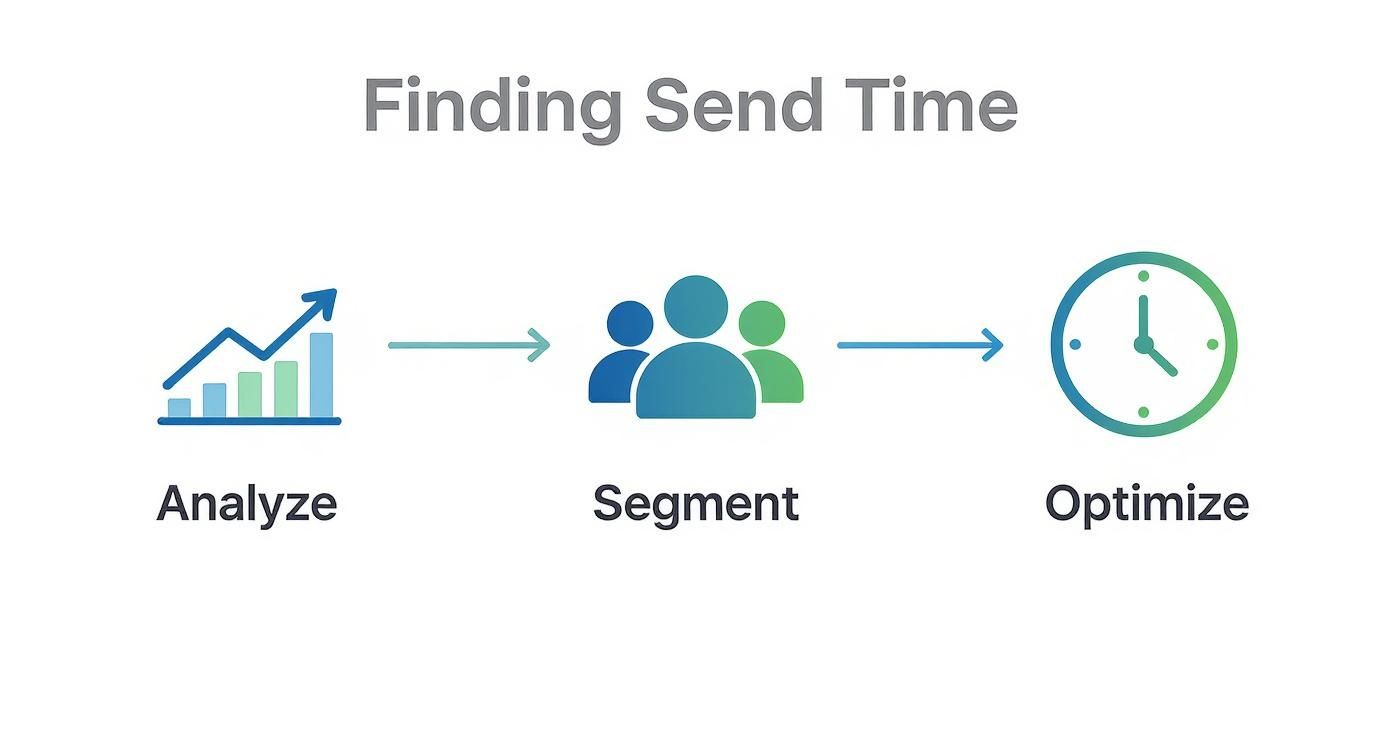
It’s a systematic approach that makes sure your scheduling choices are always backed by data, which almost always leads to better engagement.
By segmenting your audience, you can send an exclusive early-bird offer to your VIPs on a Tuesday morning, while your general monthly newsletter is scheduled for everyone else on Wednesday. It’s a simple way to make your best customers feel special.
This level of personalisation is quickly becoming the standard. Here in the UK, publishers and media organisations have really embraced it to boost engagement. Companies like The Guardian and The Times use scheduled, segmented newsletters to deliver curated content and subscription offers at just the right moment. It's a key reason why UK email volumes have climbed back to over 380 billion messages a year.
Of course, this all relies on customer data. It's crucial to be transparent about how you handle this information, which is why we detail everything in our privacy policy. If you want to dive even deeper, there are some great actionable strategies to personalize email marketing that can help you turn data into genuine conversions.
When you schedule an email with this level of thought, you're not just sending a message; you're building a relationship.
Your Final Pre-Launch Checklist
You've built the perfect campaign. The copy is sharp, the design is slick, and you're ready to schedule it. But hold on a moment. Before you hit that button, there's one last, critical step that a surprising number of marketers skip: a thorough quality check.
This isn't just about a quick once-over. This is your final chance to spot a broken link, a glaring typo, or a rendering issue before it hits thousands of inboxes. I've seen it happen too many times—a small mistake can undermine an entire campaign. So, let’s walk through how to do it right.
The first thing to do is send a test version of your email to yourself and a few colleagues. The goal here is to see exactly how your email looks and feels in the wild. An email that looks pixel-perfect in your platform's editor can easily fall apart in someone else’s inbox.
Prioritise Mobile Rendering
Pay very close attention to how your email looks on a phone. The numbers don't lie: mobile devices now account for 47.3% of all email opens in the UK. That figure is only going up.
Even more telling, 75% of UK users admit they're more likely to just delete an email if it isn't mobile-friendly. You can dig into more of this data in the latest UK email engagement statistics. Simply put, you can't afford to get this wrong.
When you open that test on your smartphone, here's what to look for:
- Readability: Is the font big enough to read easily without pinching to zoom?
- Layout: Does everything stack into a clean, single column? Are the images resizing correctly?
- Clickability: Can you actually tap the buttons and links with your thumb? Make sure they aren't crammed together.
Your Pre-Launch Quality Checklist
For the best results, get a few different pairs of eyes on it. I recommend creating a small test group with people using different email clients. Ask someone on your team who uses Outlook, another who lives in Gmail, and maybe one on Apple Mail to give it a look. This is the fastest way to catch client-specific glitches.
Think of your test email as the dress rehearsal. Treat it with the same scrutiny you would a live send, because it's your best—and last—line of defence against easily avoidable mistakes.
Before that email is officially scheduled, run through this final checklist:
- Subject Line and Preview Text: Are they accurate? Compelling? No embarrassing typos?
- All Links Work: Click every single link. Yes, that includes the social media icons and, most importantly, the unsubscribe link.
- Personalisation Tokens: Check that they’re pulling the right data. Nothing screams "automated email" like a "Hello [FNAME]" greeting.
- Spam Score Check: Run a final deliverability check on your content and sender details. If you're unsure about the rules, our guide to the Astonish Email antispam policy covers the key factors that keep you out of the spam folder.
Ticking off these boxes ensures every scheduled campaign meets a high standard, protecting your sender reputation and keeping your subscribers happy.
Got Questions? We've Got Answers
Getting your email timing just right can feel like a bit of a dark art, and it's natural to have a few questions. We get asked about scheduling all the time, so let's clear up some of the most common queries.
What’s the Best Day to Send an Email Campaign in the UK?
Everyone wants to know the secret "best day," but the honest answer is: it depends. Industry benchmarks often point to mid-week – Tuesday, Wednesday, and Thursday – as the sweet spot for engagement. That's a great place to start.
But your audience is unique. The only way to know for sure is to test it. I always recommend a simple A/B test to clients. Here's a practical guide:
- Create Your Campaign: Write and design your email as usual.
- Duplicate the Campaign: Make an identical copy of it.
- Schedule Version A: Schedule the first version for Tuesday at 10 AM to a portion of your audience.
- Schedule Version B: Schedule the second version for Thursday at 10 AM to another portion of your audience.
- Analyse the Results: After a few days, compare the open and click-through rates. The winning time is your new benchmark to test against.
And don't write off the weekend, especially if you're in retail or hospitality – a Saturday morning email can work wonders.
How Do I Change or Cancel a Scheduled Email?
We've all been there – you hit "schedule" and then spot a glaring typo. Don't panic. Almost every email marketing platform has a safety net for this.
Here is the typical step-by-step process:
- Navigate to your 'Campaigns' or 'Outbox' dashboard.
- Find the campaign you scheduled. It will likely have a "Scheduled" status.
- Click on the campaign or the options menu next to it.
- Select 'Pause' or 'Unschedule'. This will move it back to a 'Draft' status.
- Click 'Edit' to open the campaign editor, make your changes, and save.
- Go through the sending process again and reschedule it for the desired date and time. Just be sure to double-check the new schedule before you confirm.
A bit of personal advice: take five minutes to find out how this works on your platform before you ever need it. Knowing the process in advance will save you a world of stress when you're up against the clock.
Can I Set Up an Email to Send on a Recurring Basis?
Absolutely, and you definitely should! This is one of the biggest time-savers in email marketing. Setting up a campaign to go out automatically every week, fortnight, or month is a fantastic way to stay consistent without the manual effort. Think a weekly newsletter that lands every Friday at 9 AM, or a monthly roundup sent on the first of the month.
To do this, navigate to your platform's automation tools. Instead of a behavioural trigger (like an abandoned cart), you'll choose a date-based or recurring trigger. For example, you would set it up to send "Every Friday" at "9:00 AM" to your "Newsletter Subscribers" segment. It’s a classic "set it and forget it" tool that ensures you never miss a beat with your audience.
Ready to put all this into practice? Astonish Email gives UK small businesses all the tools needed to create, schedule, and automate email campaigns that truly connect with customers. It's time to build better relationships and see real growth.