On Time Email Guide: Your Roadmap to Timely Communication 2026
December 15, 2025

In a world where inboxes are overflowing and response times can make or break opportunities, mastering on time email communication is essential for success in 2026.
Falling behind on messages can damage relationships and stall productivity. This guide gives you a proven roadmap to ensure you always send and respond to emails promptly.
You will discover why timely replies matter, what causes delays, and a step-by-step system for on time email success. Explore the best tools, etiquette strategies, and future trends that will keep you ahead in the digital age.
The High Cost of Late Emails: Why Timeliness Matters in 2026
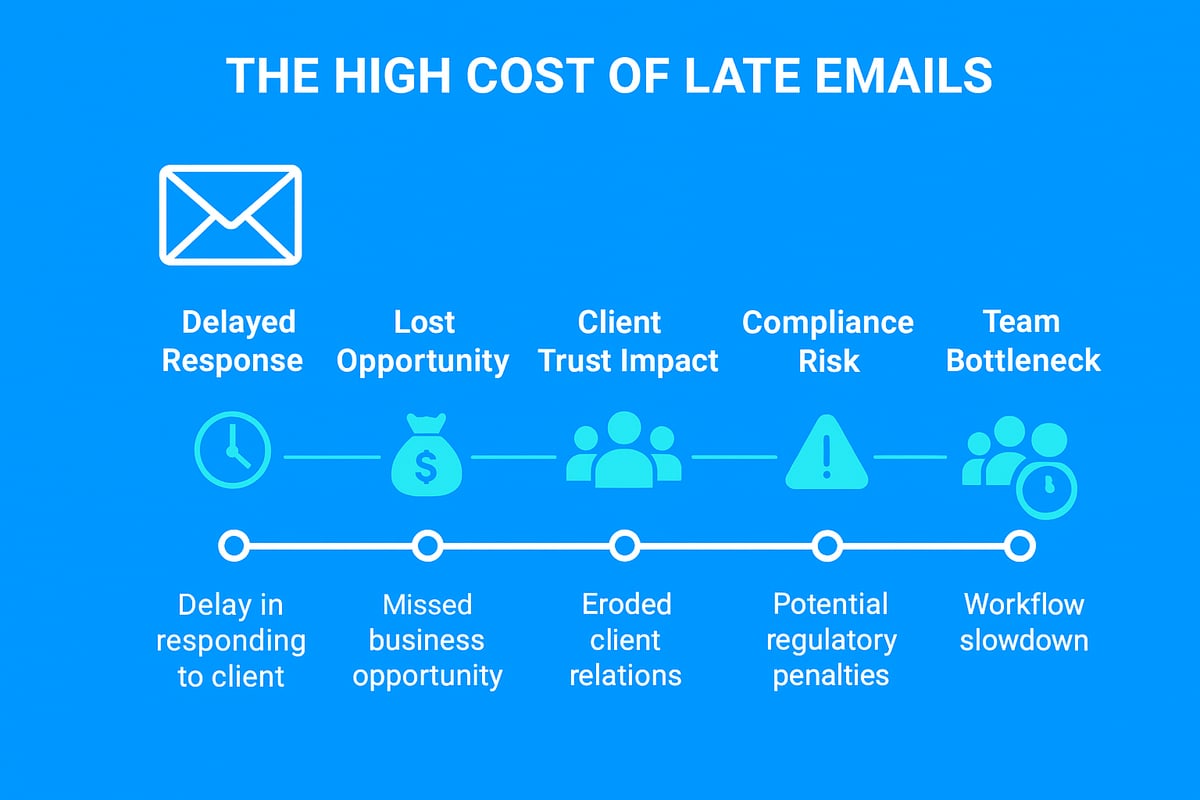
In today’s hyper-connected world, an on time email is not just a nice-to-have, it is a business necessity. The impact of delayed email responses ripples across every aspect of professional life, influencing trust, productivity, and even regulatory compliance. Let’s examine the true costs of falling behind on your inbox and why mastering on time email is vital for 2026.
The Business Impact of Delayed Responses
A single late reply can erode client trust and tarnish your professional reputation. For instance, 78% of professionals believe delayed responses harm business relationships. Consider a sales team that misses out on a key deal simply because the on time email with a quote was not sent before a competitor’s offer arrived. The damage is immediate—missed revenue, lost clients, and a reputation for unreliability.
Productivity and Workflow Consequences
When a team member waits for an on time email containing critical information, bottlenecks quickly form. This affects not only individual productivity but also the entire project timeline. Imagine a project delayed by 48 hours due to a single slow reply. Over time, these delays compound, resulting in missed milestones and frustrated colleagues.
- Bottlenecks stall decision-making
- Delays ripple across teams
- Missed deadlines become costly
Customer Expectations in the Digital Age
By 2026, customers expect responses within just 2-4 hours. According to Customer expectations for email response times, 90% of consumers rate speed of response as a top service factor. If your business does not prioritise on time email, you risk falling behind competitors who meet these growing demands. Failing to keep pace can lead to negative reviews and lost loyalty.
Regulatory and Compliance Risks
For many industries, a late response is more than a minor inconvenience—it is a compliance risk. Regulations such as GDPR or strict financial sector guidelines require that certain emails are answered promptly. Missing a deadline for a time-sensitive communication may result in fines, legal penalties, or damaged regulatory standing. Ensuring every on time email is sent is not just good practice, it is sometimes the law.
Competitive Advantage of Being On Time
Responding swiftly gives your business a measurable edge. Companies that commit to on time email often outperform their peers, winning new contracts and retaining customers more effectively. For example, Company X increased its client retention by 15% after improving response times. Fast replies demonstrate reliability and set your brand apart in a crowded marketplace.
Psychological Effects on Teams and Individuals
Waiting for important information breeds frustration and stress. Teams thrive when on time email communication is the norm. Prompt replies reduce anxiety, boost morale, and help everyone stay focused on their tasks. The phenomenon of "email anxiety" is real—when messages go unanswered, productivity and job satisfaction both suffer.
The Cost of Missed Opportunities
Every unaddressed lead or delayed proposal represents lost revenue. Studies show that a late follow-up can mean the difference between closing a deal and losing it forever. For sales teams, an on time email follow-up can directly impact the average deal value. Over time, missed opportunities add up, making timely communication a critical driver of growth.
Common Causes of Email Delays (and How to Overcome Them)
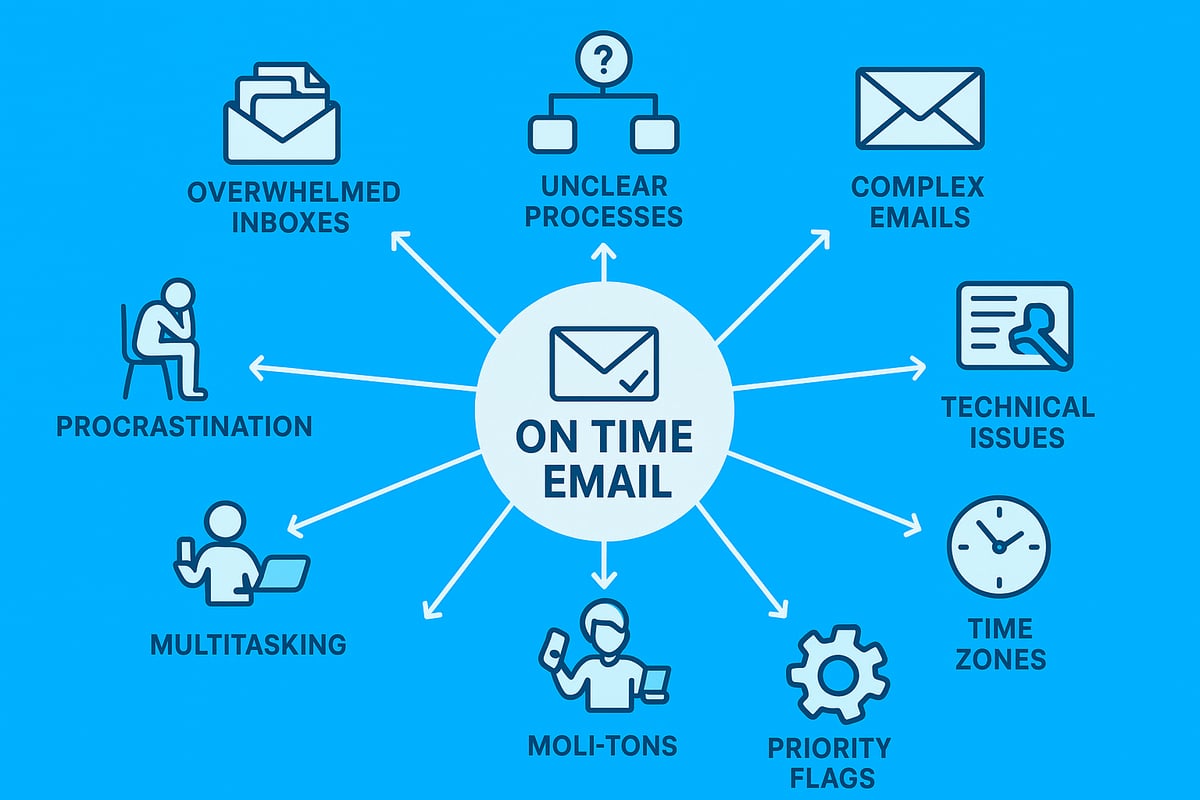
In the modern workplace, achieving on time email responses can feel like a constant battle. Despite the best intentions, numerous obstacles stand in the way of prompt communication. Understanding these common causes is the first step to conquering them and transforming your digital correspondence.
Overwhelmed Inboxes and Poor Organisation
The average professional now receives over 120 emails each day. With so many messages flooding in, it's easy to overlook urgent requests or lose track of follow-ups. Disorganised inboxes are a major enemy of on time email delivery.
To combat this, create folders and apply labels for critical projects or contacts. Use priority flags to highlight emails that need a quick response. Setting aside time each day to tidy your inbox helps ensure nothing important slips through the cracks.
Procrastination and Decision Paralysis
Putting off email responses is a natural human tendency, especially when the message requires thought or action. This procrastination can quickly derail on time email habits and lead to missed opportunities.
To overcome this, try the "two-minute rule": if an email can be answered in under two minutes, do it immediately. For more complex replies, block out dedicated time on your calendar to process emails in focused batches. This helps reduce decision fatigue and keeps your workflow moving.
Lack of Clear Processes or Protocols
Teams that lack defined response timeframes often struggle with on time email practices. Without clear guidelines, messages linger unanswered, creating bottlenecks and confusion.
Implementing Service Level Agreements (SLAs) for both internal and external communications can make a significant difference. For example, agree that all client queries will be acknowledged within 24 hours. Document these standards and review them regularly to keep everyone accountable.
Unclear or Overly Complex Emails
Ambiguous or lengthy emails slow down response times. When messages lack context, recipients may hesitate to reply or need to ask for clarification, delaying the on time email cycle.
To improve clarity, always use concise language and bullet points. A well-crafted subject line ensures your message stands out and is acted upon promptly. For more guidance, review these Email subject line best practices to boost visibility and encourage timely replies.
Technical Glitches and Delivery Issues
Technical hiccups, such as emails landing in spam folders or failed attachments, can cause significant delays. These issues undermine even the most diligent on time email routines.
Prevent problems by checking your junk folder regularly and sending test emails when necessary. Use reputable email platforms that offer robust error-checking and reliable delivery, ensuring your messages reach their intended recipients without interruption.
Multitasking and Distractions
Multitasking might seem efficient, but it can reduce productivity by as much as 40 percent. Constant notifications and switching between tasks disrupt focus, making it difficult to maintain on time email habits.
Set specific times during the day to check and process emails. Turn off unnecessary notifications and work in dedicated blocks to minimise distractions. This approach will help you respond faster and with greater accuracy.
Time Zone Differences and Global Teams
Collaborating with colleagues and clients across time zones can introduce unavoidable delays. Asynchronous work makes on time email communication more challenging, especially when expectations are unclear.
To address this, schedule emails to arrive during the recipient's working hours and communicate your own availability. Use scheduling tools to bridge gaps and set clear boundaries around response times for global teams.
Mastering these challenges is essential for reliable on time email practices. By identifying your main barriers and applying targeted solutions, you can ensure that your communication remains prompt, professional, and effective.
The Step-by-Step Roadmap to On-Time Email Communication
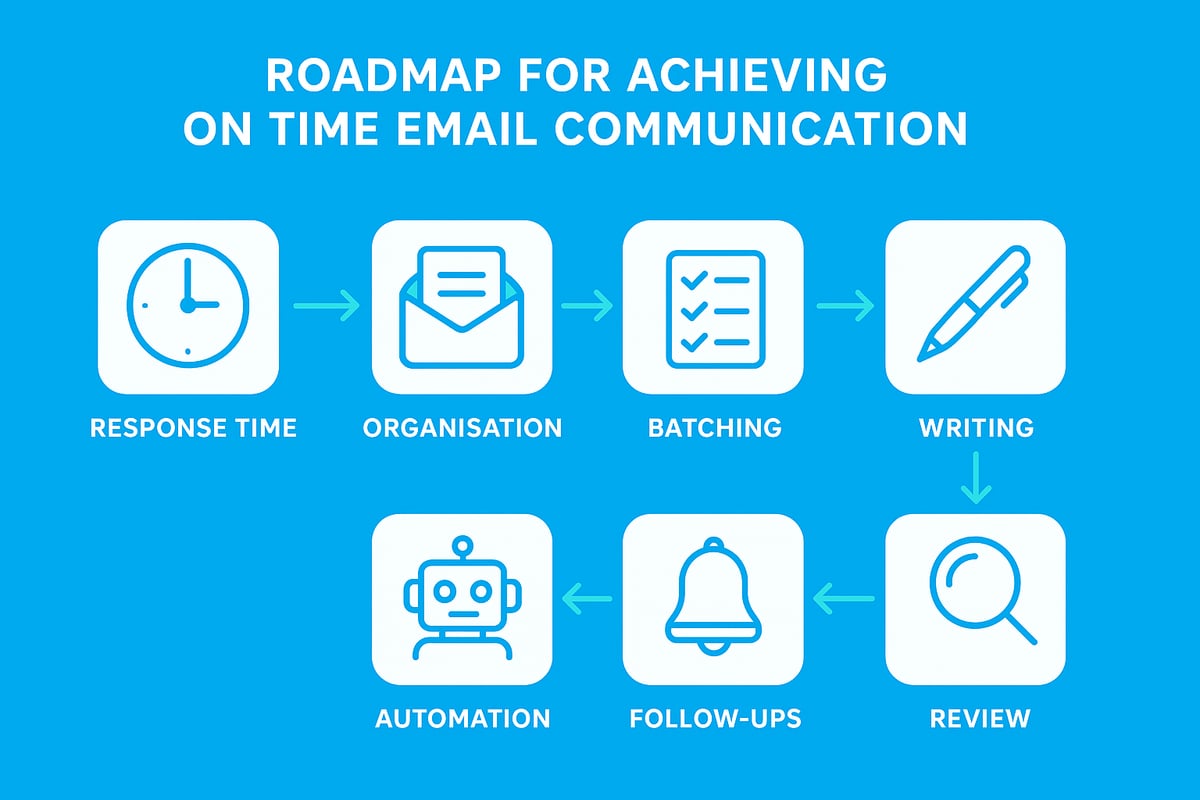
Mastering on time email habits is a game-changer for professionals in 2026. By following a structured, repeatable system, you can ensure every message is prompt, clear, and impactful. Let us break down the essential steps to help you achieve consistent on time email results.
Step 1: Set Clear Response Time Expectations
Begin your on time email journey by defining precise response timeframes. Agree internally on standards, such as replying to all emails within 24 hours. Communicate these expectations to your team and external partners.
Publish your standard in onboarding materials and email signatures. This transparency reduces uncertainty and helps build trust. For example, a statement like "We aim to respond to all queries within one business day" sets the tone.
Document response targets in a shared policy. This ensures everyone is aligned and accountable. Clear expectations are the cornerstone of on time email performance.
Step 2: Organise Your Inbox for Speed
A cluttered inbox is the enemy of on time email delivery. Set up folders, labels, and filters to keep your most important messages visible. Tools like Gmail Priority Inbox or Outlook Focused Inbox can automatically sort messages by relevance.
Create folders for urgent, important, and informational emails. Use colour-coded labels to highlight client communications or time-sensitive requests. Archive or delete irrelevant emails daily to prevent backlog.
Adopt an "inbox zero" routine. Allocate time at the start and end of each day to process new messages. Staying organised makes on time email responses far more achievable.
Step 3: Prioritise and Batch Process Emails
Tackling emails one by one throughout the day can drain your focus and productivity. Instead, use a triage system to sort messages by urgency and importance. Batch process your emails at set intervals, such as morning and late afternoon.
This approach minimises distractions and helps you maintain on time email habits. For instance, dedicate specific windows for client replies, project updates, or administrative tasks.
A sample batching schedule:
| Time | Focus |
|---|---|
| 09:00-09:30 | Urgent/Client |
| 13:00-13:30 | Team/Projects |
| 16:00-16:30 | Admin/General |
Batching ensures nothing slips through the cracks and supports your on time email goals.
Step 4: Write Clear, Actionable Emails
Ambiguous emails slow everything down. Strive for clarity with concise language, bullet points, and direct questions. This enables recipients to respond quickly, keeping your on time email process efficient.
For example, use subject lines like "Action Required: Approve Report by 3pm". Structure your message with context first, followed by specific actions needed.
Sample template:
Subject: Action Needed: Confirm Meeting Time

Hi [Name],

Could you please confirm your availability for the meeting on Thursday at 10am?

- If yes, I will send the invite.
- If not, please suggest an alternative time.

Thank you,
[Your Name]
Clear emails help everyone stay on track with on time email standards.
Step 5: Use Scheduling and Automation Tools
Leverage technology to never miss a beat with on time email communication. Scheduling tools let you draft messages and send them at optimal times, even across time zones. Set reminders for unanswered emails to keep your workflow moving.
Platforms like Boomerang and Outlook Delay Delivery offer these features. For a more comprehensive suite, you can sign up for email tools that automate scheduling, reminders, and follow-ups, making on time email routines effortless.
Automated tools free up mental space and ensure you never miss a critical reply.
Step 6: Implement Follow-Up Systems
Following up is crucial for maintaining on time email practices. Use automated reminders or CRM integrations to track pending responses. If a message goes unanswered, escalate or nudge the recipient after a set period.
Create a simple follow-up workflow. For instance, if no reply is received within 48 hours, send a polite reminder. Document follow-up attempts for accountability.
This system ensures that every conversation progresses and your on time email objectives are met, even when others lag behind.
Step 7: Continuously Review and Improve
Finally, make on time email excellence a habit by regularly reviewing your process. Conduct monthly audits to identify bottlenecks, slow response areas, or recurring issues.
Solicit feedback from colleagues and clients. Are your emails clear? Are expectations understood? Use this input to refine your approach.
Adapt your system as your team or business grows. Continuous improvement guarantees that your on time email performance remains strong, no matter how your workload evolves.
Essential Tools and Automation for Timely Emailing
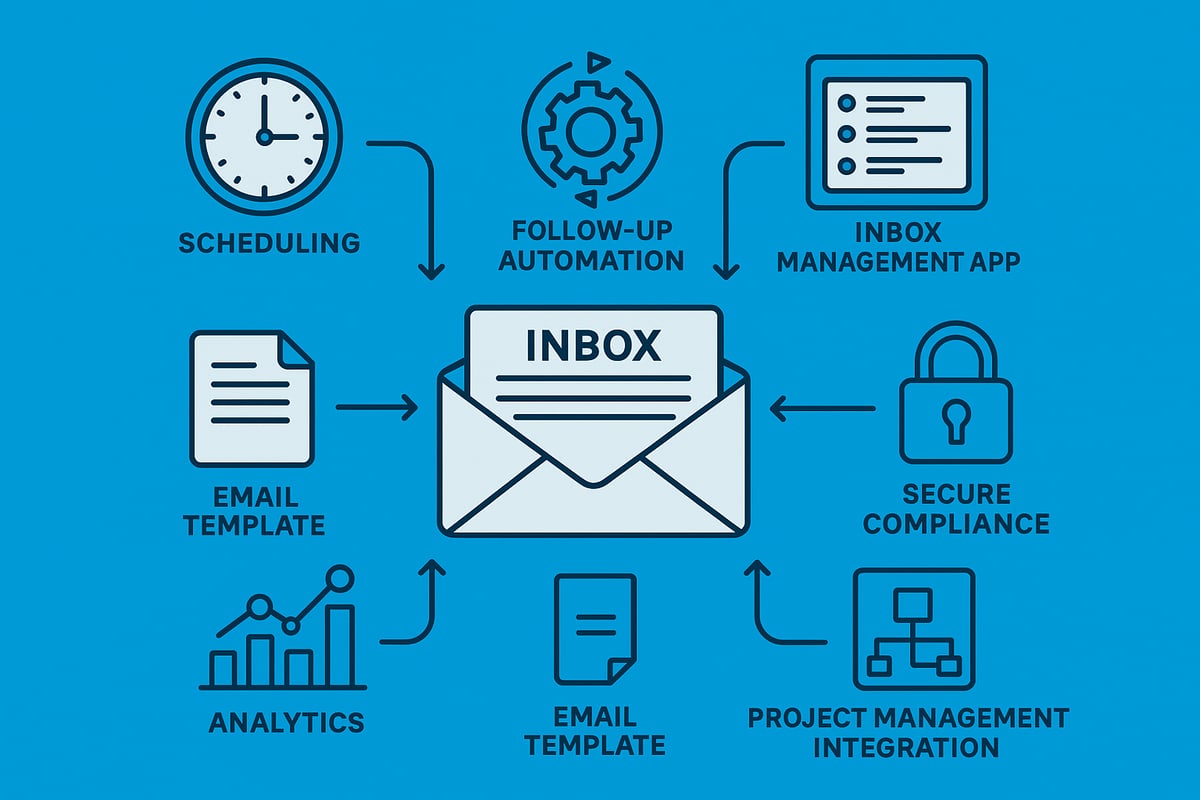
Mastering on time email delivery is impossible without the right digital toolkit. In 2026, professionals rely on a suite of purpose-built tools and automation features to ensure every email arrives, is tracked, and gets a timely response. Let us explore the essential categories that will keep your communication punctual and stress-free.
Email Scheduling and Send-Later Features
Email scheduling is a cornerstone for on time email management. With send-later functions, you can draft messages outside working hours and schedule them to arrive when recipients are most active. This reduces the risk of your email getting lost in a crowded inbox.
For global teams, scheduling bridges time zone gaps, ensuring messages arrive during business hours. Outlook’s “Send Later” and Gmail’s scheduling feature enable precise timing, supporting your on time email strategy. These tools not only increase response rates but also help maintain professionalism across borders.
Automated Reminders and Follow-Ups
Automated reminders and follow-ups are essential for on time email communication. Forgetting to respond or follow up is a common cause of delays. Tools like Boomerang and FollowUpThen let you set reminders if your email goes unanswered or schedule automatic follow-up nudges.
This automation ensures no message is overlooked, supporting a consistent on time email routine. You can customise reminders for different priorities, reducing manual tracking and freeing up mental space for more meaningful work.
Inbox Management Apps and Extensions
A cluttered inbox is a major obstacle to on time email responses. Inbox management apps such as SaneBox, Clean Email, and About Astonish Email platform offer advanced filtering, smart folders, and priority notifications.
These solutions help you triage high-importance emails, declutter your workspace, and focus on what needs an immediate reply. By automating the sorting process, you gain more control and boost your on time email performance, even as your email volume grows.
Templates and Snippets for Faster Replies
Templates and snippets are time-savers for on time email communication. Pre-built responses enable you to handle frequent queries efficiently, ensuring you never delay a reply due to repetitive typing.
Customer support teams often rely on template libraries for FAQs, order confirmations, and status updates. Tools like TextExpander and Gmail’s canned responses streamline this process, helping you maintain a rapid response rate and consistent tone.
Analytics and Reporting Tools
Tracking your on time email metrics is crucial for continuous improvement. Analytics tools monitor open rates, response times, and engagement levels. Gmail’s built-in analytics and third-party plugins provide real-time feedback on your communication habits.
By reviewing these insights, you can spot bottlenecks and adjust your workflow. Analytics empower you to set realistic targets and celebrate progress, making on time email a measurable goal for individuals and teams.
Integration with Project Management Platforms
Connecting email platforms with project management tools like Asana, Trello, or Monday.com is a game-changer for on time email workflow. Integration ensures that tasks from emails are automatically tracked, assigned, and updated in your project boards.
This eliminates the risk of missing requests or deadlines, as every action item is visible and actionable. Seamless integration keeps your team aligned, helps maintain on time email habits, and reduces manual data entry.
Security and Compliance Automation
In regulated industries, security and compliance are non-negotiable for on time email operations. Automated encryption, GDPR compliance checks, and audit trails are now standard features in leading email platforms.
These tools safeguard sensitive information and ensure you meet legal requirements for response times. Security automation provides peace of mind and supports your commitment to on time email, especially when handling confidential or time-sensitive data.
| Tool Category | Example Solutions | On Time Email Benefit |
|---|---|---|
| Scheduling & Send-Later | Outlook Send Later, Gmail Schedule | Timely delivery across time zones |
| Automated Follow-Ups | Boomerang, FollowUpThen | No missed responses |
| Inbox Management | SaneBox, Clean Email, Astonish Email | Prioritised, decluttered inbox |
| Templates & Snippets | TextExpander, Gmail Canned Responses | Faster, consistent replies |
| Analytics & Reporting | Gmail Analytics, Plugins | Track & improve response rates |
| Project Management Integration | Asana, Trello, Monday.com | Actionable, trackable requests |
| Security & Compliance | GDPR Tools, Encrypted Email | Legal & confidential compliance |
No matter your role or industry, leveraging these tools will elevate your on time email game. With automation and smart features, you can transform your communication from reactive to proactive, ensuring no opportunity slips through the cracks.
Email Etiquette and Best Practices for Timely Communication
Mastering on time email etiquette is crucial for maintaining professionalism and efficiency. Each message you send shapes how others perceive your reliability and responsiveness. By following these best practices, you can ensure every on time email reflects your commitment to clear, prompt, and respectful communication.
Crafting Clear and Concise Subject Lines
A well-written subject line sets the tone for an on time email and helps recipients prioritise your message. Ambiguous or vague subjects can cause delays, as they may be overlooked or misunderstood. Use direct phrases like "Action Required: Approve Budget by Friday" to highlight urgency. Industry benchmarks suggest that clarity in subject lines directly impacts response speed, as seen in average email response times across industries.
Using Professional and Respectful Language
The tone of your on time email can accelerate or hinder replies. Always address recipients with courtesy and maintain a formal yet approachable style. Avoid jargon or overly casual phrases unless you know the reader well. A respectful greeting and a polite closing signal your attention to detail and encourage a prompt response, reinforcing your reputation for timely communication.
Managing Expectations with Out-of-Office Replies
When you're away, an out-of-office reply ensures your on time email standards remain intact. Set up a clear auto-response stating your return date and an alternative contact if urgent. For example, "Thank you for your message. I am out of the office until Monday. Please contact Contact Astonish Email support for urgent matters." This keeps everyone informed and reduces frustration.
Timely Acknowledgement vs. Full Response
Sometimes, you may need extra time to provide a detailed answer. In those cases, a quick "Received, will respond soon" on time email assures the sender their message is not forgotten. This brief acknowledgement can ease anxiety and maintain trust, especially for important or time-sensitive issues. Always follow up with a complete reply as soon as possible.
Avoiding Email Overload
Not every conversation is best suited for an on time email. If a topic is urgent or complex, consider calling or using instant messaging instead. This prevents your inbox from becoming overwhelmed and ensures high-priority messages are not missed. Limiting unnecessary emails helps you maintain an efficient workflow and keeps your responses timely.
Handling Sensitive or Time-Sensitive Topics
Mark urgent messages with "High Importance" or use a clear subject to convey urgency. Use read receipts sparingly, as they can appear intrusive. For highly confidential or regulated information, double-check recipients and content before sending. This careful approach ensures your on time email is both prompt and appropriate, protecting sensitive data and relationships.
Cultural Sensitivity and Time Zones
Global business requires sensitivity to diverse working hours and holidays. Schedule your on time email to arrive during the recipient's office hours when possible. Acknowledge public holidays and cultural differences in your communication. This thoughtful timing demonstrates respect and increases the likelihood of a swift, positive response.
The Future of On-Time Email: Trends and Predictions for 2026
The landscape of on time email is evolving rapidly as technology, user expectations, and workplace dynamics shift. In 2026, the tools and habits shaping timely communication will look very different from today. Let us explore the trends set to redefine how professionals deliver on time email, ensuring no opportunity slips through the cracks.
AI-Powered Email Management
Artificial intelligence is transforming on time email management by automating sorting, prioritising, and even drafting responses. Predictive algorithms now help users focus on urgent messages, reducing decision fatigue. For instance, smart assistants can suggest replies or schedule follow-ups, letting professionals maintain on time email habits effortlessly. According to AI's role in reducing email workload, generative AI tools are significantly decreasing the time spent on inbox tasks, freeing up hours for more strategic work.
Hyper-Personalisation and Dynamic Content
In 2026, hyper-personalisation is the norm for on time email. Emails adapt dynamically to the recipient’s preferences and prior behaviour. This results in higher engagement and faster replies, as messages are tailored for relevance. Dynamic content blocks allow professionals to update information in real time, ensuring accuracy and boosting response rates.
Real-Time Collaboration and Integrated Platforms
The boundary between email, chat, and project management tools is blurring. On time email is now integrated with platforms like Microsoft Loop and Google Workspace, enabling teams to comment, edit, and assign tasks within a single thread. This seamless collaboration reduces delays and keeps workflows moving. Teams benefit from reduced context-switching and fewer lost messages.
Increased Automation and Workflow Integration
Automation plays a central role in the future of on time email. Routine communications, such as invoice reminders or meeting follow-ups, are triggered automatically based on workflow events. End-to-end integrations with CRM and project management platforms ensure that every request is tracked and actioned promptly. Automated reminders and escalations mean nothing gets missed, supporting a culture of timely responses.
Enhanced Security and Compliance Demands
As regulations tighten, on time email solutions in 2026 prioritise security and compliance. Advanced encryption, automated compliance checks, and AI-driven threat detection protect sensitive information. Companies must adapt to stricter data handling requirements, especially in regulated sectors. Compliance automation reduces the risk of costly errors and keeps communication secure.
The Rise of Voice and Video Email
Urgent situations now call for voice and video email. Professionals can send quick voice notes or video snippets, ensuring their on time email responses are both personal and immediate. This trend is gaining traction for its ability to clarify intent and reduce miscommunication, especially in global teams.
Sustainability and Email Carbon Footprint
Digital sustainability is a rising concern. Organisations are adopting practices to reduce the carbon footprint of on time email, such as limiting unnecessary attachments and trimming long threads. By optimising email habits, businesses not only support the environment but also streamline their communication, making each message count.