Why You Need Business Email for Professional Success
February 24, 2026

Every entrepreneur and small business owner reaches a critical moment when they realise their personal email address no longer represents their growing enterprise. Whether you're launching your first venture or scaling an established company, the decision to move beyond free email services marks a significant professional milestone. If you need business email that truly reflects your brand's credibility, understanding the strategic advantages of professional email addresses becomes essential for long-term success.
The Professional Identity Crisis Facing Small Businesses
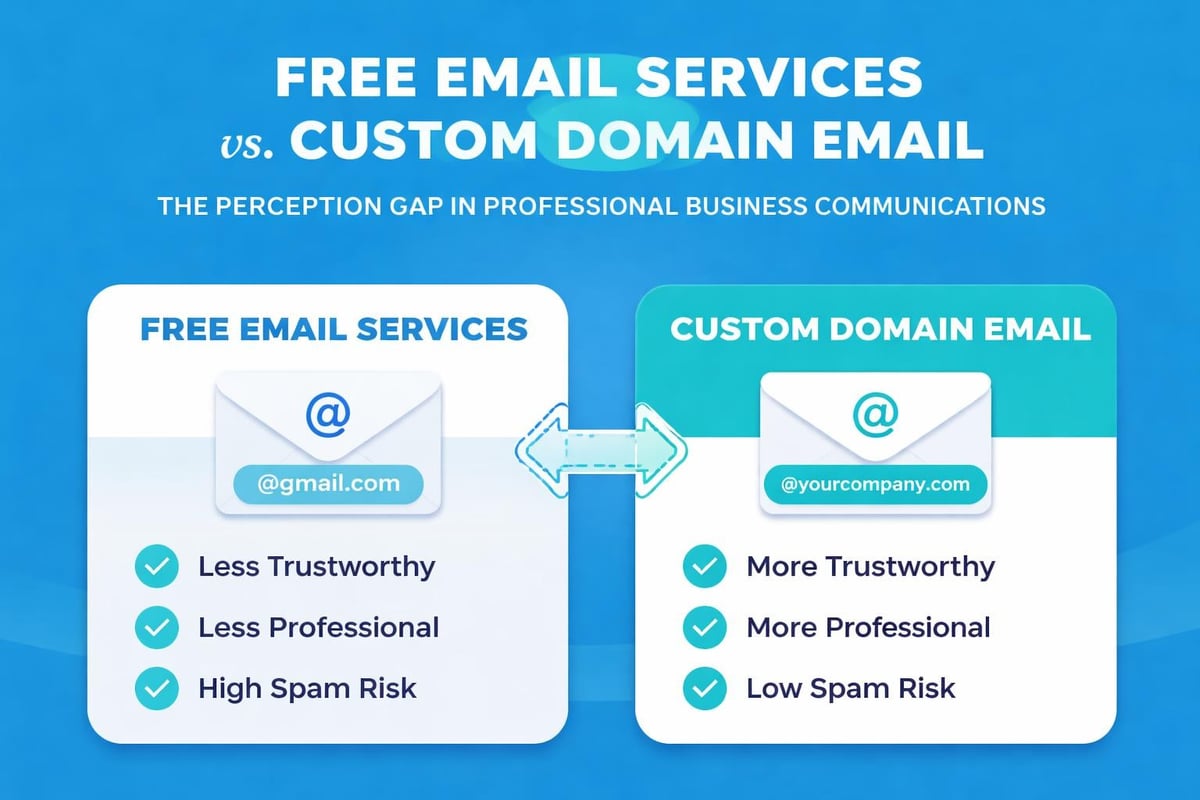
Operating with a Gmail, Yahoo, or Hotmail address sends unintended messages to potential clients, partners, and investors. Your email address serves as the digital equivalent of your business card, creating first impressions before prospects even read your message content.
Brand Consistency Across Every Touchpoint
When customers receive an email from [email protected] rather than [email protected], they immediately recognise your commitment to professionalism. This consistency reinforces your brand identity across every interaction, from initial enquiries to post-purchase support communications.
Key branding benefits include:
- Immediate brand recognition in crowded inboxes
- Consistent messaging across all team members
- Enhanced recall when customers need your services
- Professional appearance in automated email campaigns
Business owners who build trust through professional email often report higher response rates and improved customer confidence. This credibility factor becomes particularly crucial when competing against larger, established companies in your market.
Security Advantages That Protect Your Business Assets
Free email services offer basic functionality, but businesses need business email solutions that prioritise data protection and compliance. Professional email platforms provide enterprise-grade security features designed specifically for commercial communications.
Advanced Protection Features
| Security Feature | Free Email | Business Email |
|---|---|---|
| Two-factor authentication | Basic | Advanced |
| Data encryption | Standard | End-to-end |
| Spam filtering | Consumer-grade | Enterprise-level |
| Admin controls | None | Comprehensive |
| Backup & recovery | Limited | Automated |
| Compliance tools | Minimal | Industry-specific |
Professional email systems include sophisticated threat detection, phishing prevention, and malware scanning that far exceed consumer email protections. When client data passes through your communications, these enhanced security measures become non-negotiable requirements rather than optional upgrades.
The administrative control offered by business email platforms allows you to manage team access, monitor communications for compliance, and quickly respond to security incidents. These capabilities prove invaluable as your team grows and communication volume increases.
Marketing Effectiveness Multiplies With Professional Email
Small businesses often underestimate how email addresses impact marketing performance. When you need business email that drives results, the difference between personal and professional domains becomes measurable in open rates, click-through rates, and conversion metrics.
Deliverability and Inbox Placement
Email service providers scrutinise sender reputation when determining whether messages reach primary inboxes or land in spam folders. Custom domain emails benefit from:
- Dedicated sender reputation tied to your domain
- Authentication protocols (SPF, DKIM, DMARC) that verify legitimacy
- Consistent sending patterns that build trust with email providers
- Professional infrastructure recognised by spam filters
Implementing effective email marketing for small businesses requires the foundation of professional email addresses. Without this infrastructure, even the most compelling campaigns may never reach their intended recipients.
Marketing campaigns sent from free email addresses face higher spam folder placement rates, lower open rates, and reduced overall effectiveness. The investment in business email directly translates to improved marketing ROI through better deliverability and enhanced sender reputation.
Operational Efficiency Through Organised Communication
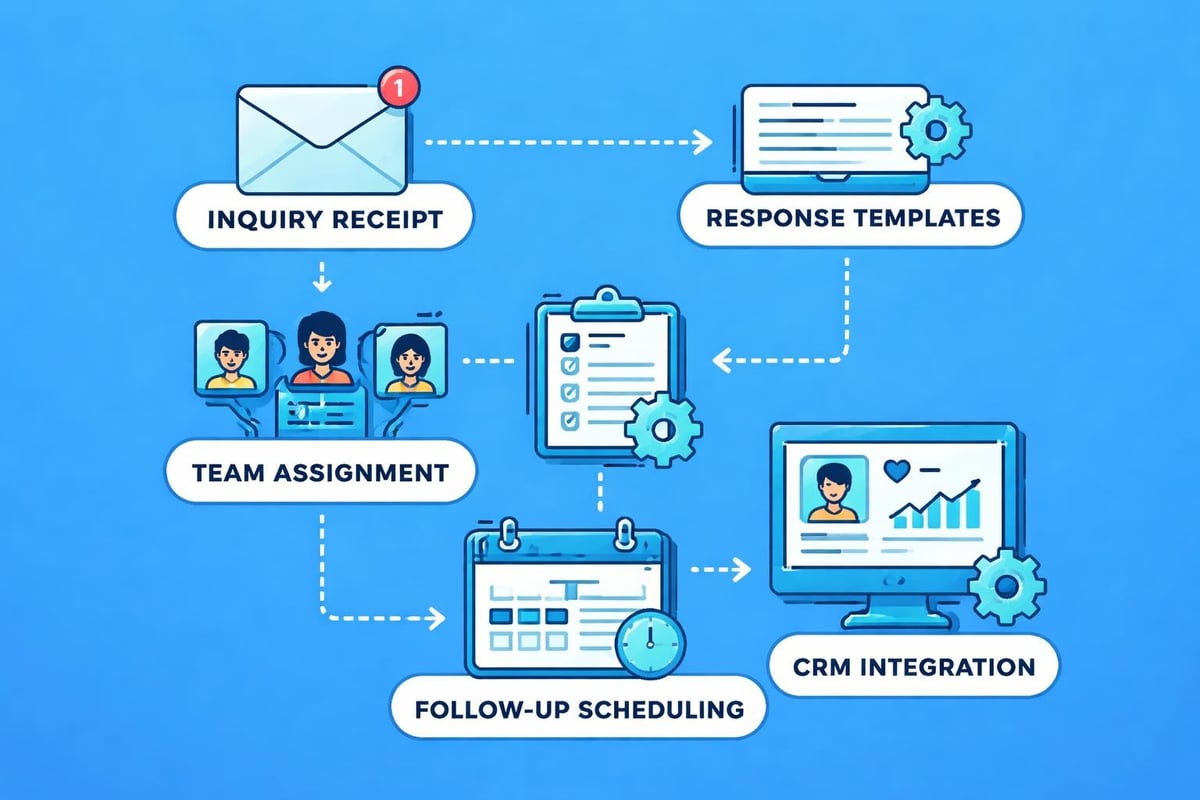
Managing business communications across multiple personal email accounts creates chaos as companies grow. Professional email solutions provide organisational tools that streamline workflows and improve team collaboration.
Team Collaboration Features
Modern business email platforms integrate seamlessly with productivity tools, calendars, and project management systems. Team members can:
- Share calendars for simplified scheduling
- Delegate inbox management during absences
- Create shared mailboxes for departments
- Access unified contact directories
- Collaborate on documents within email interfaces
These efficiency gains accumulate significantly over time. When you need business email that scales with your operations, the collaborative features become as important as the email functionality itself. Exploring email etiquette best practices becomes easier when your entire team operates within a unified professional email system.
Cost Considerations and Return on Investment
Small business owners frequently question whether business email justifies the monthly expense. This calculation requires examining both direct costs and opportunity costs associated with unprofessional communications.
Investment Breakdown
Direct costs typically include:
- Monthly subscription fees per user
- Domain registration and renewal
- Storage capacity upgrades
- Additional security features
- Technical support access
Hidden costs of free email:
- Lost opportunities from poor credibility
- Time wasted managing multiple accounts
- Security breaches and data loss
- Reduced marketing effectiveness
- Limited scalability as you grow
Most professional email solutions cost between £3-£8 per user monthly, an investment that pays for itself through improved client acquisition and retention. The benefits of professional email addresses extend far beyond the nominal monthly fees.
Domain Selection Strategy for Maximum Impact
Choosing the right domain for your business email requires strategic thinking beyond simple availability. Your domain name affects brand recognition, SEO performance, and email deliverability.
Domain Selection Criteria
| Factor | Consideration | Impact |
|---|---|---|
| Length | Shorter domains | Easier to remember, fewer typos |
| Extension | .co.uk vs .com | Regional trust, industry norms |
| Keywords | Brand vs descriptive | SEO benefits, clarity |
| Uniqueness | Distinctive vs generic | Trademark issues, differentiation |
| Pronunciation | Clear vs confusing | Verbal sharing, customer recall |
Understanding why email domains matter for business helps prioritise these factors according to your specific industry and target audience. Some sectors benefit from keyword-rich domains, whilst others prioritise brand memorability over search optimisation.
Email Address Structure and Professional Standards
Once you've secured your domain, creating an effective email address naming convention prevents confusion and maintains professionalism across your organisation.
Recommended Naming Patterns
Individual addresses:
- [email protected] (most professional)
- [email protected] (simpler for small teams)
- [email protected] (handles duplicate names)
Departmental addresses:
Avoid numerical suffixes, excessive abbreviations, or cryptic codes that diminish professionalism. When clients need business email addresses for different departments, consistent naming conventions create clarity and demonstrate organisational maturity.
Following professional email etiquette principles begins with the email address itself. Your chosen format communicates volumes about your company's attention to detail and commitment to professional standards.
Migration Planning for Minimal Disruption
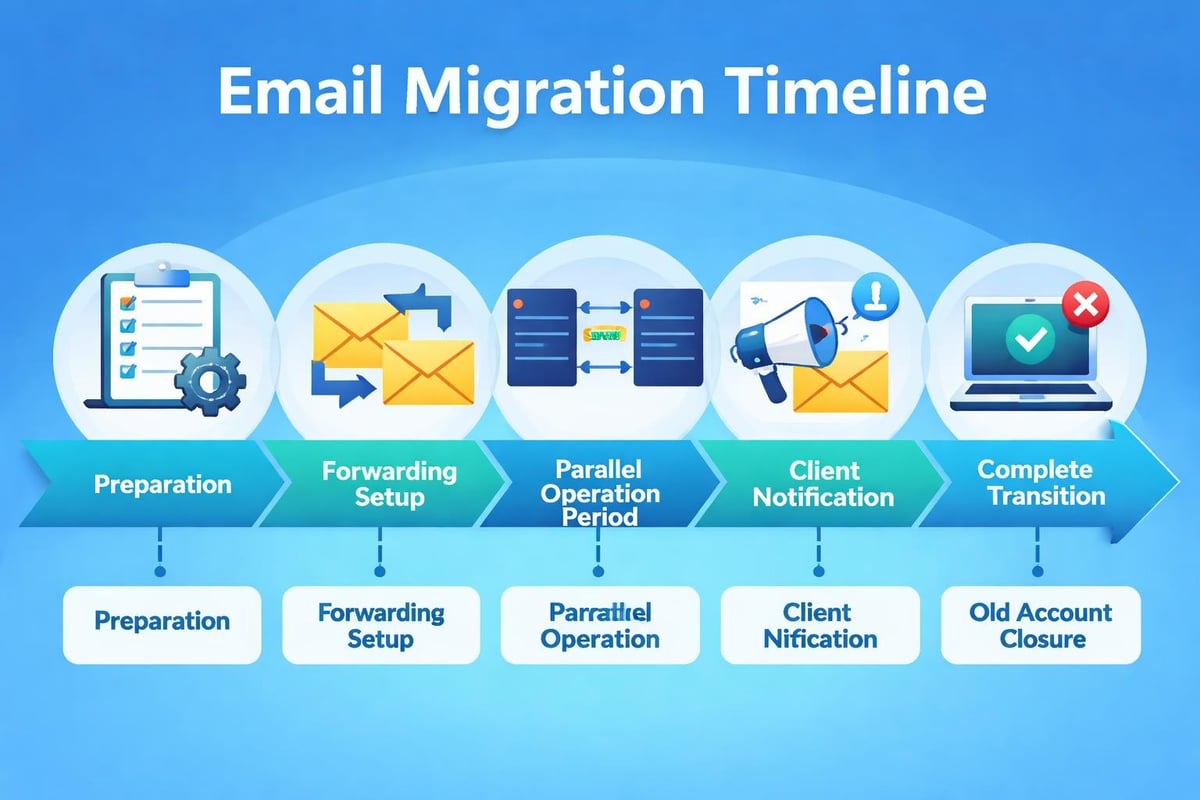
Transitioning from personal to business email requires careful planning to avoid lost messages, broken communication threads, and confused clients.
Step-by-Step Migration Approach
- Set up your new business email system with all necessary accounts
- Configure email forwarding from old addresses to new ones
- Update your email signature across all platforms
- Notify key contacts about your new address
- Run parallel systems for 30-60 days
- Update online profiles and marketing materials
- Monitor both inboxes during transition period
- Gradually phase out old addresses
This measured approach prevents communication gaps whilst allowing contacts to update their records naturally. Most businesses find that a two-month transition period provides sufficient time for smooth changeover without rushed implementation.
Integration With Marketing Tools and CRM Systems
Modern business success depends on connected systems that share data seamlessly. Professional email platforms integrate with customer relationship management software, marketing automation tools, and analytics platforms that free email services cannot support.
Essential Integration Capabilities
Marketing platform connections:
- Email marketing services for newsletter distribution
- Analytics tools for campaign performance tracking
- Social media management for unified messaging
- Content management systems for automated notifications
Business tool integrations:
- Customer relationship management databases
- Project management platforms
- Accounting and invoicing software
- E-commerce platforms for transactional emails
When you need business email that functions as part of a larger ecosystem, these integrations transform email from a communication tool into a business intelligence asset. The ability to track customer interactions, automate follow-ups, and analyse communication patterns provides competitive advantages that justify the investment many times over.
Compliance and Legal Considerations
Certain industries face regulatory requirements regarding email communications, data retention, and privacy protection. Professional email solutions offer compliance features that help businesses meet these obligations.
Regulatory Requirements by Sector
Different sectors must address specific compliance standards:
- Healthcare: HIPAA requirements for patient communication
- Finance: FCA guidelines for client correspondence
- Legal: Solicitors Regulation Authority record-keeping
- E-commerce: GDPR compliance for customer data
- Education: Data protection for student information
Business email platforms designed for regulated industries include built-in compliance tools, automated retention policies, and audit trails that satisfy regulatory bodies. These features prove essential when facing audits or legal discovery requests.
Understanding best practices for business email includes recognising when compliance features become mandatory rather than optional. The cost of non-compliance far exceeds any business email investment.
Scalability for Growing Organisations
Starting with business email establishes infrastructure that grows alongside your company. Professional email systems accommodate team expansion, increased storage needs, and evolving security requirements without forced platform migrations.
Growth-Ready Features
Scalable elements include:
- Easy addition of new user accounts
- Flexible storage allocation across team members
- Tiered security levels by role
- Departmental organisation structures
- Multi-location support with unified management
Companies that wait to implement professional email often face costly migrations later when client databases, historical communications, and established workflows make transitions more complex. Early adoption of business email prevents these future complications whilst building professional credibility from day one.
Training and Adoption Within Your Team
Implementing business email successfully requires team buy-in and proper training. Even the most sophisticated email platform delivers limited value if staff continue using personal accounts or fail to leverage available features.
Effective Adoption Strategies
| Training Element | Purpose | Timeline |
|---|---|---|
| Platform overview | Basic functionality | Week 1 |
| Security protocols | Password management, 2FA | Week 1-2 |
| Email etiquette | Professional standards | Week 2-3 |
| Advanced features | Filters, labels, automation | Week 3-4 |
| Integration training | CRM, marketing tools | Week 4+ |
Providing structured training ensures consistent adoption across your organisation. When team members understand why you need business email and how it benefits their daily workflows, resistance decreases and utilisation increases.
Measuring the Impact of Professional Email
Quantifying the return on your business email investment helps justify ongoing costs and identify areas for optimisation. Several metrics reveal how professional email contributes to business success.
Key Performance Indicators
Communication metrics:
- Email open rates for marketing campaigns
- Response time improvements
- Client satisfaction scores
- Security incident reduction
- Team collaboration efficiency
Business impact measures:
- Client acquisition attributed to professional communications
- Customer lifetime value changes
- Brand perception improvements
- Marketing ROI increases
- Operational cost savings
Tracking these metrics demonstrates tangible value beyond the intangible benefits of enhanced professionalism. Many businesses discover that their business email investment generates returns through improved client conversion rates alone, before considering operational efficiency gains.
The reasons entrepreneurs benefit from branded email become clear when measuring actual business outcomes rather than focusing solely on upfront costs.
Mobile Access and Remote Work Capabilities
Modern business requires email access across devices and locations. Professional email platforms provide mobile applications, synchronisation features, and remote access capabilities that free email services cannot match.
Mobile-First Considerations
Today's workforce operates from multiple locations using various devices. Business email systems support this flexibility through:
- Native mobile applications for iOS and Android
- Automatic synchronisation across all devices
- Offline access to recent messages
- Mobile-optimised security features
- Push notifications for priority communications
Remote work arrangements demand reliable, secure email access from any location. When you need business email that supports distributed teams, mobile capabilities and cloud-based access become essential requirements rather than bonus features.
Choosing the Right Provider for Your Needs
The business email market offers numerous providers with varying features, pricing structures, and specialisations. Selecting the appropriate solution requires evaluating your specific requirements against available options.
Provider Evaluation Criteria
Essential factors to compare:
- Storage capacity per user and organisation
- Security features included in base pricing
- Integration capabilities with existing tools
- Support availability and response times
- Scalability options as you grow
- Compliance certifications for your industry
- User interface ease of use
- Migration assistance from current systems
Small businesses particularly benefit from platforms designed specifically for their needs rather than enterprise solutions scaled down or consumer services scaled up. The email marketing solutions from Astonish Email recognise these unique requirements and provide tailored functionality for growing companies.
Professional email addresses represent far more than simple communication tools-they establish credibility, protect your brand, and create infrastructure for sustainable growth. The decision to invest in business email marks a crucial transition from amateur operations to professional enterprise. Astonish Email provides small businesses with the email marketing platform and professional communication tools needed to compete effectively whilst maintaining the simplicity and affordability that growing companies require.